VOOZH about

URL: https://www.geeksforgeeks.org/r-language/reshaping-data-frame-from-wide-to-long-format-in-r/

⇱ Reshaping data.frame from wide to long format in R - GeeksforGeeks


  • Courses
  • Tutorials
  • Interview Prep

Reshaping data.frame from wide to long format in R

Last Updated : 22 Jul, 2025

Reshaping a data frame from wide to long format in R Programming Language is a common operation when dealing with data analysis and visualization. The process involves converting data that is spread across multiple columns (wide format) into a format where each row represents a single observation (long format).

Creating Sample Wide Data Frame

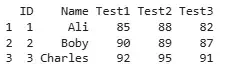
We create a wide-format data frame that stores test scores of students across multiple columns.

  • data.frame : creates a data frame by combining all the columns (like ID, Name, Test1, etc.)

Output:

👁 dataframe
Output

Method 1: Using melt from Reshape2 Package

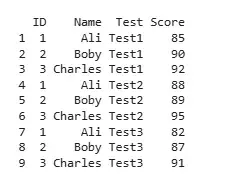
We reshape the data using the melt() function from the reshape2 package. This method transforms the score columns into a single variable.

  • melt(): Converts wide data into long format by gathering multiple columns into key-value pairs.
  • id.vars: Columns that stay fixed (like ID and Name).
  • variable.name: Name of the new column holding original column names (e.g., Test1, Test2).
  • value.name: Name of the new column storing actual data values (scores).

Output:

👁 dataframe
Output

Method 2: Using pivot_longer from Tidyr Package

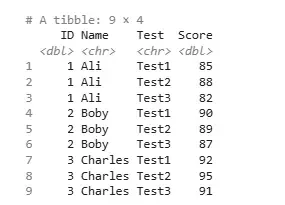
We use pivot_longer() from the tidyr package, a modern and flexible function designed for reshaping tasks.

  • pivot_longer(): A tidyverse function to reshape data from wide to long format.
  • cols = starts_with("Test"): Selects all columns whose names begin with "Test".
  • names_to: Name of the new column that stores the old column names.
  • values_to: Name of the new column that holds the values.

Output:

👁 tibble
Output

Method 3: Using reshape from Base R

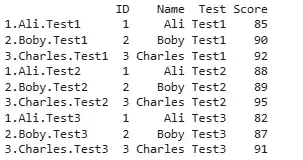
We use the base R reshape() function, which also allows us to convert the data to long format by specifying relevant columns and identifiers.

  • reshape(): Built-in R function for converting data between wide and long formats.
  • direction = "long": Indicates conversion from wide to long.
  • idvar: Columns used to uniquely identify each record (like ID and Name).
  • varying: List of columns to be reshaped.
  • v.names: Name of the new column for values.
  • timevar: Name of the new column to store original column names.
  • times: Custom labels to use in the timevar column.

Output:

👁 dataframe
Output

In this article, we explored three methods to reshape data from wide to long format in R programming language.

Comment

Explore