|
VOOZH | about |
|
VOOZH | about |
Sentiment analysis is the technique used to determine the sentiment expressed in the piece of text, classifying it as positive, negative or neutral. In R, the quanteda package is the robust tool for text processing. While sentimentr can be used for sentiment analysis. This article will guide you through the steps to perform the sentiment analysis using these packages.
Now we will discuss the step-by-step implementation of Sentiment Analysis Using quanteda in R Programming Language.
We need to install and load the required packages for text processing and sentiment analysis.
In this step, we will prepare the text data by:
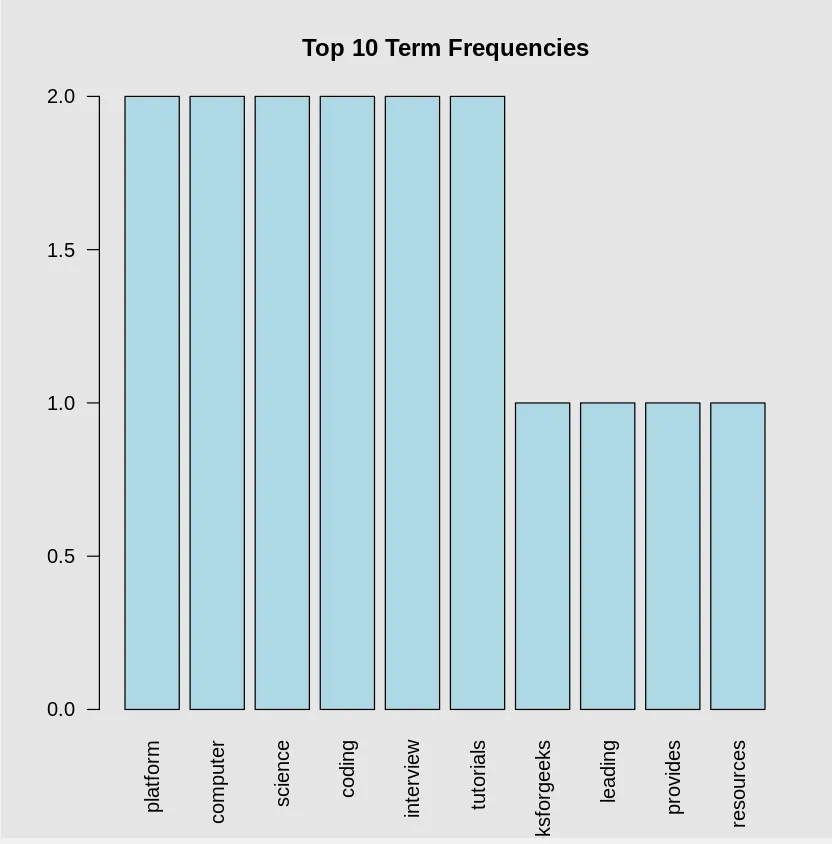
The Document-Feature Matrix (DFM) is a key structure that captures the frequency of terms across multiple text documents. It is used to analyze word patterns and frequencies. We can extract the top features (most frequent words) in the DFM to understand the most prominent terms in the text dataset.
Output:
Visualizing the text data helps to better understand sentiment distribution. We can:
Output:
Output:
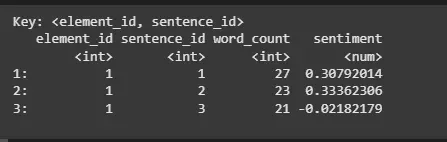
After preparing the data, we can use the sentimentr package to analyze the sentiment of the text. This step will provide sentiment scores which indicate whether the sentiment is positive, negative or neutral.
Output:
The sentiment scores are calculated for each sentence or text entry, giving us insights into the overall tone of the content.
In this article, we can demonstrated how to perform the sentiment analysis in the R using quanteda package for the text processing and the sentimentr package for the sentiment analysis. By following these steps, we can effectively analyze the sentiment expressed in the text data, making it easier to the gain insights from textual content.