|
VOOZH | about |
|
VOOZH | about |
Sorting is the process of ordering items. It can be ascending order, descending order, alphabetical order, numerical order. To sort a DataFrame by column name in R programming, we can use various methods as discussed below. To get a better understanding of how to sort DataFrame by column name, let's take some examples.
Example:
Let's suppose we have the following dataset with column names as English alphabets and tuples are integer values. Now we want to sort the column by column name in alphabetical order.
Column Names | ||||
|---|---|---|---|---|
|
R o w s | Banana | Orange | Mango | Apple |
| 1 | 6 | 2 | 4 | |
| 6 | 2 | 4 | 2 | |
| 5 | 3 | 4 | 3 | |
| 5 | 7 | 0 | 9 | |
| 6 | 4 | 3 | 7 | |
After sorting DataFrame by column name it should look alike this:
| Sorted Column name | ||||
|---|---|---|---|---|
|
R o w s | Apple | Banana | Mango | Orange |
| 4 | 6 | 2 | 1 | |
| 2 | 2 | 4 | 6 | |
| 3 | 3 | 4 | 5 | |
| 9 | 7 | 0 | 5 | |
| 7 | 4 | 3 | 6 | |
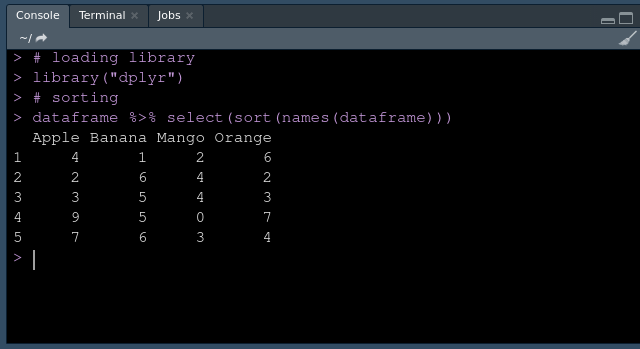
dplyr is used to manipulate the DataFrame and names is used to set or get to the object name in R. To use dplyr, it needs to be installed explicitly.
Approach
Syntax:
DataFrame %>% select(sort(names(DataFrame)))
Example:
Output:
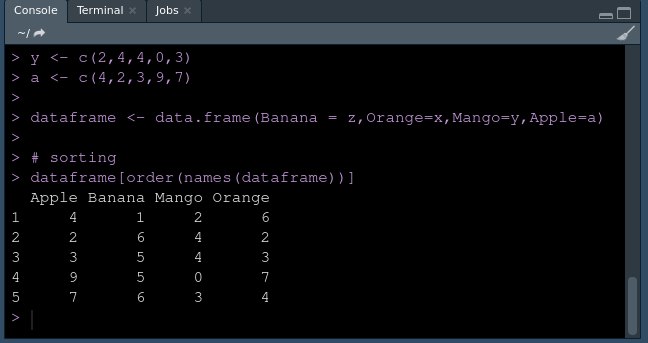
We can use the order function to sort the columns by column name.
Syntax:
order(names(dataframe))
Approach
Program:
Output: