|
VOOZH | about |
|
VOOZH | about |
MongoDB is a NoSQL document model database, and it is mainly used in Big Data analysis like election poll results, growth of an industry in the past few years, etc., For doing huge computations, in MongoDB, we use aggregation.
Aggregation groups the data from multiple documents and provides the summed up results, the average value from a large result set, min/max value from a large result set, etc. In this article, let us see how we can perform Aggregation using Mongoose.
Module Installation: Install the required module using the following command.
npm install mongoose
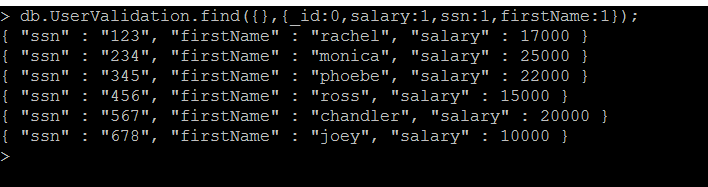
Database: Following is the sample data present in a collection in the MongoDB database.
Database Name: UserDB
Collection Name: UserValidation
The below image shows that the existence of the document in it. Specifically taken ssn and salary columns alone.
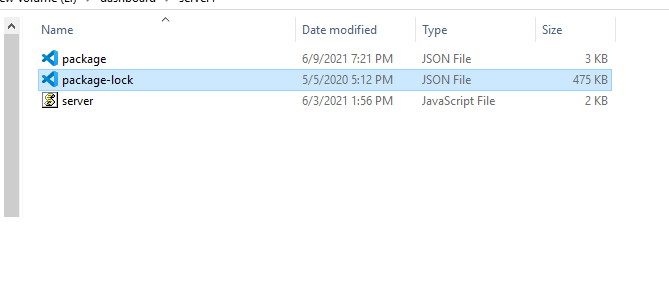
db.UserValidation.find({},{_id:0,salary:1,ssn:1,firstName:1});Project structure: It will look like this.
👁 ImageExample 1: Summation of the salary values.
Syntax: As we are summing up the fields, we need a grouping operation($group) followed by summation ($sum) as shown below.
db.UserValidation.aggregate([
 {
 $group: {
 _id: null,
 salarycount: {
 $sum: "$salary"
 }
 }
 }
]);
Filename: server.js
Step to run the program: Run the server using the following command.
node server.js
Output:
👁 ImageExample 2: Calculate location-based summation of salaries of employees.
Syntax: In order to provide additional filter conditions, we can use the $match operator.
db.UserValidation.aggregate([
{
 $match: {
 address: {
 $eq: "Chennai"
 }
 }
},
{
 $group: {
 _id: null,
 salarycount: {
 $sum: "$salary"
 }
 }
}]);
Here we are matching the address column to have Chennai only. Hence, whichever documents matching with the value of the address to Chennai are only summed up.
Filename: server.js
Step to run the program: Run the server using the following command.
node server.js
Output:
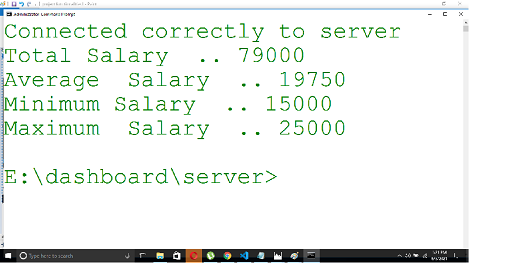
👁 ImageExample 3: To get Average value/Minimum value/Maximum value
Syntax: We need to use avg functionality for average/min functionality for minimum/max functionality for maximum using the following syntax.
db.UserValidation.aggregate([{
 $match: { address: { $eq: "Chennai" } }
 },
 {
 $group: {
 _id: null,
 totalSalary: { $sum: "$salary" },
 averageSalary: { $avg: "$salary" },
 minimumSalary: { $min: "$salary" },
 maximumSalary: { $max: "$salary" }
 }
 }
])
Filename: server.js
Step to run the program: Run the server using the following command.
node server.js
Output:
👁 ImageNote: By default, the _id field will be available for the output documents. We can use 1 to include a field in the output document and 0 to suppress.
Conclusion: Aggregate queries are very powerful and their functionality is similar to SQL in terms of group by clause(i.e. $group) and having functionalities (i.e. $match). MongoDB is a much powerful NoSQL documentum typed database and aggregate queries play a vital role in that.
References: https://www.mongodb.com/docs/manual/aggregation/