|
VOOZH | about |
|
VOOZH | about |
Access control is one of the most important aspects of database security. In MongoDB, user creation and role assignment help define who can access the database and what actions they are allowed to perform. MongoDB’s built-in user management system allows administrators to control user privileges, ensuring data security and integrity. By creating users with specific roles and permissions, we can manage access to your MongoDB instance effectively.
In this article, we will explain how to create users, assign them roles, and configure authentication in MongoDB. This will provide us with the tools to set up proper access control and security measures for our database.
In MongoDB, we are allowed to create new users for the database. Every MongoDB user only accesses the data that is required for their role. A role in MongoDB grants privileges to perform some set of operations on a given resource. In MongoDB, users are created using createUser() method. This method creates a new user for the database, if the specified user is already present in the database then this method will return an error.
A user in MongoDB is an entity that is granted access to one or more databases. Users must authenticate using valid credentials before they are allowed to execute operations on the database. Users can have varying levels of access depending on the roles assigned to them.
A role in MongoDB defines a set of privileges or actions that a user is allowed to perform. MongoDB provides several built-in roles such as read, readWrite, and dbAdmin. These roles grant users permissions to perform certain operations on specific resources like collections or databases.
MongoDB provides the createUser() method, which allows you to create new users and assign them specific roles. These roles determine what actions a user can perform within the database.
Syntax:
db.createUser({
user: "<username>", // User’s name
pwd: "<password>", // User’s password
roles: [ // Roles assigned to the user
{ role: "<role_name>", db: "<db_name>" }
]
})
Key Terms
$external).read, readWrite, dbAdmin, etc.db.createRole() method.In MongoDB, you can create an administrative user using the createUser() method. In this method, we can create the name, password, and roles of an administrative user. Let us discuss this concept with the help of an example:
In this example, we are going to create an administrative user in the admin database and gives the user readWrite access to the config database which lets the user change certain settings for sharded clusters.
Query:
db.createUser(
{
 user: "hello_admin",
 pwd: "hello123",
 roles:
 [
 { role:"readWrite",db:"config"},
 "clusterAdmin"
 ] } );
So to create an administrative user first we use the admin database. In this database, we create an admin user using the createUser() method. In this method, we set the user name is "hello_admin", password is "hello123" and the roles of the admin user are readWrite, config, clusterAdmin.
Output
In MongoDB, we can create a user without any roles by specifying an empty array[] in the role field in createUser() method. Let us discuss this concept with the help of an example:
Syntax:
db.createUser({ user:"User_Name", pwd:"Your_Password", roles:[]});
In the following example, we are going to create a user without roles. Here, we are working on the "example" database and created a user named "geeks" without roles.
db.createUser({user:"geeks", pwd: "computer", roles:[]});Output
In MongoDB, we can create a user with some specified roles using the createUser() method. In this method, we can specify the roles that the user will do after creating. Let us discuss this concept with the help of an example:
In this example, we are going to create a user with some specified roles.
db.createUser(
...{
...user: "new_one_role",
...pwd: with_roles",
...roles:["readWrite", "dbAdmin"]
...}
...);
Here, we create a user whose name is "new_one_role", password is "with_roles" and the specified roles are:
Output
In MongoDB, we can also create a user for single database using createUser() method. Let us discuss this concept with the help of an example:
db.createUser(
{
user: "robert",
pwd: "hellojose",
roles:[{role: "userAdmin" , db:"example"}]})
Here, we create a user whose user name is "Robert", password is "hellojose", and we assign a role for the user which in this case needs to be a database administrator so it is assigned to the "userAdmin" role. This role will allow the user to have administrative privileges only to the database specified in the db option, i.e., "example".
Output:
In MongoDB, authentication is a process which checks whether the user/client who is trying to access the database is known or unknown. If the user is known then it allows them to connect with server. We can also create a user with authentication restrictions using createUser() method by setting the value of authenticationRestrictions field. This field provides authentication permission of the user and contains the following fields:
1. clientSource: If the value of this field is present, so when a user is authenticating the server verifies the client IP by checking the IP address in the given list or CIDR range in the list. If the client IP present in the list then the server authenticate the client or if not then server will not authenticate the user.
2. serverAddress: It is a list of IP addresses or CIDR ranges to which the client can connect. If the value of this field is present in the list, then the server verify the client connection and if the connection was established via unrecognized IP address, then the server does not authenticate the user.
Let us discuss this concept with the help of an example:
In this example, we are going to create a user with authentication restrictions:
use admin
db.createUser(
 {
 user: "restrict",
 pwd: passwordPrompt(),
 roles: [ { role: "readWrite", db: "example" } ],
 authenticationRestrictions: [ {
 clientSource: ["192.168.65.10"],
 serverAddress: ["198.157.56.0"]
 } ]
 }
)
Here we create a user named "restrict" in the admin database. So this user may only authenticate if connecting from IP address 192.168.65.10 to this server address IP address 198.157.56.0.
Output
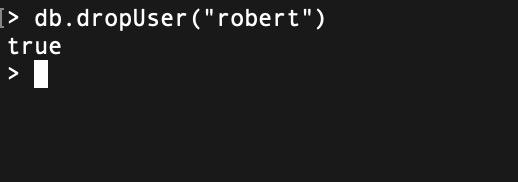
In Mongodb, we can also drop a user using dropUser() method. This method returns true when the user is deleted otherwise return false.
Syntax:
db.dropUser("Username")
Example:
In this example, we will drop a user whose name is Robert.
db.dropUser("robert")Output:
In MongoDB, managing users and roles is important for maintaining data security and access control. By utilizing the createUser() method, administrators can define user credentials, roles, and authentication restrictions customized to their organizational needs. This ensures that MongoDB deployments are secure and users have appropriate access to perform their tasks effectively. By understanding and implementing MongoDB's user and role management system, we can strengthen your security posture, ensure data integrity, and meet compliance requirements.