|
VOOZH | about |
|
VOOZH | about |
The MongoDB findOneAndUpdate() method is used to update the first matched document in a collection based on the selection criteria. It offers various options such as sorting, upserting, and returning the updated document. This method is a part of MongoDB's CRUD operations and provides an easy-to-use interface for handling document updates efficiently.
The MongoDB findOneAndUpdate() method updates the first matched document in the collection that matches the selection criteria. If more than one document matches the selection criteria then it updates only the first matched document. When we update the document, the value of the _id field remains unchanged.
This method will return the original document but if we want to return the updated document then we have to set the value of the returnNewDocument parameter to true. It takes three parameters, the first one is the selection criteria, the second one is the new data to be updated and the remaining are optional. Using this method we can also replace embedded documents. We can also use this method in multi-document transactions.
Syntax:
db.collection.findOneAndUpdate(
selection_criteria: <document>,
update_data: <document>,
{
projection: <document>,
sort: <document>,
maxTimeMS: <number>,
upsert: <boolean>,
returnNewDocument: <boolean>,
collation: <document>,
arrayFilters: [ <filterdocument1>, ... ]
})
returnNewDocument is true: Returns the updated document.findOneAndUpdate() in MongoDBIn the following examples, we are working with:
In this example, we update the first matched document according to the selection criteria(i.e., name:"Nikhil") by a new document(i.e., {$inc:{score:4}} - the value of the score field is increase by 4) and return the original document:
Query:
db.student.findOneAndUpdate({name:"Nikhil"},{$inc:{score:4}})👁 ImageOutput
👁 ImageExplanation: The document where name: "Nikhil" will have the score field incremented by 4. The method will return the original document unless returnNewDocument is specified.
Here, we update the math field inside the score embedded document for the student "Ashok" by increasing it by 50.
Query:
db.student.findOneAndUpdate({name:"Ashok"},{$inc:{"score.math":50}})👁 ImageOutput
👁 ImageExplanation: The score.math field inside the document for "Ashok" will be incremented by 50.
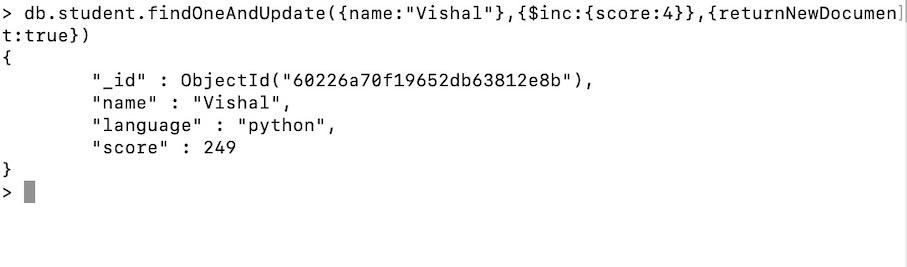
Here, we update the first matched document according to the selection criteria(i.e., name:"Vishal") by a new document(i.e., {$inc:{score:4}} - the value of the score field is increase by 4) and return the new updated document because we set the value of the returnNewDocument to true.
Query:
 db.student.findOneAndUpdate(
 { name: "Vishal" },
 { $inc: { score: 4 } },
 { returnNewDocument: true }
)
Output:
Explanation: The updated document for "Vishal" will be returned, with the score field incremented by 4.
This example demonstrates the upsert option. Let's Update the document for "John" to set the language to "Java" and score to 300, or insert a new document if "John" does not exist.
Query:
db.student.updateOne(
 { name: "John" },
 { $set: { language: "Java", score: 300 } },
 { upsert: true }
);
Output:
{ "acknowledged" : true, "matchedCount" : 1, "modifiedCount" : 1, "upsertedId" : { "_id" : ObjectId("60226a70f19652db63812e8a") } }Explanation: This query updates the document where the name is "John" to set the language to "Java" and score to 300. If no document matches, it inserts a new document with these values (upsert).
In this example, we find the student with the highest score and update their language to "JavaScript"
Query:
db.student.find().sort({ "score": -1 }).limit(1).forEach(function(doc) {
 db.student.updateOne({ "_id": doc._id }, { $set: { language: "JavaScript" } });
});
Output:
{ "acknowledged" : true, "matchedCount" : 1, "modifiedCount" : 1 }Explanation: This query sorts the documents by score in descending order and updates the first document found by setting the language to "JavaScript".
findOneAndUpdate()sort parameter, ensure that it is needed for your use case. Overusing sorting can introduce performance overhead, especially on large datasets.findOneAndUpdate() in loops, try to minimize the number of queries by optimizing the selection criteria.returnNewDocument Wisely: By default, MongoDB returns the original document. Only set returnNewDocument to true if you need the updated document immediately.The findOneAndUpdate() method in MongoDB is an invaluable tool for performing atomic updates on a single document. It offers a range of options to fine-tune the behavior of the operation, such as sorting, upserting, and returning the updated document. By understanding its various parameters and options, developers can efficiently update documents based on specific criteria and manage their MongoDB collections effectively.