The count() method improve was used to return the number of documents matching a query, but it is now deprecated in MongoDB.
Counts documents based on specified query criteria. Supports optional filters to narrow the count scope. Can be called on a collection or cursor. Functionally similar to db.collection.find().count() Useful for fast record counting in queries and reports. Features of count() Method Here are some features:
Counts by Query Condition: Returns the number of documents matching a filter, or all documents if no filter is provided. Supports Query Options: Allows options like limit, skip, and hint for refined counting behavior. Not Supported in Transactions: Cannot be used within multi-document transactions . Potential Inaccuracy in Sharded Clusters: May return approximate counts during chunk migrations. Recommended Alternative for Accuracy: Use countDocuments() for accurate counts with filters, and estimatedDocumentCount() for fast approximate counts. Syntax of count() Method The count() method can be used in two ways:
1. Count all documents in a collection:
db.Collection_Name.count() 2. Count documents that match a filter condition:
db.collectionName.count(
 selectionCriteria,
 {
 limit: <integer>,
 skip: <integer>,
 hint: <string or document>,
 maxTimeMS: <integer>,
 readConcern: <string>,
 collation: <document>
 }
 )
Selection Criteria:
The first parameter is a document specifying the query condition to filter documents before counting. If omitted, count() will count all documents in the collection. Optional Parameters:
The second parameter is an optional document that allows fine-tuning of the counting process.
limit: Limits the number of documents counted skip: Skips a specified number of documents before counting hint: Specifies an index to use for performance optimization maxTimeMS: Sets the maximum time allowed for the query to execute readConcern: Defines the read concern level (for example, majority) collation: Applies language-specific sorting and case-sensitivity rules Return Type: The count() method returns an integer representing the number of documents that match the selection criteria.
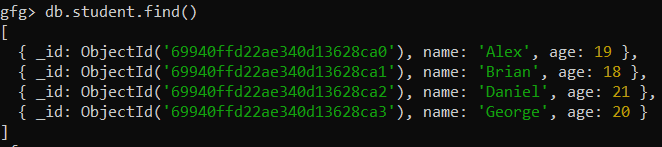
Examples of Using count() in MongoDB The collection contains multiple documents, each representing a student with name and age fields. Below is a sample dataset used for the examples:
Database: gfg Collections: student Document: Four documents contains name and age of the students 👁 Screenshot-2026-02-17-122212 Example 1: Count all Documents in a Collection Count the total number of documents present in the student collection.
db.student.count() Output:
👁 Screenshot-2026-02-17-122409 Note: The db.collection.count() method is deprecated in MongoDB. Use db.collection.countDocuments() for accurate counts with filters, or db.collection.estimatedDocumentCount() for fast approximate counts of all documents.
Example 2: Count all Documents that Match a Query Count documents in the student collection that meet a specific condition, such as age greater than 18.
db.student.count({age:{$gt:18}}) Output:
👁 Screenshot-2026-02-17-122633 $gt filters documents where age is greater than 18. Query applies the condition and counts matching students. Output returns the total number of matched documents. Example 3: Count with limit and skip Parameters Limit the number of documents counted while skipping a specified number of documents in the student collection.
db.student.count({}, { skip: 1, limit: 2 }) Output:
👁 Screenshot-2026-02-17-122824 skip: 1 skips the first document in the collection. limit: 2 counts only the next two documents after skipping. Best Practices for Using count() in MongoDB Here are some best practices :
1. Avoid Using count() in Transactions Use a transaction-safe alternative for counting.
The count() method cannot be used within transactions in MongoDB. For reliable counting in transactional contexts, use the aggregate() method instead 2. Use countDocuments() Instead of count() Prefer the recommended method for accurate results.
The count() method is deprecated in MongoDB 4.0+. It is recommended to use countDocuments(), which provides more accurate results in sharded clusters and distributed environments. 3. Optimize Performance Using Indexes Leverage indexes to speed up count queries.
Using the hint parameter allows MongoDB to leverage an index for faster count queries. This optimization reduces query execution time by directing MongoDB to use the most efficient index for filtering.