|
VOOZH | about |
|
VOOZH | about |
Exporting data from MongoDB is a common requirement for sharing data with external applications or performing data analysis using different tools. MongoDB provides a command-line tool called mongoexport to facilitate this process.
In this article, We will learn about How to Export data from MongoDB with the help of various examples and so on.
mongoexportNote: mongoexport does not run in the mongo shell. So, when we use mongoexport tool we have to exit from the Mongo shell.
Exporting data from MongoDB is essential for data backup and migration.
Syntax:
For exporting data in JSON format
mongoexport --db database_name --collection collection_name --out path_or_name_of_the_fileFor exporting data in CSV format
mongoexport --db database_name --collection collection_name --type=csv --fields fields_names --out path_or_name_of_the_fileImportant Points:
| Option | Description |
|---|---|
| --help | It will return the information about option and the use of mongoexport |
| --version | It will return the version of mongoexport |
| --db | It will specify the name of the database in which mongoexport will run. |
| --collection | It will specify the collection to export. |
| --fields | It will specify the fields that will include in the export. If you are specifying multiple fields the use comma in between them. E.g. --fields name, class |
| --type | It will specify the file type to export. For JSON format use json and for CSV format use csv. |
| --out | It will specify a file in which the data is going to store. |
| --skip | Using this option you can control from where mongoexport starts exporting files. |
| --sort | Using this option you can sort the exporting data. |
| --limit | Using this option you can limit the number of documents to export. |
In the following examples, we are working with:
Database: GeeksforGeeks
Collection: students
Documents: five documents that contain the details of the students in the form of field-value pairs.
Output:
In this example, we are going to export all the documents present in the student collection to a JSON file(named as exportstudents.json) using mongoexport tool.
mongoexport --db GeeksForGeeks --collection students --out C:\Users\Darksider\exportstudents.json So, here we export all the 5 documents present in the student collection to a JSON file.
Output:
In this example, we are going to export only 2 documents from the student collection to a JSON file(named as studentslim.json) using mongoexport tool.
mongoexport --db GeeksForGeeks --collection students --limit 2 --out C:\Users\Darksider\studentslim.jsonSo, here we only export 2 documents from the student collection by setting up the value of --limit to 2.
Output:
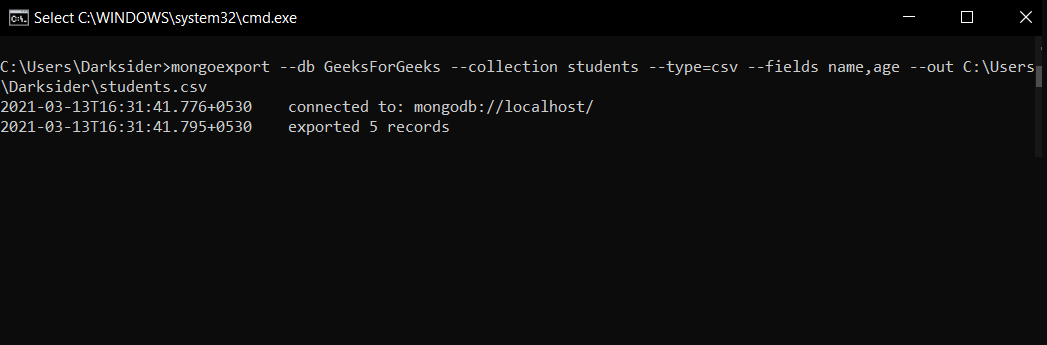
In this example, we are going to export all the documents present in the student collection to a CSV file(named as students.csv) using mongoexport tool.
mongoexport --db GeeksForGeeks --collection students --type=csv --fields name,age --out C:\Users\Darksider\students.csvOutput:
Exporting data from MongoDB using the mongoexport tool is a straightforward process that can be customized with various options to fit specific requirements. Whether you need JSON or CSV formats, mongoexport provides the flexibility to export data efficiently, making it accessible for use in other applications or for further analysis.