The $concatArrays operator in MongoDB combines two or more arrays into a single array within the aggregation pipeline, preserving the original order of elements.
Merges multiple array fields into one unified array. Preserves the order of elements from input arrays. Works within aggregation stages for data transformation. Can combine array fields with static arrays or expressions. Syntax { $concatArrays: [ <array1>, <array2>, ... <arrayN> ] } <array1>, <array2>, ..., <arrayN>: These are the arrays to be concatenated. Each of these arrays must be a valid expression that resolves to an array. The operator will return a single array that contains the elements of all input arrays, in the order provided. If any of the input arrays are null or missing, the operator will return null. Features of the $concatArrays Operator Here are some features of $concatArrays operator:
Concatenation of Multiple Arrays : The operator can merge any number of arrays, regardless of their sizes or data types. Array Preservation : It preserves the order of elements from the original arrays. Handling Missing Arrays : When arrays are missing or null, the operator returns null, making it essential to handle these cases with conditional logic. Versatility : It works well with both arrays stored in different fields and static arrays defined inline. Examples of MongoDB $concatArrays Let's go through some practical examples to understand how the $concatArrays operator works. In the following examples, we are working with:
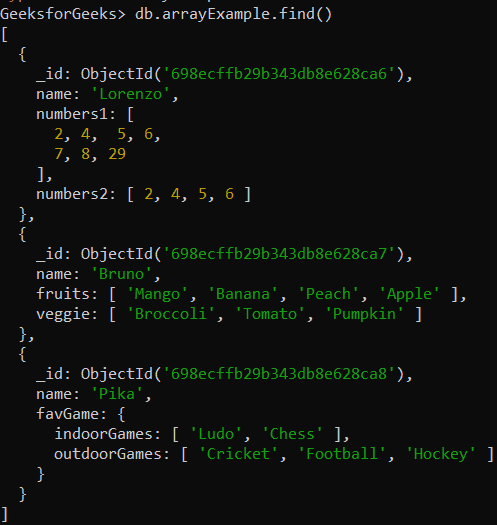
Database: GeeksforGeeks Collection: arrayExample Document: Three documents that contain the details in the form of field-value pairs . 👁 Screenshot-2026-02-13-124751 Example 1: Using $concatArrays Operator Concatenate the values (i.e., arrays) of numbers1 and numbers2 fields using $concatArrays operator.
db.arrayExample.aggregate([
 { $match: { name: "Lorenzo" } },
 {
 $project: {
 concatResult: { $concatArrays: ["$numbers1", "$numbers2"] }
 }
 }
])
Output:
👁 concatenate numbers1 and numbers2 are merged into one array using $concatArrays. The result preserves order: [2, 4, 5, 6, 7, 8, 29, 2, 4, 5, 6]. Example 2: Using $concatArrays Operator to concatenate arrays Values Concatenate the fruits and veggie arrays into a single array for a document with name: "Bruno" using $concatArrays operator.
db.arrayExample.aggregate([
 { $match: { name: "Bruno" } },
 {
 $project: {
 concatResult: { $concatArrays: ["$fruits", "$veggie"] }
 }
 }
])
Output:
👁 concatenate2 $concatArrays merges the fruits and veggie arrays into a single array. The combined result preserves order: ["Mango", "Banana", "Peach", "Apple", "Broccoli", "Tomato", "Pumpkin"]. Example 3: Using $concatArrays Operator in the Embedded Document Concatenate the value (i.e., array) of favGame.indoorGames field with the specified array(i.e., ["Uno", "Snooker"]) using $concatArrays operator.
db.arrayExample.aggregate([
 { $match: { name: "Pika" } },
 {
 $project: {
 concatResult: {
 $concatArrays: ["$favGame.indoorGames", ["Uno", "Snooker"]]
 }
 }
 }
])
Output:
👁 concatenate3 Appends ["Uno", "Snooker"] to the existing favGame.indoorGames array. Result becomes ["Ludo", "Chess", "Uno", "Snooker"]. Use Cases for MongoDB $concatArrays Operator The $concatArrays operator is used in various scenarios, including:
Combining Data from Multiple Fields : Merging arrays from different fields in a single document. Concatenating Arrays Across Different Documents: Aggregating arrays from different documents into one. Adding Static Arrays to Existing Data : Concatenating predefined static arrays with arrays from your documents. Flattening Data : Helps combine arrays, but true flattening of nested arrays requires operators like $reduce or $unwind.