The $concat operator in MongoDB concatenates multiple strings or expressions into a single string within the aggregation pipeline, enabling efficient string formatting and reporting during data transformation.
Commonly used in aggregation stages like $project, $addFields, and others for string transformations. Accepts multiple string expressions and computed expressions as inputs. Supports combining field values, literals, and expression results. Enables complex string formatting for reporting and presentation. Evaluates expressions server-side for efficient transformations. Syntax { $concat: [ <expression1>, <expression2>, ... ] } Accepts multiple arguments: string literals, fields, or expressions that resolve to strings. Each input expression is evaluated before concatenation. Produces a single combined string as the output. Features of $concat Operator Some features are listed below:
Input Expressions : Accepts multiple arguments, including string literals, field references, and expressions that resolve to strings. Null Handling : Returns null if any argument evaluates to null. Missing Fields : Returns null if any referenced field is missing in the document. Output Type : Produces a single concatenated string as the result. Usage Context : Commonly used in the $project stage of aggregation pipelines for string formatting. Use Cases for MongoDB $concat Operator Here are a few practical scenarios where the $concat operator shines:
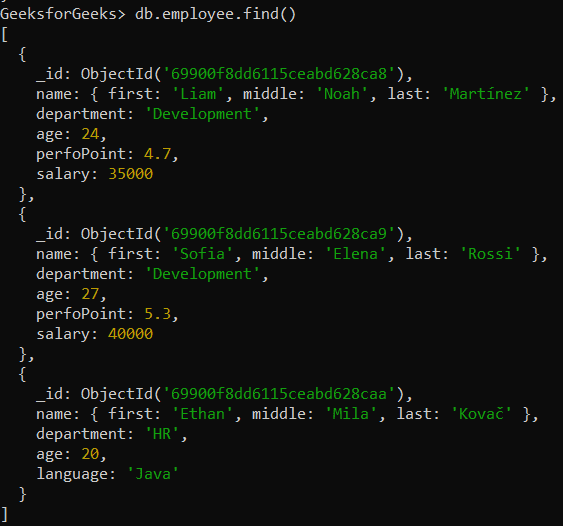
Concatenating First and Last Names: Combine the first name, middle name, and last name to create a full name for a user. Adding Static Prefixes or Suffixes: Prefix or suffix text to data, such as adding "Hello, " before a name or " - Employee" after a title. Building Custom Messages: Create personalized messages, for example, for a report or a notification. Examples of MongoDB $concat Operator We'll use a sample collection called employee in the GeeksforGeeks database, which contains employee information.
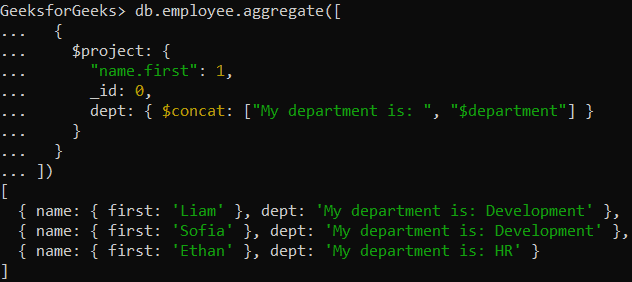
Database: GeeksforGeeks Collection: employee Document: Three documents that contain the details of the employees in the form of field-value pairs. 👁 Screenshot-2026-02-14-113110 Example 1: Concatenating Strings Using $concat Formatting a string by combining a static message with the department field. Here, we concatenate "My department is:" string with the value of the department field.
db.employee.aggregate([
 {
 $project: {
 "name.first": 1,
 _id: 0,
 dept: { $concat: ["My department is: ", "$department"] }
 }
 }
])
Output:
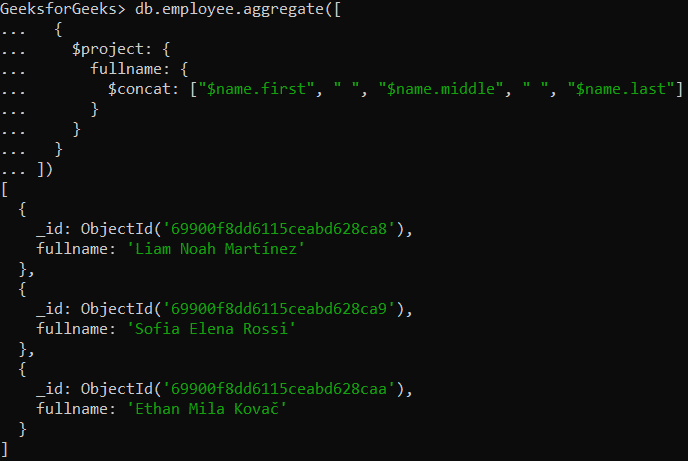
👁 Screenshot-2026-02-14-113233 Projects only the employee’s first name. Concatenates a custom string with the department field. Creates a formatted message indicating the employee’s department. Example 2: Concatenating Strings in Embedded Documents Find the full name of the employees by concatenating the values of the name.first, name.middle, and name.last fields.
db.employee.aggregate([
 {
 $project: {
 fullname: {
 $concat: ["$name.first", " ", "$name.middle", " ", "$name.last"]
 }
 }
 }
])
Output:
👁 Screenshot-2026-02-14-113428 Concatenates first, middle, and last name fields into fullname. Creates a new field fullname in the output. Provides the employee’s complete name in a single string. Usage of $concat Operator Here are some usage of $concat operator:
Aggregation Usage: Commonly used in the $project stage to create new computed fields. Flexible Inputs: Accepts field references, string literals, and computed expressions. Null Handling: Returns null if any argument is null or a referenced field is missing. Composable: Works with operators like $trim, $toUpper, and $toLower for advanced formatting. Multiple Fields: Merges values from multiple fields into a single string. Dynamic Strings: Builds labels, messages, or formatted outputs at query time. Data Transformation: Adds prefixes/suffixes and formats strings for reporting or UI output.