The $reverseArray operator in MongoDB reverses the order of elements in an array within the aggregation pipeline, making it useful for data processing and presentation when the order of values needs to be flipped.
Reverses the order of elements in an array and returns a new reversed array.
Works within aggregation pipeline stages like $project and $addFields for transforming results.
Useful for data processing and presentation when the order of values needs to be flipped.
Takes an array as input and outputs the same elements in reverse sequence.
Syntax
{ $reverseArray: <array expression> }
Accepts an array field, inline array, or any expression that resolves to an array.
Returns a new array with the elements in reversed order.
Features of MongoDB $reverseArray
Here are some features of $reverseArray:
Non-Destructive Operation: Returns a new reversed array while keeping the original array unchanged.
Null & Missing Handling: Returns null if the input field is missing or resolves to null.
Top-Level Only Reversal: Reverses only the outer array; it does not recursively reverse nested arrays.
Result Ordering for Display: Helps reorder results for presentation (e.g., showing latest items first).
Composable with Other Operators: Can be combined with operators like $slice, $arrayElemAt, and $cond for flexible transformations.
Examples of MongoDB $reverseArray
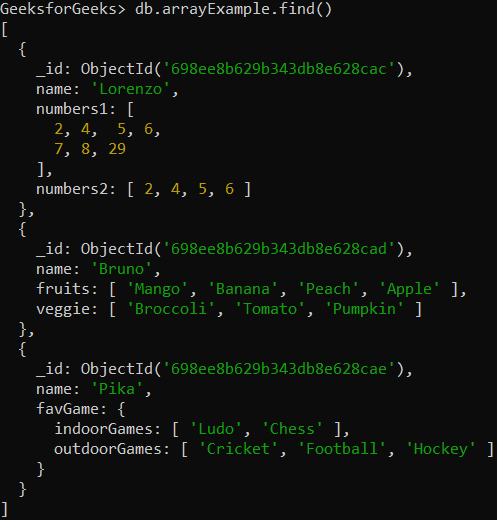
In these examples, we will work with a sample collection named arrayExample that contains various fields with arrays.
Database: GeeksforGeeks
Collection: arrayExample
Document: Three documents that contain the details in the form of field-value pairs.
Reverses the order of elements in the numbers2 array.
Result becomes [6, 5, 4, 2].
Example 2: Using $reverseArray Operator on Array of Strings
Reverse the value of the fruits field using $reverseArray operator. Here, the value of the fruits field is an array and the elements of the array of string values (fruit names).
Reverses the order of elements in the fruits array.
Result becomes ["Apple", "Peach", "Banana", "Mango"].
Example 3: Using $reverseArray Operator in the Embedded Document
Reverse the value of the favGame.outdoorGames field using $reverseArray operator. Here, the value of the favGame.outdoorGames field is an array and the elements of the array are strings(i.e. outdoor games names).