|
VOOZH | about |
|
VOOZH | about |
MongoDB provides powerful methods to manage and retrieve data efficiently. One such method is countDocuments(), which allows us to count the number of documents in a collection that match a specified query filter. This method is particularly useful when dealing with large datasets, ensuring accurate and efficient counting operations.
In this article, we will explore the countDocuments() method in MongoDB, its syntax, parameters, examples, and best practices to enhance performance.
countDocuments() in MongoDB?The countDocuments() method in MongoDB is used to count the number of documents in a collection that match a specified query filter. It performs a precise count by scanning documents in the collection or utilizing indexes for optimized counting. It takes two arguments first one is the selection criteria and the other is optional.
countDocuments()0 if the collection is empty or does not exist. $where, $near, and $nearSphere. Syntax
db.collection.countDocuments(query, options)
Parameters:
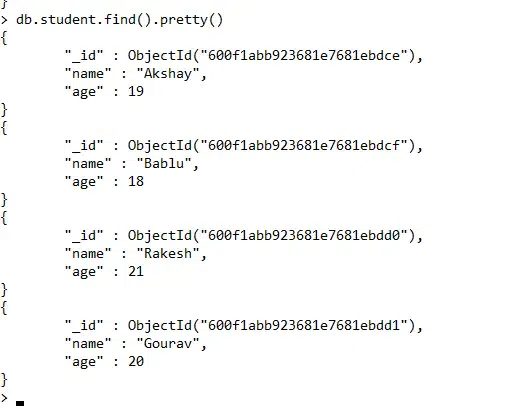
query: A document that specifies the selection criteria using query operators.options (Optional): An object that specifies additional options for the count operation. limit: The maximum number of documents to count.skip: The number of documents to skip before counting.hint: An index hint to use for the query.maxTimeMS: The maximum amount of time to allow the query to run.countDocuments() in MongoDBTo understand MongoDB countDocuments() we need a collection called student. This collection contains student records with fields such as name, age, and grade, allowing us to perform various counting queries based on different conditions.
Below, we will execute queries on this dataset to count documents efficiently.
The countDocuments({}) method is used to count all documents in a collection. Since we pass an empty query ({}), MongoDB does not apply any filters and returns the total number of documents available in the student collection.
Query:
db.student.countDocuments({})Output:
Explanation:
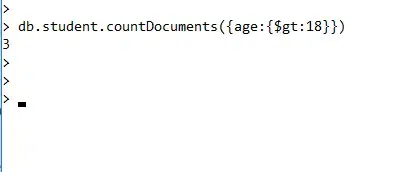
{} query matches all documents in the collection.student collection.0The countDocuments() method can be used with a query filter to count documents that match specific conditions. In this example, we count the number of students whose age is greater than 18 ($gt: 18)
Query:
db.student.countDocuments({age:{$gt:18}})Output:
Explanation:
{ age: { $gt: 18 } } filter selects only students where age is greater than 18.student collection and counts only the matching documents.0In this example, we use countDocuments() to count the number of students who have received grade "A" in the student collection.
db.student.countDocuments({ grade: "A" });2Explanation:
{ grade: "A" }matches only those students whose grade field is exactly "A".student collection and counts only the documents that meet this condition.0In this example, we use countDocuments() with the skip and limit options to control which documents are counted. This allows us to skip the first document and count only the next two in the student collection.
db.student.countDocuments({}, { skip: 1, limit: 2 });2Explanation:
skip: 1 → Skips the first document in the collection.limit: 2 → Counts only the next two documents after skipping.countDocuments()To optimize counting queries, follow these best practices:
✅ Use Indexes: If counting based on a query, ensure the field is indexed for faster execution.
✅ Avoid Large Skips: Using .skip() on large collections can be slow; instead, use range queries ($gte, $lte).
✅ Apply Filters Efficiently: Use specific field filters to reduce the dataset scanned.
✅ Set maxTimeMS: To prevent long-running queries, set a timeout using maxTimeMS
The countDocuments() method in MongoDB is a powerful tool for counting documents accurately within a collection. By using indexes and query optimizations, it can handle large-scale datasets efficiently. Whether you’re working on analytics, reporting, or database monitoring, mastering countDocuments() will enhance performance and scalability in your MongoDB applications. Understanding how to combine countDocuments() with filters, indexing, and pagination will further optimize query execution and improve overall database efficiency