|
VOOZH | about |
|
VOOZH | about |
insertMany() inserts multiple documents in one operation, improving performance and efficiency.
Syntax:
db.collection_name.insertMany([<document 1>, <document 2>, ...],{writeConcern: <document>,ordered: <boolean>})The insertMany() method returns an object that includes:
We’ll assume we’re working with a collection called student, which contains information about students such as their name and age.
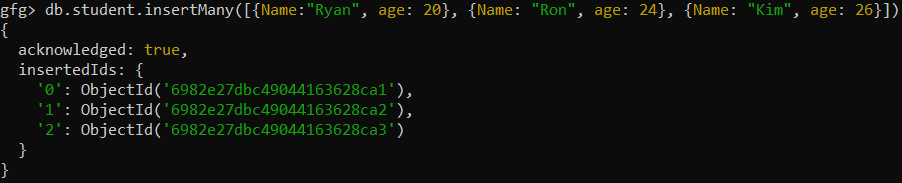
We insert the array of documents that contains the name and age of the students.
Query:
db.student.insertMany([{name:"Ryan",age:20}, {name:"Ron",age:24}, {name:"Kim",age:26}])Output:
Three documents are inserted into the student collection in a single operation.
The query inserts multiple documents with custom _id values into the student collection, and MongoDB throws a duplicate key error if any _id already exists.
Query:
db.student.insertMany([{ _id: "stu200", name: "Luca", age: 20 }, { _id: "stu201", name: "Tim", age: 24 }])Output:
The documents are inserted successfully with the given _id, preventing automatic ObjectId generation. If _id is duplicated, MongoDB will reject the insert operation for that document.
During bulk operations like insertMany(), MongoDB may throw a BulkWriteError (e.g., due to duplicate _id values), which can be handled using a try–catch block in application code.
var docs = [ /* array of documents */ ]
db.collection.insertMany(docs, { ordered: false })
 .then(result => console.log(result))
 .catch(error => {
 if (error.name === "BulkWriteError") {
 error.writeErrors.forEach(writeError => {
 console.error("Document index:", writeError.index);
 console.error("Error message:", writeError.errmsg);
 });
 } else {
 console.error("Unexpected error:", error);
 }
 });
This approach helps identify and handle BulkWriteError effectively.
Unordered inserts in MongoDB allow remaining documents to be inserted even if some insert operations fail.
Query:
db.student.insertMany(
 [
 {_id:"stu203",name:"Sophia",age:28},
 {_id:"stu206", name:"Emma", age:25}
 ],
 {ordered: false}
)
Output: