In MongoDB , findOneAndReplace() replaces the first matching document (including embedded documents ) and returns the original document by default, or the new one using options.
Single-document replace: Replaces the first matching document. Returns original by default: Can return the new document with options. Filter-based: Uses a filter to find the document. Full replacement: Replaces the entire document (except _id). Supports embedded documents: Can replace nested content as part of the document. Transaction-safe: Can be used within multi-document transactions. Options supported: Control return behavior and other settings. Syntax db.collection.findOneAndReplace(filter, replacement, options) filter: Criteria to find the document to replace. replacement: New document that replaces the matched document. options (optional): Additional settings for the operation. projection: Selects returned fields (1/true include, 0/false exclude). sort: Chooses which document to replace if multiple match. maxTimeMS: Sets a time limit (in ms) for the operation. upsert: Inserts a new document if no match is found when true. returnNewDocument: Returns the replaced document when true; otherwise returns the original (default). collation: Applies language-specific string comparison rules (case and accents). Return Value of findOneAndReplace() Returns the original document by default. Returns the replaced document when returnDocument: 'after' is set. Examples of MongoDB findOneAndReplace() Method In the following examples, we are working with:
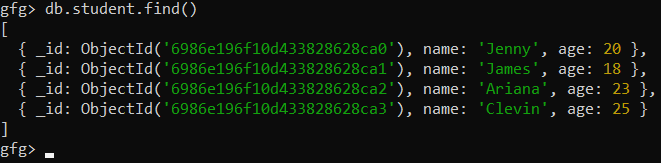
Database: gfg Collection: student Document: Four documents contain name and the age of the students 👁 Screenshot-2026-02-07-122446 Example 1: Replace first matching document and returns replaced document Finds the first document where age is 18 and replaces it with a new document. It returns the original document before replacement.
Query:
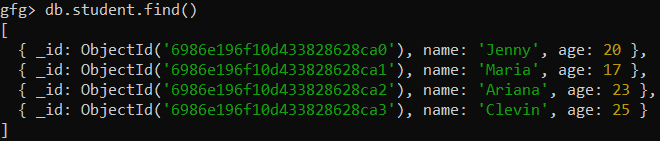
db.student.findOneAndReplace({age:18},{name:"Maria", age:17}) Before replacement:
👁 Screenshot-2026-02-07-123139 After replacement:
👁 Screenshot-2026-02-07-123241 Example 2: Replace the first matched document and returns a new document Replaces a document where age is 25 and ensures that the updated document is returned instead of the original.
Query:
db.student.findOneAndReplace({age:25}, {name:"Sophia", age:45}, {returnDocument: "after"}) Output:
👁 Screenshot-2026-02-07-123545 Important Points Here are some important points to remember:
findOneAndReplace() finds and replaces the first document that matches the filter. Returns the original document by default; can return the updated document using returnDocument: 'after'. Supports options like projection, sort, maxTimeMS, upsert, returnDocument, and collation. Can be used for atomic single-document operations and within transactions.