|
VOOZH | about |
|
VOOZH | about |
MongoDB, a leading NoSQL database, is known for its flexibility, scalability, and ease of use. However, like any database, MongoDB is susceptible to data loss due to hardware failures, software issues, human errors, or even cyberattacks. Database backup and restore processes are critical for maintaining data integrity, ensuring data protection, and enabling recovery from data loss events.
These processes are essential for safeguarding against hardware failures, software issues, human errors, and cyberattacks. In this article, We will learn about Backup and Restoration in detail by understanding their significance along with how they work, and the best practices to follow.
Database backup and restore are critical processes for data protection and recovery in database systems. Backup is the process of creating a copy of our database data to safeguard against unexpected data loss. Restoration is the process of using the backup to recover the database to its previous state after data loss.
Database restore is the process of using the backup copy to recover and restore the database to its previous state following a data loss. These processes ensure data availability and business continuity, enabling organizations to recover from incidents with minimal downtime.
Data loss in MongoDB can be caused by a variety of factors such as:
Having a robust backup strategy helps mitigate these risks and ensures data can be restored to its original state quickly. Moreover, effective backup and restoration are critical for complying with industry regulations, maintaining customer trust, and supporting disaster recovery plans
MongoDB supports different types of backup methods based on the use case and requirements.
In MongoDB, mongodump tool is used to take the data backup. It simply dumps all the data stored into a dump directory of MongoDB. Backed-up data is in BSON format also known as BSON data dumps. By default, the backup is stored in mongodb's bin\dump folder to specify a different output directory we can use the --out option.
The mongodump command is used to export data from a MongoDB instance. It is used in two ways with or without argument. Here’s how it works
mongodumpmongodump --db databaseName --collection collectionNameTo specify a different output directory we can use the --out option:
mongodump --db databaseName --collection collectionName --out c:\backupLet’s say we have multiple databases. Running the following command will back up all of them into a specified folder: Here we have 10 databases which all get backed up in the folder backupDatabase.
Note: exit mongo shell by ctrl+c to use the mongodump command.
mongodump --out c:\backupDatabaseOutput:
👁 ImageHere, we are making a backup of the collection student which contains 6 documents and is inside the GeeksForGeeks database, the backup is made inside the GFGbackup Folder.
mongodump --db GeeksForGeeks --collection students --out c:\GFGbackupOutput:
👁 ImageIn MongoDB, mongorestore utility is used to restore the backup data. It restores the binary backup created by mongodump utility(i.e., BSON data dumps). It can restore either an entire database backup or a subset of the backup.
It also restores the indexes which are created for any collection inside that database. By default, mongorestore looks for a database backup in mongodb's bin\dump folder which is also the default folder for mongodump command for dumping the backup.
mongorestore dumpmongorestore --db databaseName --collection collectionName directory\collectionName.bsonIn this example, we are using a database GeeksForGeeks which has 4 collections. We are firstly going to make a backup of student collection and then drop the student collection and then restore the student collection.
To make backup we use -
mongodump --db GeeksForGeeks --collection students --out c:\GFGbackup Output:
👁 ImageThe backup will be stored in c:\GFGbackup folder and we will drop students collection by using:
db.students.drop() Output:
👁 ImageNow we will restore student collection by using:
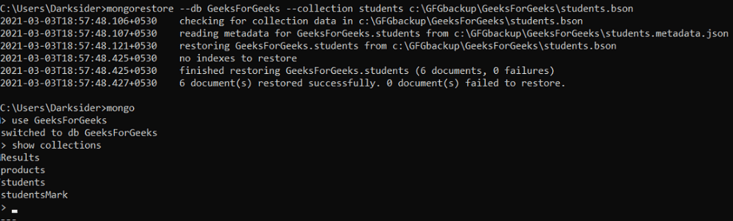
mongorestore --db GeeksForGeeks --collection students c:\GFGbackup\GeeksForGeeks\students.bson Output:
Backup and restore processes are essential for maintaining data integrity and ensuring data recovery in case of loss or corruption. Here’s a breakdown of how these processes work:
Together, these processes help in recovering lost or corrupted data, maintaining data integrity, and ensuring business continuity.
Database backup and restore are vital components of data management, ensuring that data remains secure and recoverable. By implementing effective backup strategies and understanding the restore process, organizations can protect against data loss, maintain operational continuity, and ensure that critical data is always available when needed. By using MongoDB’s mongodump and mongorestore utilities, implementing effective backup strategies, and adhering to best practices like encryption, automation, and regular testing, we can ensure our data is always protected.