|
VOOZH | about |
|
VOOZH | about |
Almost every company relies on repeat business to make money. Bringing in new customers is expensive, so the real win is getting them to come back after they sign up or make a purchase. The best way to do that is to offer them products or services that actually match what they care about.
How do you figure out what that is? A strong signal is what they've already used or bought from you, especially if they left good feedback. You can also learn a lot from quick surveys or by looking at what products "similar" users are consuming. Whatever the source, you're basically trying to solve the same problem:
"Find me something that's semantically similar to this."
That's exactly what recommendation engines are built to do. In this article, we'll break down how they work and walk through how you can build one yourself using machine learning (ML) and MongoDB Vector Search.
Before machine learning took off, recommendation engines leaned heavily on humans. Teams of people would manually tag products or content with attributes that could be compared later. Netflix famously hired staff and freelancers to watch shows and movies, then label them with highly specific genres like "European detective series," plus other details like mood, pace, and age rating.
This worked pretty well: Netflix could recommend new content based on what you'd already watched and enjoyed. If the tagging was done carefully, there was a good chance you'd like the next suggestion too, and keep paying your subscription.
The downside, of course, was that this process:
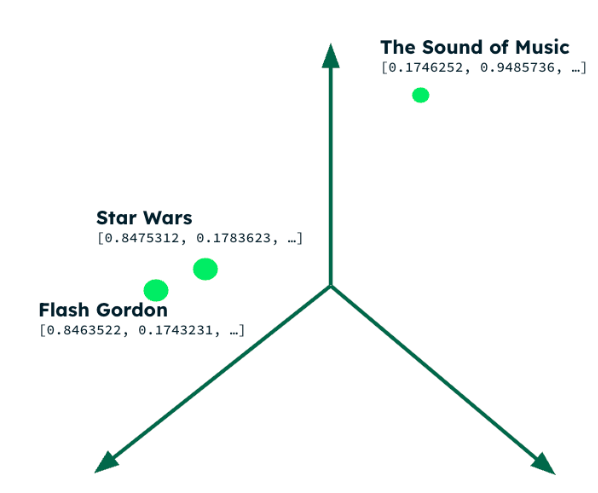
Modern recommendation engines offload most of this work to machine learning. Instead of people hand-tagging everything, an embedding model takes information about a piece of content and turns it into a vector-an array of numbers that captures its meaning in a high-dimensional space. You can feed these models text, audio, images, or even video, and they'll generate vectors where "similar" items end up close together.
Movies with different plots are close together in the multi-dimensional vector space
Once you've generated embeddings for your entire product catalog, you can build a vector search index over them.
When you need a recommendation, you:
The items behind those closest embeddings are your recommendations.
MongoDB provides three critical components required to build a recommendation engine:
Note that all of the code, setup instructions, and Postman tests can be found in the mongodb-movie-recommendations repo.
The application provides a service to implement a recommendation engine for movies.
The application provides three endpoints (no front-end code is included, but there's a Postman collection that can be used for testing):
{
 "customerId": "customer1",
 "movieId": "573a13c6f29313caabd73051",
 "viewedAt": "2025-11-04T13:45:26.768Z",
 "completed": true,
 "rating": -1
}
{
 "plot": "A young farm boy discovers he has special powers and joins a rebellion to fight an evil empire in space."
}
Returns the details for ten movies that are semantically similar to the provided plot description.
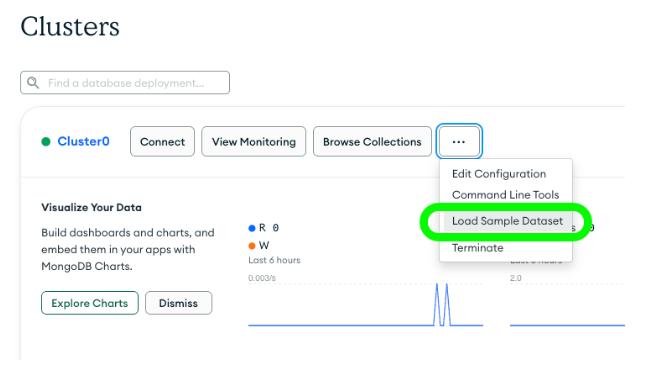
The application works from the data in the `movies` collection of the `sample_mflix` database that you can automatically create in MongoDB Atlas.
The `movies` collection contains a document for each movie. These documents contain a `fullplot` field, and it's this data that we'll use to find similar movies. We'll generate an embedding (vector) from the `fullplot` field, and then include it as a new field in the original `movies` documents.
The application automates the maintenance and creation of a new field in the `movies` collection named `fullplot_embedding` using an Atlas Trigger. Whenever a document is inserted/replaced, or the `fullplot` field is updated, the trigger calls the Voyage AI API to generate a new vector/embedding from the new string, and stores it in the `fullplot_embedding` field.
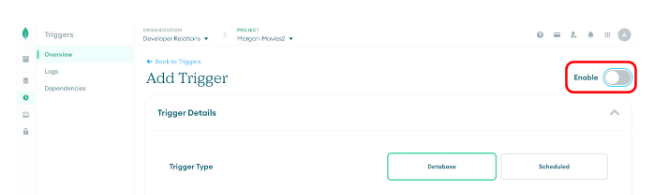
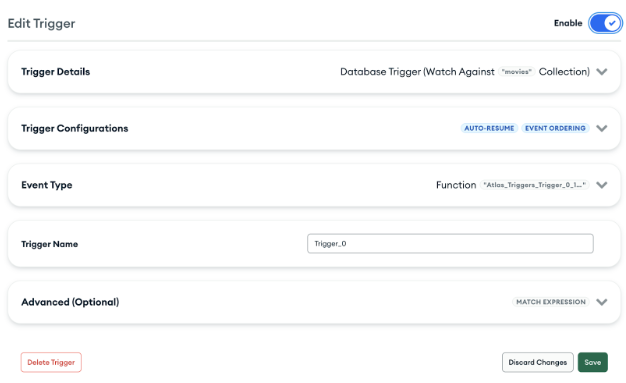
Start configuring the MongoDB Atlas trigger as shown here:
Configure the Trigger in the Atlas UI
Note that the `Enable` toggle should be turned off at this point, because the trigger will fail until the Atlas Secret has been configured.
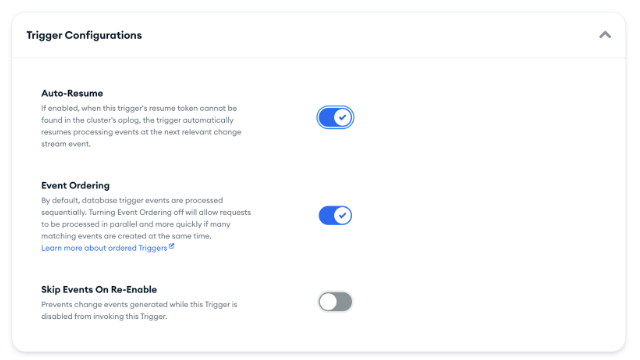
Continue Configuring the Trigger:
Continue to Configure the Trigger
Note that `Event Ordering` is enabled, preventing lots of trigger invocations running in parallel. This ensures that we don't exceed the Voyage AI free-tier rate limit when making a bulk change to `movies` collection.
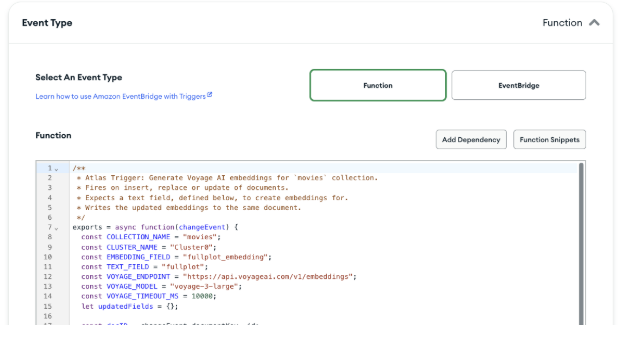
Set the `Event Type` to `Function` and paste in the code from Atlas/plotChangeTrigger.js
Add the Code for the Trigger
The function takes the new value of the `fullplot` embedding, sends it to the Voyage AI API to generate an embedding, and then writes the embedding to the `fullplot_embedding` field in the stored movie document. We'll look at example code to invoke the Voyage AI API later.
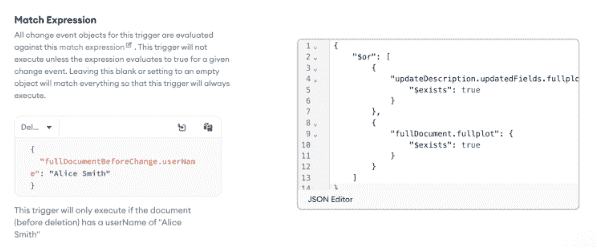
Set a Match Expression Atlas/triggerMatchExpression.json so that resources aren't wasted running the trigger if the movie document is updated, but the `fullplot` field hasn't been changed:
Provide a match expression to limit when the trigger should run
Optionally, name the trigger, and then `Save` it.
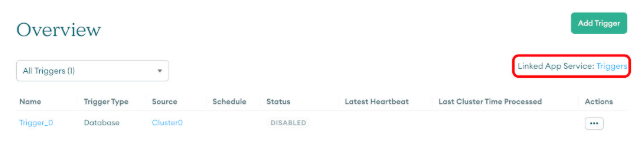
Return to the Triggers overview and select the "Linked App Service" link:
Select the triggers app service
Select `Values` from the App Services menu and then click on "Create New Value."
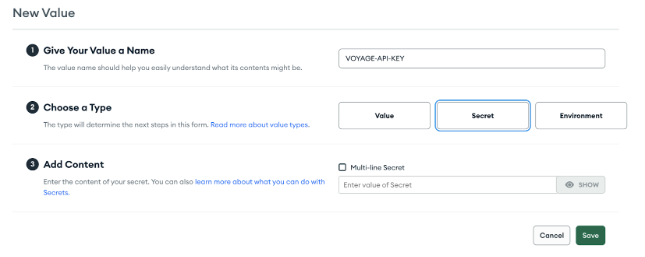
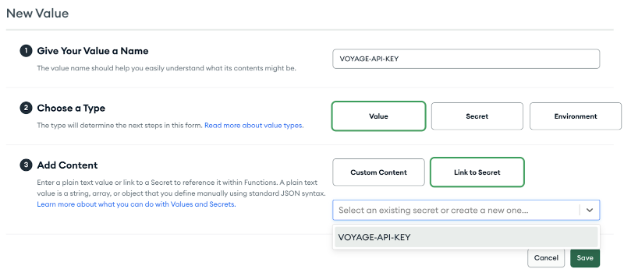
Select `SECRET`, and set the name to `VOYAGE-API-KEY`, and the value to the key that you got from the Voyage AI site as part of the prerequisites:
Create an Atlas secret for the Voyage AI API key
To access the secret from the trigger code, it needs to be wrapped in a value (again named `VOYAGE-API-KEY`):
Wrap the new secret in an Atlas variable
Return to the trigger definition and enable the trigger:
Enable the new trigger.
The trigger is now active, and so we can update `fullplot` in all of the `movies` documents, and then the trigger will asynchronously request the embedding from Voyage AI, and store it in the movie document as a new field named `fullplot_embedding`:
use sample_mflix
db.movies.updateMany(
 { fullplot: { $type: "string" } },
 [
 { $set: { fullplot: { $concat: ["$fullplot", " "] } } } // Add a space to
 // the end of the fullplot string
 ]
);
This update will complete quickly, but the triggers run sequentially and so it will take some time for `fullplot_embedding` to be set in all of the movie documents.
From the `mongosh` shell, create the vector search index using `createSearchIndex`:
use sample_mflix
db.movies.createSearchIndex(
 'movie-recommendation', // Name of the index
 'vectorSearch', // It's a vector search index
 {
 "fields": [
 {
 "type": "vector",
 "path": "fullplot_embedding", // Name of field containing the embedding
 "numDimensions": 1024, // Number of elements in the vector (dictated
 // by the embedding model used)
 "similarity": "cosine", // Algorithm to use to determine closeness of
 // vectors
 "quantization": "scalar" // Reduce the size of the vector index by converting
 // the floating point vector dimensions into
 // integers
 },
 {
 "type": "filter", // Enable pre-filtering on the _id field
 "path": "_id"
 },
 {
 "type": "filter", // Enable pre-filtering on the type field
 "path": "type"
 }
 ]
 }
)
This index can now be used to perform a vector search on the `fullplot_embedding` field, as well as pre-filtering the results on the `_id` and `type` fields.
Environment Variables
The application expects three environment variables to be set:
Configuring the Application
src/config.js contains all of the settings that can be customised before starting the app (database and collection names, port numbers, development mode, etc.).
Starting the Express Server
npm install
npm start
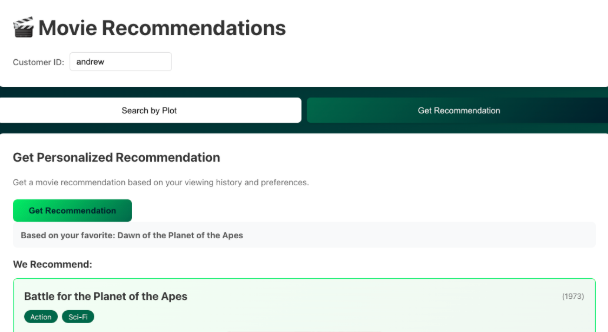
The repo includes a React web application that you can use to try out your recommendation service. The focus of this article is on the backend service, and so we won't go into the details of this frontend application.
Frontend web app for the recommendation engine
Postman/Movies-local.postman_collection.json contains a Postman collection that can be imported into Postman to test each of the endpoints.
Resources are consumed whenever a new connection to MongoDB is created, and so it's wasteful to do so on every invocation of an endpoint. Instead, the application does so once when the application starts (and again if/when the connection is lost). This is performed by the `getDB` function in src/helpers/db.js:
The `getVoyageClient` funtion implemented in src/helpers/voyageai.js returns a client connection to the Voyage AI API:
This is implemented in src/endpoints/getMovie.js and should be used whenever you need to fetch a movie's document (based on the `_id` for the movie):
This is implemented in src/endpoints/postViewing.js and should be used whenever a customer has watched a new movie.
The endpoint adds a new object to the customer's document `viewedMovies`-an array representing the movie viewing. The object contains:
The `_id` of the new movie.
A flag to indicate if the customer watched the movie to the end.
When they watched it.
The rating the viewer gave (-1 === disliked, 1 === liked, 0 === didn't express a view).
Here's a sample document:
{
 _id: 'customer1',
 name: { first: 'John', last: 'Doe' },
 email: 'john.doe@example.com',
 viewedMovies: [
 {
 movieId: ObjectId('573a139af29313caabcef29d'),
 viewedAt: 2025-12-02T14:25:20.580Z,
 completed: true,
 rating: -1
 },
 {
 movieId: ObjectId('573a139af29313caabcf0324'),
 viewedAt: 2025-12-02T14:25:20.580Z,
 completed: true,
 rating: 1
 },
 {
 movieId: ObjectId('573a13e3f29313caabdbfc11'),
 viewedAt: 2025-12-02T14:25:20.580Z,
 completed: true,
 rating: -1
 },
 {
 movieId: ObjectId('573a13a0f29313caabd05069'),
 viewedAt: 2025-12-02T14:25:20.580Z,
 completed: true,
 rating: 0
 },
 {
 movieId: ObjectId('573a13b8f29313caabd4cdc1'),
 viewedAt: 2025-12-02T14:25:20.580Z,
 completed: false,
 rating: 1
 },
 ...
}
We only want to maintain the most recent 50 movies for each customer. This is achieved using this MongoDB update:
await customerCollection.updateOne(
 { _id: body.customerId },
 {
 // Add the new viewing to the start of the array, keeping only the most recent 50
 $push: { viewedMovies: { $each: [viewingRecord], $position: 0, $slice: 50 } }
 }
);
This single call to MongoDB atomically:
This is implemented in src/endpoints/getRecommendation.js. It's the main endpoint for the recommendation engine. It uses the `customerId` provided by the caller to find the customer's document. That document contains a date-ordered array of the most recent 50 movies watched by the customer. A simple algorithm is applied to identify the customer's "favorite" from that list. MongoDB Atlas Vector Search is then used to find the movies that are most similar to this favourite.
The endpoint returns to the caller:
Here's a sample of the response received by the caller:
{
 "favourite": {
 "_id": "573a139af29313caabcf0324",
 "title": "Robin of Locksley",
 "fullplot": "After his parents win the lottery Robin McAllister is sent to the prestigious Locksley Hall. There he experiences how the sons of the school's benafactors, John Prince and his associates Warner and Gibson, are treated like royality. Robin can't join archery club, he gets in trouble when he stands up for himself, and his parents are completely preoccupied with their new horse ranch. But it isn't until one of the school's scholarship students, Tommy, is in a terrible accident that Rob begins to take action against Prince, Warner, Gibson, and their sons. With a little help from his two new friends, Will Scarlett and John Little, and the ranch hand's daughter Marion, he electronically takes money from their company accounts to put towards Tommy's medical bills. However, as the operations become more costly and as a bubbling agent named Nottingham begins to close in on him, Robin questions his own motives. ",
 "mostSimilar": {
 "ids": [
 "573a1393f29313caabcddc55",
 "573a1392f29313caabcdb585",
 "573a1399f29313caabcedf24",
 "573a13bcf29313caabd56292",
 "573a1399f29313caabcecb4a",
 "573a1396f29313caabce51eb",
 "573a1391f29313caabcd7626",
 "573a139af29313caabcef6f6",
 "573a1395f29313caabce24fb",
 "573a1394f29313caabcdefaa"
 ],
 "lastUpdated": "2026-01-08T13:17:00.236Z"
 }
 },
 "recommendation": {
 "_id": "573a1393f29313caabcddc55",
 "fullplot": "Sir Robin of Locksley, defender of downtrodden Saxons, runs afoul of Norman authority and is forced to turn outlaw. With his band of Merry Men, he robs from the rich, gives to the poor and still has time to woo the lovely Maid Marian, and foil the cruel Sir Guy of Gisbourne, and keep the nefarious Prince John off the throne. ",
 "imdb": {
 "rating": 8,
 "votes": 36916,
 "id": 29843
 },
 "year": 1938,
 "plot": "When Prince John and the Norman Lords begin oppressing the Saxon masses in King Richard's absence, a Saxon lord fights back as the outlaw leader of a rebel guerrilla army.",
 "genres": [
 "Action",
 "Adventure",
 "Romance"
 ],
 "rated": "PG",
 "metacritic": 97,
 "title": "The Adventures of Robin Hood",
 "lastupdated": "2015-09-07 08:33:44.247000000",
 "languages": [
 "English"
 ],
 "writers": [
 "Norman Reilly Raine (original screenplay: based upon ancient Robin Hood legends)",
 "Seton I. Miller (original screenplay: based upon ancient Robin Hood legends)"
 ],
 "type": "movie",
 "tomatoes": {
 "viewer": {
 "rating": 3.7,
 "numReviews": 33169,
 "meter": 89
 },
 "dvd": "2003-09-30T00:00:00.000Z",
 "critic": {
 "rating": 8.9,
 "numReviews": 44,
 "meter": 100
 },
 "lastUpdated": "2015-08-23T19:01:18.000Z",
 "consensus": "Errol Flynn thrills as the legendary title character, and the film embodies the type of imaginative family adventure tailor-made for the silver screen.",
 "rotten": 0,
 "production": "Warner Bros.",
 "fresh": 44
 },
 "poster": "https://m.media-amazon.com/images/M/MV5BYjZjOTU3MTMtYTM5YS00YjZmLThmNmMtODcwOTM1NmRiMWM2XkEyXkFqcGdeQXVyNjc1NTYyMjg@._V1_SY1000_SX677_AL_.jpg",
 "num_mflix_comments": 1,
 "released": "1938-05-14T00:00:00.000Z",
 "awards": {
 "wins": 5,
 "nominations": 2,
 "text": "Won 3 Oscars. Another 2 wins & 2 nominations."
 },
 "countries": [
 "USA"
 ],
 "cast": [
 "Errol Flynn",
 "Olivia de Havilland",
 "Basil Rathbone",
 "Claude Rains"
 ],
 "directors": [
 "Michael Curtiz",
 "William Keighley"
 ],
 "runtime": 102
 }
}
The MongoDB aggregation uses the `$facet` stage to fetch both a list of `_id`s for the movies that the customer has recently viewed (we'll use this later to ensure that we don't recommend any movies that the customer has recently viewed), together with the details of the favorite movie from that list:
const favouritesPipeline = [
 { $match: { _id: customerId } },
 { $project: { viewedMovies: 1 } },
 {
 $facet: {
 viewedIds: [
 { $unwind: '$viewedMovies' },
 { $replaceRoot: { newRoot: '$viewedMovies' } },
 { $project: { movieId: 1 } },
 { $group: { _id: null, ids: { $addToSet: '$movieId' } } },
 { $project: { _id: 0, ids: 1 } }
 ],
 favourite: [
 { $unwind: '$viewedMovies' },
 {
 $addFields: {
 score: {
 $add: [
 '$viewedMovies.rating',
 { $cond: ['$viewedMovies.completed', 0.5, 0] }
 ]
 }
 }
 },
 { $sort: { score: -1, 'viewedMovies._id': 1 } },
 { $limit: 1 },
 { $replaceRoot: { newRoot: '$viewedMovies' } },
 {
 $lookup: {
 from: config.moviesCollection,
 localField: 'movieId',
 foreignField: '_id',
 as: 'movie'
 }
 },
 { $set: { movie: { $first: '$movie' } } },
 { $replaceRoot: { newRoot: '$movie' } },
 { $project: {
 _id: 1,
 title: 1,
 mostSimilar: 1,
 fullplot: 1,
 fullplot_embedding: 1 } }
 ]
 }
 },
 {
 $project: {
 viewedMovieIds: { $ifNull: [ { $arrayElemAt: ['$viewedIds.ids', 0] }, [] ] },
 favouriteMovie: { $arrayElemAt: ['$favourite', 0] }
 }
 }
];
The algorithm used to decide which viewed movie is their favorite is simple-these points are assigned:
The most recently viewed movie from those with the most points is considered the favorite.
The embedding from the favorite movie's document is used to perform a vector search against the product catalog:
const vectorSearchPipeline = [
 {
 $vectorSearch: {
 filter: {
 _id: { $nin: viewedMovieIds },
 type: 'movie'
 },
 index: config.moviesVectorIndex,
 limit: 10,
 numCandidates: 100,
 path: 'fullplot_embedding',
 queryVector: favouriteMovie.fullplot_embedding
 }
 },
 {
 $set: { score: { $meta: 'vectorSearchScore' } }
 },
 {
 $unset: ['fullplot_embedding']
 },
 // Filter out low-score results to avoid poor recommendations
 {
 $match: { score: { $gt: config.recommendationThreshold }}
 }
]
Note that the vector search includes a pre-filter to ensure that the search skips any document that:
filter: {
_id: { $nin: viewedMovieIds },
type: 'movie'
}
Note also that we included a final stage in the pipeline to exclude any movies where the "closeness score" is less than our configured threshold. We want this because vector search will find the closest matches, even if those matches are very distant-it's better to enforce this similarity threshold rather than spam the customer with poor recommendations:
{
$match: { score: { $gt: config.recommendationThreshold }}
}
The recommendations returned by the vector search are ranked-the most similar movie (according to the vector search index) being first in the list. We can improve the accuracy of this ordering by feeding the plots from the favourite movie and the plots from the top recommendations into a [reranker]:
// Rerank the results using Voyage AI's reranking model, which may provide better
// relevance ordering than just vector similarity alone
const rerankResponse = await voyageClient.rerank({
 model: 'rerank-2',
 query: favouriteMovie.fullplot,
 documents: searchResults.map(doc => doc.fullplot)
});


// rerankResponse ===
// {
// object: 'list',
// data: [
// { relevanceScore: 0.5546875, index: 1 },
// { relevanceScore: 0.5078125, index: 3 },
// { relevanceScore: 0.453125, index: 0 },
// { relevanceScore: 0.453125, index: 2 },
// { relevanceScore: 0.3828125, index: 4 }
// ],
// model: 'rerank-2',
// usage: { totalTokens: 942 }
// }
The initial implementation performs the vector search and reranking every time we want to make a recommendation to one of our customers. If we want to make a recommendation to 100,000 customers who all happen to have the same favorite recently viewed movie, then we run (almost) the same vector search and reranking 100,000 times. As the service scales, this could prove costly in terms of CPU usage and API fees.
As each of those 100,000 invocations will produce similar results, we can cache some interim results and save resources. If Star Wars is the most similar movie to Flash Gordon at 12:00, then it's probably still the most similar at 12:01 or 15:00-the result would only change when changes are made to the product catalog. Let's exploit that by "caching" the search results in the favorite movie's document when we perform the first search. We can then reuse those cached results when making recommendations for other customers with the same favorite recently viewed movie.
Note that we need to change the prefilter in our vector search as it no longer makes sense to filter out movies that the first customer has recently viewed. This reduces the pre-filter to just exclude the favourite movie itself and non-movies:
filter: {
 _id: { $ne: favouriteMovie._id },
 type: 'movie'
}
Once we have the re-ranked recommendations for this first customer, we store them in the favorite movie's document:
await moviesCollection.updateOne(
 { _id: favouriteMovie._id },
 { $set: {
 mostSimilar: {
 ids: similarMovieIds,
 lastUpdated: new Date()
 }
 } }
);
We set `lastUpdated` to the current date/time as we'll want to recalculate the results periodically to reflect changes made to the product catalog.
We also need to add logic to use the cached results from the favorite movie's document where possible:
// If we've already cached the most similar movie in the last X days,
// then use that. This can reduce costs by reducing how often we need to do
// a vector search.
if (config.cacheSimilarMovies && favouriteMovie?.mostSimilar?.ids?.length > 0 &&
 favouriteMovie?.mostSimilar?.lastUpdated >
 Date.now() - config.recommendationTimeoutDays * 24 * 60 * 60 * 1000
) {
 console.log('Using cached most similar movie for recommendation.');
...
Note that `config.cacheSimilarMovies` is a feature flag so that we can configure whether to save cost by caching (at the expense of missing some recently added movies).
Recall that when using caching, our vector search pre-filter no longer excludes the customer's recently viewed movies (as the cached results came from a different customer).
That means that we need to filter out the current customer's recently viewed movies (this is referred to as post-filtering):
// Fetch the first cached most similar movie that the customer hasn't already viewed
const mostSimilarUnviewedMovieId = favouriteMovie.mostSimilar.ids.find(
 id => !viewedMovieIds.includes(id)
);
This is implemented in src/endpoints/findMovieByPlot.js wants to find a movie based on a plot description.
The endpoint generates an embedding from the provided plot description, and then it performs a semantic search of the product catalog to find the closest matches.
Here's a sample of a document returned to the client:
Voyage AI's `voyage-3-large` mode is used to generate an embedding from the provided plot:
We then use vector search to find the closest ten matches:
We then refine the ordering of these results using Voyage AI's reranker:
Once you've spent the time and money to win a new customer, the real goal is to keep them engaged so they keep buying from you or renewing their subscription. Recommendation engines help with this by suggesting new products that are semantically similar to the ones a customer has already shown that they value. Vector search lets you efficiently find those similar items in your product catalog, while AI rerankers fine-tune the order so the strongest candidates surface first.
As your traffic grows, vector search and reranking can get expensive-but you can keep costs under control by caching recommendation results where it's safe to reuse them, instead of recomputing everything on every request
1. How can I avoid hallucinations when using vector search? I'd rather be told there's no recommendation than be spammed with things that are of no interest to me.
In MongoDB Atlas Vector Search, you can project (expose) the similarity score for the search results as a subsequent stage in your aggregation pipeline:
{
$set: { score: { $meta: 'vectorSearchScore' } }
}
You can then filter on that score to exclude any results where the similarity doesn't meet your chosen threshold:
// Filter out low-score results to avoid poor recommendations
{
$match: { score: { $gt: config.recommendationThreshold }}
}
2. Should I pre-filter or post-filter my vector search results?
In general, it's most efficient to pre-filter the results. If you post-filter, then you may have to increase the number of results returned by the vector search so that there are enough candidates to deliver the required number matches after the post-filter has been applied.
A possible exception to this is when you want to cache the vector search results so that they can be reused to save on cost. If the future uses of the cached results have a different set of filter criteria, then it's best to cache the unfiltered results and apply a different filter each time those results are reused.
3. There are other vector databases out there. Why should I use MongoDB Atlas Vector Search?
When using a dedicated vector database, it's separate from your operational database. It's your job to update the vector index when your operational data changes.
With MongoDB, your operational data and vector search indexes are all part of the same platform. When your product catalog changes, you can automatically propagate those changes to your vector search index.