Data types are essential in programming and databases by defining the kind of data a variable or object can hold. In MongoDB, data types classify and organize data by enabling developers to perform appropriate operations and ensuring data is stored correctly according to its type.
In this article, We will see How to Change the Type of a Field by understanding the various method with the help of examples and so on.
What is a Data Type?
A data type is one of the building blocks of any programming language or database. Data type acts as a classifier that specifies the type of data that a particular object or variable can hold.
With the help of the data types, a developer knows which value a variable can hold or which value is valid for a variable and, what operations can be performed on those values.
Data types are a way to organize data in its correct categories.
The choice of data type depends on the requirements of the application in which the data is used.
There are several types of data types in MongoDB. Let's explore different types of data types in MongoDB.
What are the Different Data Types in MongoDB?
MongoDB supports many data types to be able to handle different types of data support for a wide range of applications. These data types include:
String: String is one of the most commonly used data types in MongoDB for storing data. The string represents a sequence of UTF-8 characters.
Integer: The Integer data type of MongoDB is used for storing an integer. The integer data can store data in both forms as a 32-bit signed integer or as a 64-bit signed integer. The int data type is commonly used for 32-bit signed integers which lies in the range of -2,147,483,648 to 2,147,483,647. The long data type is used for larger integer values which the int data type cannot manage.
Double: The double data type is used to store the float values.
Date: The date data type stores the date. It is a 64-bit integer which represents the number of milliseconds.
Boolean: This data type is used to store either True or False values.
Array: The array data type is used to store a set of values. It can be used to store either same or different data types values.
Object: Object represent a nested document.
Binary Data: The binary data type is used to store to store binary data.
ObjectId: This represents a unique identifier for documents.
Null: The null data type is used to store the null value.
To explore in detail the various data types of MongoDB you can refer to Data Types in MongoDB article which explores various data types in detail.
Different Ways of Changing the Type of Field in MongoDB
Changing the type of a field involves in updating the existing fields of the documents in the collection.
Method 1: Using MongoDB Compass
Step 1: Open MongoDB Compass and connect to your Mongodb database.
Step 2: Navigate to the collection containing the field you want to update.
Step 3: On hovering over the collection we will be able to see the Edit document button. click on the Edit document button.
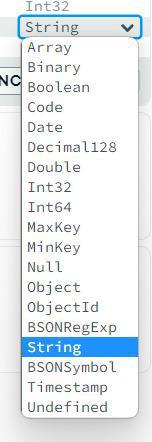
Step 4: After clicking the edit document option on the right hand side of the document you will be able to see the data types which can be edited by clicking them.
Step 5: Select the data type as per your requirement and then click on the `Update` button shown. This will change the data type of the corresponding field to the data type you have choose.
For example, in the below document the data type of field `degree` is changed from `String` to `Arrays`.
This method involves using the `$set` operator along with the correct type conversion functions so that this does not result into an error while updating the data type of a field.
Step 1: Open MongoDB Compass and connect to our MongoDB database.
Step 2: Click on the "Collections" tab to view your collections.
Step 3: Select the collection containing the documents where we want to change the field type.
You can understand this clearly with an example.
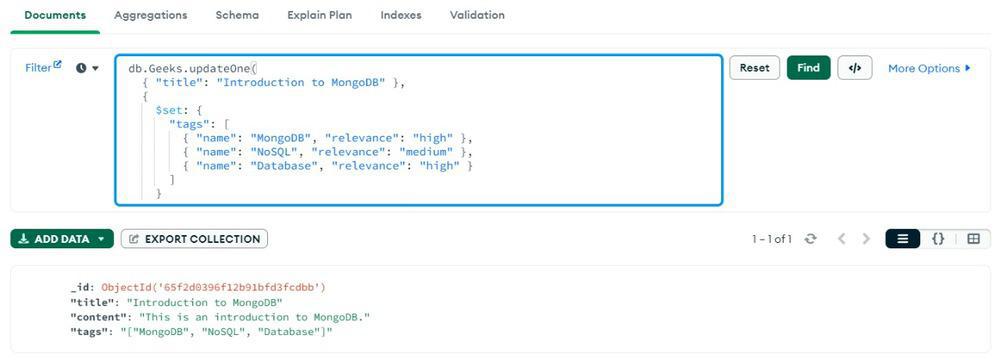
Example: You have a collection which contains various fields:
The above query uses the `updateOne()` method to update a single document in the "articles " collection.
The first argument is the query filter `{ "title": "Introduction to MongoDB" }`,which specifies the document to be updated based on its title.
The second argument is the update operation, where `$set` operator is used to set the value of `tags` field from an array of string to an array of objects.
Each object within the array represents a tag and contains two properties: `name` and `relevance`.
Conclusion
Overall, In MongoDB, data types play a crucial role in organizing and managing data. They define the type of values that can be stored in a field and the operations that can be performed on those values. By understanding the different data types available in MongoDB and how to change the type of a field, developers can effectively design and manage their databases to meet the requirements of their applications.