|
VOOZH | about |
|
VOOZH | about |
Knowing how tolist databases in MongoDB is an important part of managing your data effectively. By using basic MongoDB shell commands, you can easily see what databases you have and understand their sizes.
By using commands such as showdbs and db.stats() and users can gain valuable insights into their MongoDB environment. In this article, We will explore the steps involved in listing all databases in MongoDB and so on.
Managing databases in MongoDB involves knowing how to list all databases. This basic task helps users see the available databases and their sizes by giving a clear picture of the database setup.
By using commands like show dbs and db.stats(), users can get detailed information such as database size, collections and the number of documents.
First, let's create some databases using Mongo shell.
To create a new database, we can use the use <database_name> command. Replace <database_name> with the name we want for our database.
use my_databaseCreate as many databases as we want to create. I had created lots of databases:
Example:
use NoSQL
use Employee
use registration
use employee
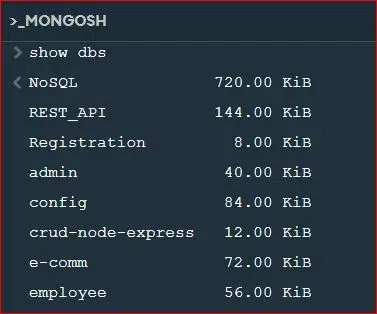
The most basic command for listing the databases in the MongoDB shell is 'show dbs'. This command prints the list of databases and their sizes.
On the other hand, we need to understand that MongoDB has only databases that have data. Empty databases will never show in the output.
show dbsOutput:
Explanation: As we have seen in the image that we have List of all the databases which we had created.
After executing `show dbs`, MongoDB prints out a list of the databases in our system with the sizes of each database in megabytes (MB). Big data is usually associated with larger databases that facilitate increased data storage and usage.
However, size isn't the only reflection of the complexities and the performance of our MongoDB environment.
While show dbs gives a brief but useful outline, you can drill down into specific databases by using db.stats() function.
This command displays the categories such as database size, the number of collections, and document count.
use my_database
db.stats()
Example:
use employee
d.stats()
Output:
Explanation: As we have seen in the image that it show all the details of the employee database.
Besides listing databases, it is also crucial to interpret the data inside them. Change the database environment with the use command and display all collections within the database using the show collections command.
These commands permit easy navigation and control of the MongoDB databases and collections.
use my_database
show collections
Example:
use employee
show collections
Output:
Explanation: As we have seen in the image that there are the two collections in employee database.
Once we have completed our tasks in the MongoDB shell, we can exit.
Click on the close (X) button located at the top-right corner of the MongoDB Compass window.
Overall, understanding how tolist databases in MongoDB is vital for effective database management. Utilizing MongoDB shell commands allows users to gain insights into database structures and sizes, facilitating better decision-making. By using these skills, users can enhance their data organization and improve the overall performance of their MongoDB applications.