|
VOOZH | about |
|
VOOZH | about |
MongoDB's flexibility in managing arrays within documents is invaluable for modern applications. Sometimes, we might need to find documents where an array field contains more than one element. Here’s how you can achieve this using MongoDB queries
In this article, We will various methods through which we can easily learn How to Query for Documents Where the Array Size is Greater Than 1 in MongoDB with examples.
In MongoDB, querying documents based on array size is a common requirement. For example,we might want to find all documents where a specific array field contains more than one element. This can be challenging because MongoDB's query language doesn't have a direct operator to compare array sizes. Below are the approaches that are used to find all documents where a specific array field contains more than one element.
Let's set up an Environment
To understand How to check the size of an array in MongoDB we need a collection on which we will perform various operations and queries. Here we will consider a collection called students which contains _id, name, and subjects as field it.
The $expr operator in MongoDB allows us to use aggregation expressions within a query. This can be useful when we need to compare fields within a document or perform complex logical operations.
Syntax:
db.collection.find({
 $expr: {
 // Aggregation expression
 }
})
Explanation: In the find method, we will specify the $expr operator followed by an object containing the aggregation expression. The aggregation expression can use aggregation operators and functions to perform comparisons and transformations.
Example:
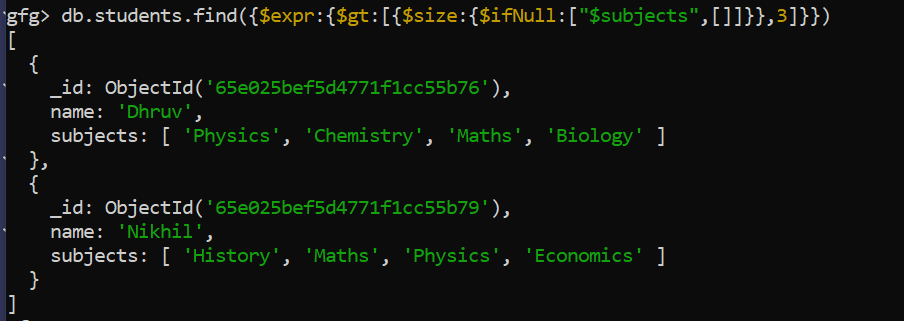
db.students.find({$expr:{$gt:[{$size:{$ifNull:["$subjects",[]]}},3]}})
Output:
The $where operator allows us to execute JavaScript expressions for querying documents. This operator can be useful when we need to perform complex queries that cannot be expressed using the standard query language.
Syntax:
db.collection.find({ $where: function() {
 // JavaScript expression or function
 return expression;
}})
Explanation:
db.collection.find(): This is the method used to query documents in a collection.{ $where: function() { ... } }: This is the query object where the $where operator is used to specify a JavaScript function or expression.function() { ... }: This is the JavaScript function or expression that is executed for each document in the collection. It can contain any valid JavaScript code.return expression;: This is the return statement within the JavaScript function that evaluates the expression. If the expression evaluates to true, the document is included in the query result.Example:
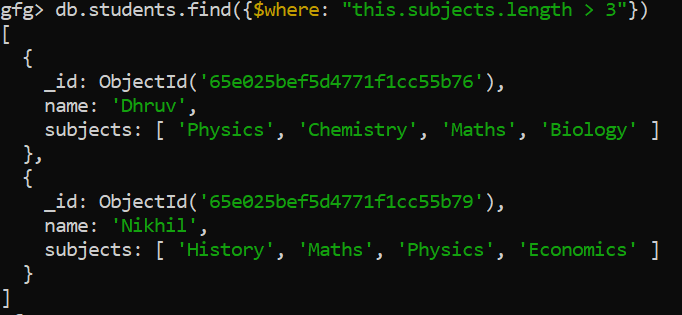
db.students.find({$where: "this.subjects.length > 3"})
Output:
The aggregation pipeline in MongoDB allows us to process data from a collection and perform various operations, such as filtering, grouping, sorting, and transforming documents. It consists of a series of stages, where each stage performs a specific operation on the data.
Syntax:
db.collection.aggregate([
 { $stage1: { <stage1-operator>: <expression> } },
 { $stage2: { <stage2-operator>: <expression> } },
 // Add more stages as needed
])
Example:
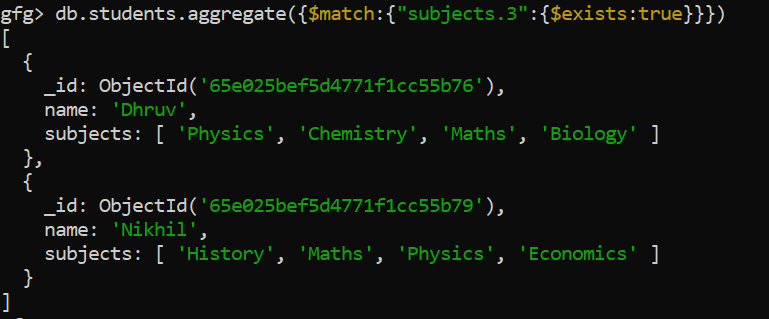
db.students.aggregate({$match:{"subjects.3":{$exists:true}}})
Output:
Explanation: The above query searched for all the documents whose "subjects" field has size greater than "3".
db.students.find({
 $expr: { $gt: [{ $size: "$subjects" }, 1] }
})
Output:
[
 {
 "_id": ObjectId("65e025bef5d4771f1cc55b76"),
 "name": "Dhruv",
 "subjects": ["Physics", "Chemistry", "Maths", "Biology"]
 },
 {
 "_id": ObjectId("65e025bef5d4771f1cc55b77"),
 "name": "Achyut",
 "subjects": ["Physics", "Chemistry", "Maths"]
 },
 {
 "_id": ObjectId("65e025bef5d4771f1cc55b79"),
 "name": "Nikhil",
 "subjects": ["History", "Maths", "Physics", "Economics"]
 }
]
These documents have subjects arrays with more than one element, meeting the query criteria.
Overall, Querying MongoDB documents based on array size is a common requirement. with the help of $expr and $gt operators, the $where operator, or the aggregation pipeline, you can efficiently find documents with arrays larger than one element. Each approach has its strengths and use cases, providing flexibility in querying MongoDB data.