|
VOOZH | about |
|
VOOZH | about |
Have you ever imagined taking a photo of yourself, comparing it against a database full of celebrities, and instantly finding out who you look most alike?
Or maybe uploading any image, an object, a place, a product, and getting back the items in your database that look the most similar?
This is the idea behind image similarity search, and it’s becoming increasingly common in modern applications. The best part: You don’t need a complex architecture to build it. MongoDB Atlas already gives you everything you need.
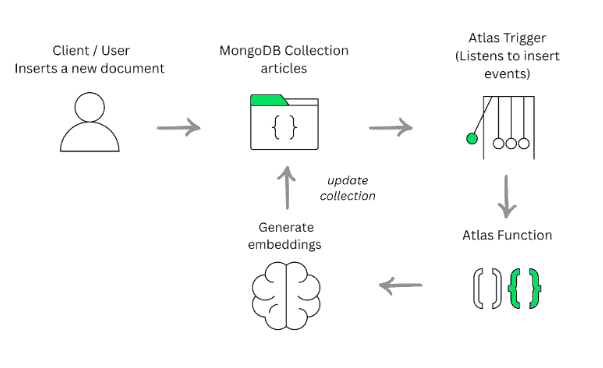
In this article, we’ll walk through this solution in two simple stages:
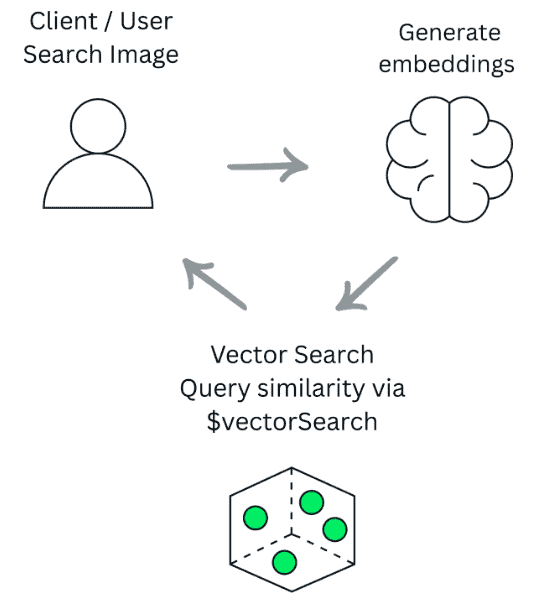
Once your documents have embeddings, the similarity search workflow happens in three simple steps:
By the end, you’ll have a database that can understand images—and return the ones that look the most similar to any photo you send.
To follow this tutorial, you only need:
To keep the example simple and realistic, we’ll work with a collection of articles. Each article contains basic metadata, a title, tags, authors, and a URL, along with a cover image.
{
 "title": "Getting Started With Hibernate ORM and MongoDB",
 "tags": ["Java", "ORM"],
 "publishedAt": "11-04-2025",
 "authors": ["Ricardo Mello"],
 "url": "https://foojay.io/today/getting-started-with-hibernate-orm-and-mongodb/",
 "views": 1065,
 "cover": "https://www.freelancinggig.com/blog/wp-content/uploads/2018/03/Hibernate-ORM.jpg"
}
This cover image is what we’ll use later to perform image similarity search, allowing us to find articles whose images look similar to a query image.
Once this document is inserted, we’ll set up an Atlas Trigger so that every new article automatically gets an image embedding.
Atlas Triggers let you automatically run server-side logic whenever a change occurs in your MongoDB Atlas data. They listen to real-time insert, update, replace, and delete events through MongoDB change streams and react instantly by executing custom logic that you define.
Because Triggers run on a fully managed, serverless compute layer, they’re ideal for event-driven workflows such as enriching documents, synchronizing data, or calling external APIs.
In our case, we use a Trigger that fires on every insert and invokes an Atlas Function to generate the image embedding. In MongoDB Atlas, open your project and go to:
Project → Streaming Data → Triggers
Configure it as follows:
Click Save to create the Trigger.
Atlas Functions let you run custom JavaScript in a fully managed, serverless environment. You don’t need to deploy or maintain any servers, you just write the code, and MongoDB Atlas takes care of executing it whenever it’s called.
They’re ideal for lightweight tasks like transforming documents, validating data, moving information between collections, or calling external APIs. For example, you might send an email notification, update related records, or, in our case, call Voyage AI to generate an image embedding.
After creating the Trigger, the next step is to attach the Function that will run whenever the event occurs.
Inside the Trigger configuration screen:
From this point on, every time a new document is inserted into the target collection, MongoDB Atlas will automatically call your Function and run the code you defined.
Before the Function can call Voyage AI to generate embeddings, we need to store the API key securely inside MongoDB Atlas. We do this using Secrets and Values in App Services.
Follow these steps:
Once this is done, your Function can safely access the key using:
const key = context.values.get("Value-0");
This keeps your API key protected and out of the application code.
Now that each document contains an embedding, we need to create a vector search index so MongoDB can efficiently compare those vectors.
To create the index:
{
 "fields": [
 {
 "numDimensions": 1024,
 "path": "embedding",
 "similarity": "dotProduct",
 "type": "vector"
 }
 ]
}
6. Click Next, then Create Index.
Once this index is created, your collection is ready to perform fast and accurate image similarity queries using $vectorSearch.
With the Trigger, Function, and vector search index in place, everything is ready. Let’s confirm that the pipeline works as expected by inserting a new document into the articles collection.
Run the following insert in your Atlas Cluster:
The moment this document is inserted, your database Trigger fires and executes the Function you configured.
After a few seconds, check the document again and you should see:
"embedding": [0.018554688,… ]
Now, we’re ready to run similarity search.
To search for similar images, you first need an embedding for the query image, the one the user wants to compare against your dataset. In a real application, this embedding is usually generated by the application itself.
For this example, we’ll generate it manually using a simple curl command:
MongoDB will compute similarity using the vector index and return the closest matches in the articles collection, effectively giving you image similarity search inside your database.
At the end of the day, the most important takeaway is the core idea behind this entire workflow: image similarity search. Whether you build it with Java, Node.js, Python, or any other language, the concept remains the same: Generate embeddings, store them, and compare vectors to find what looks alike.
In this walkthrough, we intentionally used native Atlas features like Triggers, Functions, and Vector Search to show that you don’t always need a full backend to experiment with AI-driven
For more information about MongoDB and everything it can do, check out the official documentation.