|
VOOZH | about |
|
VOOZH | about |
MongoDB is a popular NoSQL database that offers flexibility and scalability, making it an excellent choice for modern applications. Mongoose, a powerful ODM (Object Data Modeling) library, simplifies the interaction between MongoDB and Node.js by providing a schema-based solution for data validation, querying, and model creation. Mongoose streamlines database operations by providing a robust API to interact with MongoDB.
In this article, we will explore how to integrate MongoDB with Mongoose into a Node.js application step by step, providing us with the tools to efficiently manage and interact with our data.
Mongoose is an Object Data Modeling (ODM) library for MongoDB and Node.js. It provides a straightforward schema-based solution to model our application data. With Mongoose, we can define schemas for our data models, perform validation, create queries, and interact with MongoDB using a more expressive and user-friendly API compared to raw MongoDB commands.
Follow these steps to create a simple Node.js app that integrates MongoDB and Mongoose.
Ensure that we have Node.js installed on our machine. If not, download and install it from nodejs.org. Create a new directory for our project and initialize it:
mkdir my-node-app
cd my-node-app
npm init -y
Install Mongoose and Express. Mongoose helps manage MongoDB interactions in a more structured way, while Express is used for setting up the server:
npm install mongoose expressCreate a server.js file and set up a basic Express server. To establish a connection to our MongoDB database using Mongoose:
const express = require('express');
const app = express();
const mongoose = require('mongoose');
const dotenv = require('dotenv');
dotenv.config();
mongoose.connect(process.env.MONGO_URL)
.then((result) => {
 console.log('connected to Mongodb');
}).catch((err) => {
 console.error(err);
});
app.listen(8800,()=>{
 console.log("backend server is running!!!");
})
The connection to MongoDB is handled using Mongoose. Make sure to store the MongoDB URI in a .env file for security and convenience.
MONGO_URL=mongodb://localhost:27017/mydatabaseIn the code above, the mongoose.connect() method connects your application to MongoDB using the connection string stored in your environment variable MONGO_URL
Once connected, we need to define a schema for your data. For example, let's create a schema for a Book model.
const mongoose = require('mongoose');
const bookSchema = new mongoose.Schema({
 title: String,
 author: String,
 year: Number
});

const Book = mongoose.model('Book', bookSchema);
module.exports = Book;
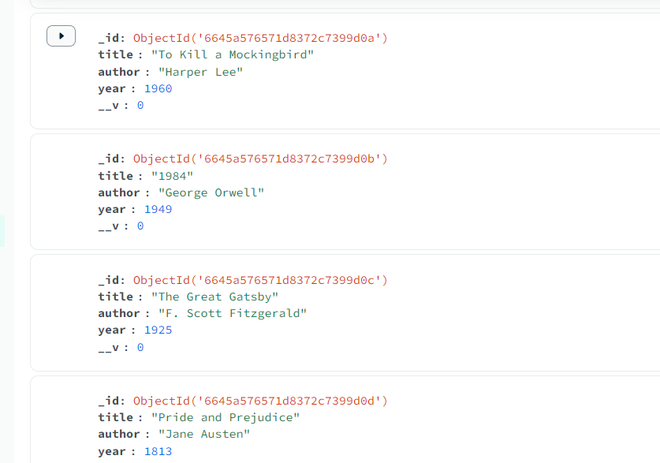
Now that we have your model defined, we can start adding documents to our MongoDB database.
const mongoose = require('mongoose');
const Book = require('./models/book'); // Path to the Book model

// Connect to MongoDB
mongoose.connect('mongodb+srv://Abdullah:Abdullah123@cluster0.ihx3lfc.mongodb.net/node?retryWrites=true&w=majority');

// Insert books into the database
const books = [
 { title: "The Catcher in the Rye", author: "J.D. Salinger", year: 1951 },
 { title: "To Kill a Mockingbird", author: "Harper Lee", year: 1960 },
 { title: "1984", author: "George Orwell", year: 1949 },
 { title: "The Great Gatsby", author: "F. Scott Fitzgerald", year: 1925 },
 { title: "Pride and Prejudice", author: "Jane Austen", year: 1813 }
];

// Insert multiple documents (books) into the collection
Book.insertMany(books)
 .then(() => {
 console.log('Books inserted successfully');
 mongoose.connection.close(); // Close the connection after insertion
 })
 .catch((err) => {
 console.error('Error inserting books:', err);
 mongoose.connection.close(); // Close the connection on error
 });
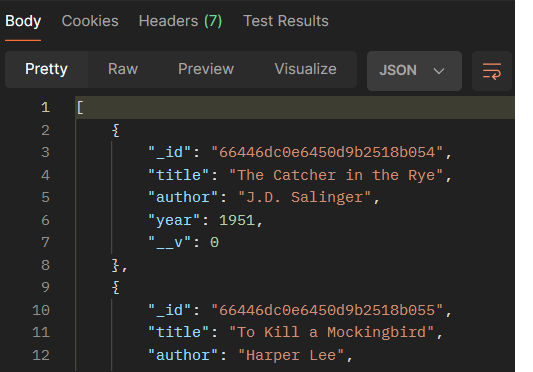
To interact with the data in MongoDB, we can create API routes using Express. For instance, to fetch all books from the database, create a simple GET route: Let's create an endpoint to retrieve users from our database and test it using Postman.
app.get('/books', async (req, res) => {
 try {
 // Fetch all books from the database
 const books = await Book.find();
 res.json(books); // Respond with the list of books as JSON
 } catch (err) {
 console.error('Error fetching books:', err);
 res.status(500).json({ message: 'Internal Server Error' });
 }
});
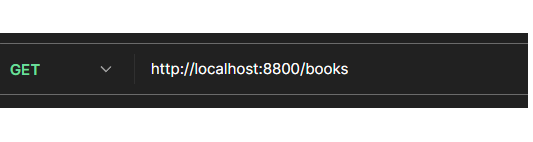
Start your server (node server.js). Open Postman and make a GET request to http://localhost:8800/books.
We should receive a JSON response with the users stored in our MongoDB database.
This URL corresponds to the route we defined in our Express application to fetch all books (/books).
Below is an example to Use MongoDB and Mongoose with Node.js. The code establishes a MongoDB connection using Mongoose, inserts multiple book records, and sets up an API endpoint to fetch all books from the database.
Query:
const express = require('express');
const mongoose = require('mongoose');
const Book = require('./models/book.js');

// Create Express app
const app = express();

// Middleware to parse JSON bodies
app.use(express.json());

// Connect to MongoDB
mongoose.connect('mongodb://localhost:27017/mydatabase')
 .then(() => {
 console.log('Connected to MongoDB');
 })
 .catch((err) => {
 console.error('Error connecting to MongoDB:', err);
 });

// Insert books into the database
const books = [
 {
 title: "The Catcher in the Rye",
 author: "J.D. Salinger",
 year: 1951
 },
 {
 title: "To Kill a Mockingbird",
 author: "Harper Lee",
 year: 1960
 },
 {
 title: "1984",
 author: "George Orwell",
 year: 1949
 },
 {
 title: "The Great Gatsby",
 author: "F. Scott Fitzgerald",
 year: 1925
 },
 {
 title: "Pride and Prejudice",
 author: "Jane Austen",
 year: 1813
 }
];

// Insert multiple documents (books) into the collection
Book.insertMany(books)
 .then(() => {
 console.log('Books inserted successfully');
 })
 .catch((err) => {
 console.error('Error inserting books:', err);
 });

// Route to fetch all books
app.get('/books', async (req, res) => {
 try {
 // Fetch all books from the database
 const books = await Book.find();
 res.json(books); // Respond with the list of books as JSON
 } catch (err) {
 console.error('Error fetching books:', err);
 res.status(500).json({ message: 'Internal Server Error' });
 }
});

// Start the server
const PORT = process.env.PORT || 3000;
app.listen(PORT, () => {
 console.log(`Server is running on port ${PORT}`);
});
Output
Explanation:
/books route is accessed, the API will return a JSON array of all the books in the database, showcasing their title, author, and year fields. If there’s an issue with the query or the database connection, an error message will be logged in the console.In this article, we've covered the basics of integrating MongoDB and Mongoose with Node.js. We learned how to establish a connection to MongoDB using Mongoose, define schemas and models, add data to the database, and create endpoints to interact with our data using Express and Postman. This setup forms a solid foundation for building robust and scalable Node.js applications backed by MongoDB. Explore further by implementing more complex schemas, relationships between models, and advanced queries with Mongoose.