|
VOOZH | about |
|
VOOZH | about |
The lookup() method in Mongoose’s Aggregate API is a powerful tool that allows you to perform left join operations between collections in the same MongoDB database. It enables you to combine documents from different collections based on matching fields. This method is an essential part of data aggregation and helps you retrieve data more efficiently from multiple collections.
In this article, we'll explain how the lookup() method works, its syntax, and provide real-world examples to help you master it for your applications.
lookup() Method?The lookup() method in Mongoose is used to perform left joins in MongoDB. When we need to join two collections in the same database based on a matching field, lookup() is the go-to method. It accepts an object that specifies the details of the join operation, such as:
This method then returns an aggregated result in the form of an array.
Syntax:
aggregate.lookup({
from: <collectionName>,
localField: <fieldToMatch>,
foreignField: <fieldToMatchWith>,
as: <resultingField>
});
lookup() Examplelookup()Let’s explore how you can use lookup() with real-world examples. We’ll assume you have two collections: students and marks. We want to aggregate student data along with their corresponding marks.
Step 1: Create a Node.js application using the following command:
npm initStep 2: After creating the NodeJS application, Install the required module using the following command:
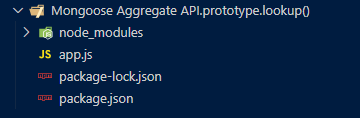
npm install mongooseProject Structure: The project structure will look like this:
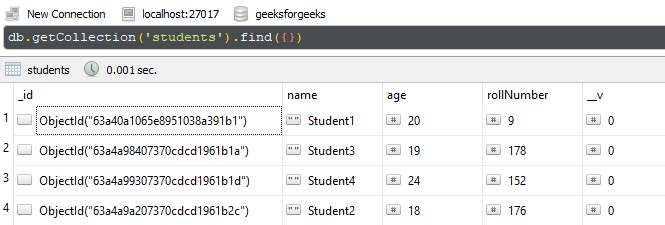
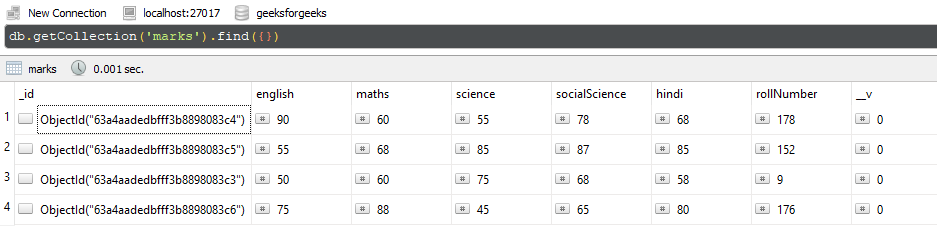
Database Structure: The database structure will look like this, the following documents are present in the collection.
lookup()In this example, we have established a database connection using mongoose and defined the model over studentSchema and marksSchema. In the end, we call the loopup() method by passing various property values in the object form. We are getting the expected result in the form of an array. To get a better picture we are extracting the first object from the result array.
Filename: app.js
Step to run the program: To run the application execute the below command from the root directory of the project:
node app.jsOutput:
result - {
 _id: new ObjectId("63a40a1065e8951038a391b1"),
 name: 'Student1',
 age: 20,
 rollNumber: 9,
 __v: 0,
 student_marks: [
 {
 _id: new ObjectId("63a4aadedbfff3b8898083c3"),
 english: 50,
 maths: 60,
 science: 75,
 socialScience: 68,
 hindi: 58,
 rollNumber: 9,
 __v: 0
 }
 ]
}
lookup()In this example, we have established a database connection using mongoose and defined the model over studentSchema and marksSchema. In the end, we are using the aggregation pipeline and configuring $lookup object. We are getting the expected result in the form of an array. In the end, we are iterating the array using forEach method and displaying the name of the student and the marks of the student.
Filename: app.js
Step to run the program: To run the application execute the below command from the root directory of the project:
node app.jsOutput:
Student1
[
 {
 _id: new ObjectId("63a4aadedbfff3b8898083c3"),
 english: 50,
 maths: 60,
 science: 75,
 socialScience: 68,
 hindi: 58,
 rollNumber: 9,
 __v: 0
 }
]
Student3
[
 {
 _id: new ObjectId("63a4aadedbfff3b8898083c4"),
 english: 90,
 maths: 60,
 science: 55,
 socialScience: 78,
 hindi: 68,
 rollNumber: 178,
 __v: 0
 }
]
Student4
[
 {
 _id: new ObjectId("63a4aadedbfff3b8898083c5"),
 english: 55,
 maths: 68,
 science: 85,
 socialScience: 87,
 hindi: 85,
 rollNumber: 152,
 __v: 0
 }
]
Student2
[
 {
 _id: new ObjectId("63a4aadedbfff3b8898083c6"),
 english: 75,
 maths: 88,
 science: 45,
 socialScience: 65,
 hindi: 80,
 rollNumber: 176,
 __v: 0
 }
]
Explanation: In this example, each student's details are combined with their marks using the lookup() method, and the result is iterated to display the output.
The Mongoose lookup() method is an incredibly powerful tool for performing left joins between collections in MongoDB. It helps aggregate data efficiently and is essential for situations where you need to combine related data from multiple collections. By understanding the syntax and leveraging examples like the ones above, you can enhance your aggregation operations in Mongoose to retrieve and manipulate data effectively.