|
VOOZH | about |
|
VOOZH | about |
Mongoose is a strong ODM (Object Data Modeling) library for MongoDB and Node.js that streamlines working with MongoDB by using schema-based solutions to model and interact with data. Another important feature of Mongoose is that it creates indexes automatically when a model is defined using mongoose.model().
However, sometimes we might need to manually trigger index building for specific models, and that’s where the Model.init() method comes in. In this post, we will be discussing the Model.init() method, its usage, syntax, and examples in order to make sure that you are able to build and maintain indexes on your Mongoose models successfully.
Model.init() Method?The Model.init() method in Mongoose is used to initialize a model and build indexes defined in the schema. While Mongoose automatically builds indexes when the model is created, there may be situations where we want to manually trigger index building. This can be particularly useful when you want to control the timing of index creation or when you need to explicitly check for the status of index building.
Syntax:
Model_Name.init(callback);
Parameters: The Model.init() method accepts one parameters:
Return Value:
init() method returns a Promise, which resolves when the index creation process completes. If an error occurs during the process, the promise is rejected.Before we dive into examples, let's first set up the required Node.js application and install Mongoose.
To start a new Node.js project, navigate to your desired folder and initialize the project:
npm initAfter creating the NodeJS application, Install the required module using the following command:
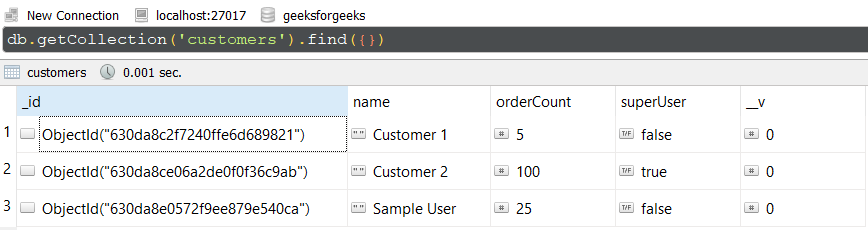
npm install mongooseDatabase Structure: The database structure will look like this, the following documents are present in the collection.
Model.init()In this example, We have established a database connection using mongoose and defined model over userSchema, having two columns or fields “name” and “age”. In the end, we are using the init() method on the User model which will build the indexes for the model.
app.js: Write down the below code in the app.js file:
// Require mongoose module
const mongoose = require('mongoose');

// Set Up the Database connection
mongoose.connect(
 'mongodb://localhost:27017/geeksforgeeks', {
 useNewUrlParser: true,
 useUnifiedTopology: true
})

const userSchema = new mongoose.Schema(
 { name: String, age: Number }
)

// Defining userSchema model
const User = mongoose.model('User', userSchema);

User.init().then(function(Event){
 console.log('Indexes Builded')
})
Steps to run the program: To run the application execute the below command from the root directory of the project:
node app.jsOutput:
Indexes BuildedGUI Representation of the Database using Robo3T GUI tool:
Explanation:
In this example, we define a simple User schema with name and age fields. We then trigger the index building process using User.init(), and the indexes for this model are created. The promise resolves, and we log a success message to the console.
init()In this example, we have established a database connection using mongoose and defined model over studentSchema, having three columns or fields “name”, “school”, and “class”. In this example, we are trying to build the indexes for the student model and listing them in the callback function.
app.js: Write down the below code in the app.js file:
// Require mongoose module
const mongoose = require("mongoose");

// Set Up the Database connection
mongoose.connect("mongodb://localhost:27017/geeksforgeeks", {
 useNewUrlParser: true,
 useUnifiedTopology: true,
});

const studentSchema = new mongoose.Schema({
 name: String,
 school: String,
 class: Number,
});

// Defining studentSchema model
const Student = mongoose.model("Student", studentSchema);

Student.init().then(function(Event){
 console.log("Indexes Built successfully")
 console.log(Student.listIndexes())
})
Steps to run the program: To run the application execute the below command from the root directory of the project:
node app.jsOutput:
Indexes Built successfully
Promise { <pending> }
GUI Representation of the Database using Robo3T GUI tool:
Explanation:
In this example, after initializing the indexes for the Student model using Student.init(), we list all indexes associated with the Student model using listIndexes(). This allows you to verify which indexes have been built and ensure that your database is properly optimized.
Model.init()The Model.init() method is particularly useful in the following scenarios:
The Mongoose Model.init() method is an essential tool for controlling index creation in MongoDB. By learning how to utilize init(), you can make your Mongoose models indexed effectively and optimize the performance of your database queries. Whether developing a small app or a massive project, handling indexes is important for optimal database efficiency. The init() function enables fine-grained control of index creation, facilitating easier management of your database schema and query performance.