|
VOOZH | about |
|
VOOZH | about |
The Mongoose Document API Model.prototype.$where() method of the Mongoose API is used on the Document model. It allows putting the where condition in the MongoDB query. Using this method we can form MongoDB query having JavaScript expression. We can use this method directly on the MongoDB model as well. Let us understand the $where() method using an example.
Syntax:
Model.$where(<argument>);
Parameters: This method accepts a single parameter as discussed below:
Return Value: This method returns a query object on which we can call the callback function.
Setting up Node.js application:
Step 1: Create a Node.js application using the following command:
npm init
Step 2: After creating the NodeJS application, Install the required module using the following command:
npm install mongoose
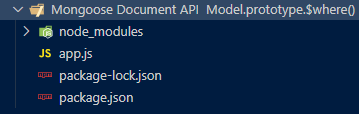
Project Structure: The project structure will look like this:
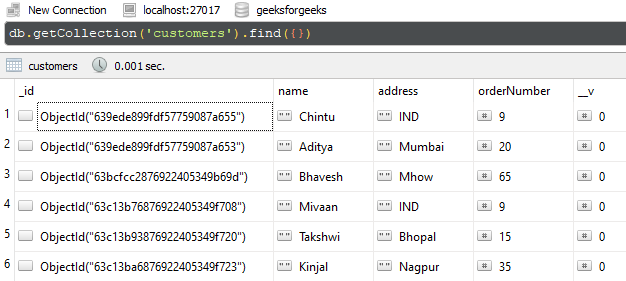
Database Structure: The database structure will look like this, the following documents are present in the collection.
Example 1: In this example, we are illustrating the functionality of $where() method. We are accessing the $where() method directly on the Customermodel and fetching the document where the name field's value is Aditya.
Filename: app.js
Step to run the program: To run the application execute the below command from the root directory of the project:
node app.js
Output:
[
 {
 _id: new ObjectId("639ede899fdf57759087a653"),
 name: 'Aditya',
 address: 'Mumbai',
 orderNumber: 20,
 __v: 0
 }
]
Example 2: In this example, we are illustrating the functionality of $where() method. We are accessing the$where() form on the result set, and fetching the documents where the value of the orderNumber field is 9.
Filename: app.js
Step to run the program: To run the application execute the below command from the root directory of the project:
node app.js
Output:
[
 {
 _id: new ObjectId("639ede899fdf57759087a655"),
 name: 'Chintu',
 address: 'IND',
 orderNumber: 9,
 __v: 0
 },
 {
 _id: new ObjectId("63c13b76876922405349f708"),
 name: 'Mivaan',
 address: 'IND',
 orderNumber: 9,
 __v: 0
 }
]
Reference: https://mongoosejs.com/docs/api/model.html#model_Model-$where