|
VOOZH | about |
|
VOOZH | about |
The Mongoose Document API Model.updateMany() method of the Mongoose API is used on the Document model. It allows updating more than one document in one go. Using this method we can update multiple documents that match the filter condition in one execution. Let us understand the updateMany() method using an example.
Syntax:
Model.updateMany(filter, update, options, callback);
Parameters: This method accepts four parameters as discussed below:
Return Value: It returns the query object. on which we can call the callback function and handle the promise.
Setting up Node.js application:
Step 1: Create a Node.js application using the following command
npm init
Step 2: After creating the NodeJS application, Install the required module using the following command
npm install mongoose
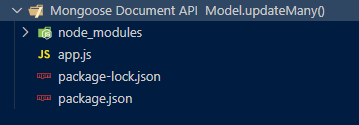
Project Structure: The project structure will look like this:
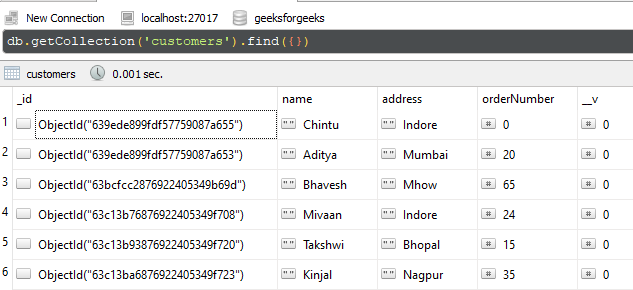
Database Structure: The database structure will look like this, the following documents are present in the collection.
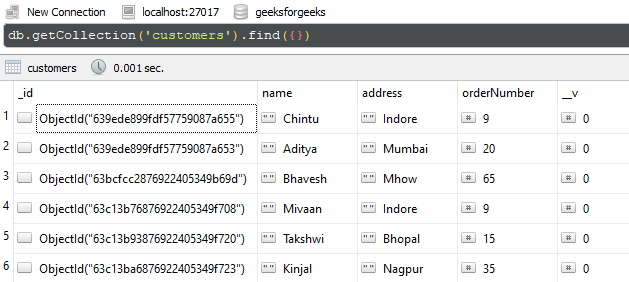
Example 1: In this example, we are illustrating the functionality of updatemany() method. We are filtering the documents using the address field, and we are updating the order number field. In the end, we are handing the returned promise using then and catch block.
Filename: app.js
Step to run the program: To run the application execute the below command from the root directory of the project
node app.js
Output:
{
 acknowledged: true,
 modifiedCount: 2,
 upsertedId: null,
 upsertedCount: 0,
 matchedCount: 2
}
GUI Representation of the Database using Robo3T GUI tool:
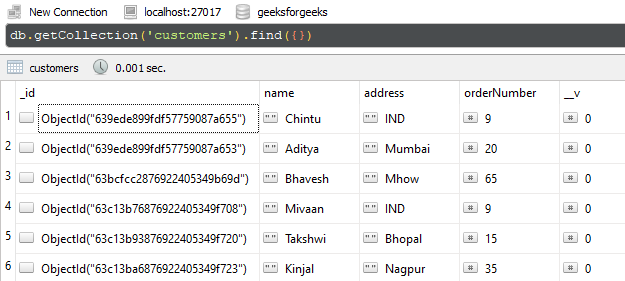
Example 2: In this example, we are illustrating the functionality of updatemany() method. We are filtering the documents using orderNumber field, and we are updating the address field. In the end, we are handing the returned promise by providing the callback function as a third argument to the updateMany()method.
Filename: app.js
Step to run the program: To run the application execute the below command from the root directory of the project:
node app.js
Output:
{
 acknowledged: true,
 modifiedCount: 0,
 upsertedId: null,
 upsertedCount: 0,
 matchedCount: 2
}
GUI Representation of the Database using Robo3T GUI tool:
Reference: https://mongoosejs.com/docs/api/model.html#model_Model-updateMany