|
VOOZH | about |
|
VOOZH | about |
The findById() method in Mongoose is one of the most commonly used methods for retrieving a document by its unique identifier (_id) in a MongoDB collection. This article will cover everything we need to know about how to use the findById() method, including syntax, examples, installation, and troubleshooting.
In Mongoose, findById() is a method used to retrieve a single document by its _id field. This is the primary method to query documents using the unique identifier, typically the _id field, which is automatically generated by MongoDB for each document. This method allows for a simplified querying process, making it easy to retrieve a document based on its _id, ensuring a more efficient and streamlined data retrieval process in our Node.js applications.
Model.findById(id,[projection],[options])
Parameters:
The findById() method is very straightforward and can be used to retrieve a document by its _id. Here's how you can use it in your Node.js application.
In this example, we connect to a mongoDB database and retrieves a document by its id with the help of findById() method:
// Filename - index.js

const mongoose = require('mongoose');

// Database connection
mongoose.connect('mongodb://127.0.0.1:27017/geeksforgeeks', {
 useNewUrlParser: true,
 useCreateIndex: true,
 useUnifiedTopology: true
});

// User model
const User = mongoose.model('User', {
 name: { type: String },
 age: { type: Number }
});

// Finding a document whose id=5ebadc45a99bde77b2efb20e
let id = '5ebadc45a99bde77b2efb20e';
User.findById(id, function (err, docs) {
 if (err){
 console.log(err);
 }
 else{
 console.log("Result : ", docs);
 }
});
name and age fields.findById() to retrieve the document by its _id ('5ebadc45a99bde77b2efb20e').Before using findById() or any other Mongoose method, ensure that Mongoose is installed in your Node.js project.
You can install the Mongoose package in your project directory by running the following command:
npm install mongooseAfter installing the mongoose module, you can check your mongoose version in command prompt using the command.
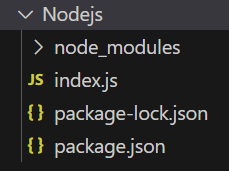
npm version mongooseProject Structure:
👁 NodeProjAfter installation, your package.json file will contain an updated dependencies section like this:
"dependencies": {
 "mongoose": "^7.6.5",
}
After that, we can just create a folder and add a file for example index.js, To run this file we need to run the following command.
node index.jsBelow is the sample data in the database before the function is executed, You can use any GUI tool or terminal to see the database, like we have used Robo3T GUI tool as shown below: 👁 Database
Console Output: So this is how we can use the mongoose findById() function to find a single document by its _id field.
The findById() method is commonly used in scenarios where you need to fetch a single document by its unique identifier. Some of the typical use cases include:
The findById() method can be used with callbacks or promises. When using Promises, we can handle success and failure scenarios more easily with then() and catch() or async/await.
User.findById(id)
 .then(user => {
 console.log('User found:', user);
 })
 .catch(err => {
 console.error('Error:', err);
 });
const getUser = async (id) => {
 try {
 const user = await User.findById(id);
 console.log('User found:', user);
 } catch (err) {
 console.error('Error:', err);
 }
};

getUser('5ebadc45a99bde77b2efb20e');
The findById() method in Mongoose is a simple yet powerful function to retrieve a document based on its _id field. It offers a clean and efficient way to query MongoDB by utilizing the unique identifiers that MongoDB automatically generates. With support for Promises and async/await, you can integrate this method into modern JavaScript applications seamlessly. Whether you’re building user authentication systems or fetching items in an API, findById() is an essential tool for handling data retrieval in Mongoose.