|
VOOZH | about |
|
VOOZH | about |
The mongoose.model() function is a core method in the Mongoose library, used for interacting with MongoDB in a Node.js environment. It helps in creating a MongoDB collection associated with a schema, defining the structure of documents that will be stored within it. This article will explain mongoose.model() function, its syntax, parameters, and provide practical examples to help us understand how to use it effectively in our applications.
mongoose.model() Function?The mongoose.model() function is used to create models in Mongoose, which act as the interface to MongoDB collections. A model is a constructor function that allows us to create, query, update, and delete documents within a specific MongoDB collection.
When creating a model, Mongoose automatically uses the singular, capitalized form of the model name, pluralizes it, and associates it with a MongoDB collection. For instance, creating a model called User will result in the collection being named users in MongoDB.
Syntax:
mongoose.model(<ModelName>, <Schema>)
Parameters:
User will correspond to the users collection).mongoose.Schema() function, where you specify the fields and their types.Return type:
mongoose.model() function returns a model object, which is used to interact with the MongoDB collection.mongoose.model()?Creating a model involves two steps:
mongoose.model() function to create a model from the schema.// Importing mongoose module
const mongoose = require("mongoose")
// Database Address
const url = "mongodb://localhost:27017/GFG"
// Connecting to database
mongoose.connect(url).then((ans) => {
console.log("ConnectedSuccessful")
}).catch((err) => {
console.log("Error in the Connection")
})
// Calling Schema class
const Schema = mongoose.Schema;
// Creating Structure of the collection
const collection_structure = new Schema({
name: {
type: String,
require: true
}
,
marks: {
type: Number,
default: 0
}
})
// Creating collection
const collections = mongoose.model("GFG", collection_structure)
// Inserting one document
collections.create({
name: "aayush",
marks: 10
}).then((ans) => {
console.log("Document inserted")
}).catch((err) => {
console.log(err.Message);
})
1. Installing Module: Install the mongoose module using the following command:
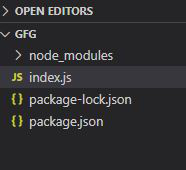
npm install mongooseProject Structure: Our project structure will look like this:
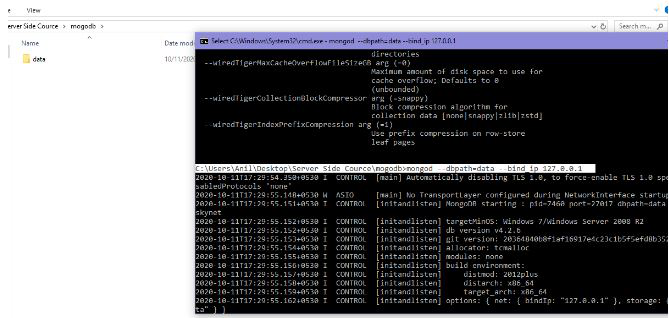
👁 Image2. Running the server on Local IP: Data is the directory where MongoDB server is present.
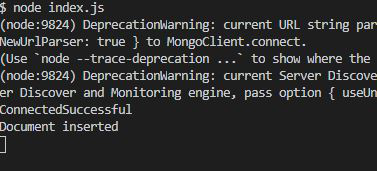
mongod --dbpath=data --bind_ip 127.0.0.1👁 Imagenode index.jsOutput:
👁 ImageMongoDB Database: Our database after executing the above command will look like this:
👁 ImageWhen you run the application, the following happens:
mongoose.connect() method connects your Node.js application to the MongoDB database. If successful, you'll see the message "Connected to MongoDB successfully."name and marks), and the model is created using mongoose.model().{name: "Aayush", marks: 10} is inserted into the gfgs collection. If successful, the message "Document inserted successfully." will appear.After executing the code, the MongoDB database (GFG) will contain a collection named gfgs with a document similar to the following:
{
 "_id": ObjectId("1234567890abcdef12345678"),
 "name": "Aayush",
 "marks": 10
}
The mongoose.model() function is crucial for interacting with MongoDB in Node.js applications. It creates a model based on a schema, allowing us to manage documents efficiently while ensuring data integrity. With its simple syntax and powerful features, mongoose.model() is an essential tool in any MongoDB-powered Node.js project. By following the examples and tips provided in this article, we can efficiently use the mongoose.model() function to create models and manage your MongoDB collections in Node.js.