|
VOOZH | about |
|
VOOZH | about |
The Mongoose Query API.prototype.$where() method of the Mongoose API is used on the Query objects. It allows us to put the where condition in the form of JavaScript object or a function in order to pass the expression to the mongodb system. Let us understand the $where() method using an example.
Syntax:
query.$where( js );
Parameters: This method accepts a single parameter as described below:
Return Value: This method returns query object.
Setting up Node.js Mongoose Module:
Step 1: Create a Node.js application using the following command:
npm init
Step 2: After creating the NodeJS application, Install the required module using the following command:
npm install mongoose
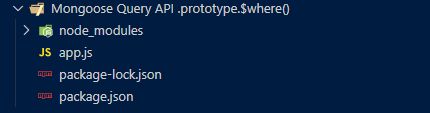
Project Structure: The project structure will look like this:
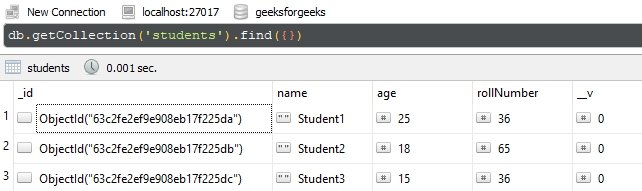
Database Structure: The database structure will look like this, the following database present in the MongoDB.
Example 1: The below example illustrates the basic functionality of the Mongoose Connection $where() method. We are fetching the document from collection where name is equal to "Student1".
Filename: app.js
Step to run the program: To run the application execute the below command from the root directory of the project:
node app.js
Output:
[
 {
 _id: new ObjectId("63c2fe2ef9e908eb17f225da"),
 name: 'Student1',
 age: 25,
 rollNumber: 36,
 __v: 0
 }
]
Example 2: The below example illustrates the basic functionality of the Mongoose Connection $where() method. We are fetching the documents from the collection where age is greater than and equal to 18.
Filename: app.js
Step to run the program: To run the application execute the below command from the root directory of the project:
node app.js
Output:
Result - [
 {
 _id: new ObjectId("63c2fe2ef9e908eb17f225da"),
 name: 'Student1',
 age: 25,
 rollNumber: 36,
 __v: 0
 },
 {
 _id: new ObjectId("63c2fe2ef9e908eb17f225db"),
 name: 'Student2',
 age: 18,
 rollNumber: 65,
 __v: 0
 }
]
Reference: https://mongoosejs.com/docs/api/query.html#query_Query-$where