|
VOOZH | about |
|
VOOZH | about |
The Connection.prototype.dropDatabase() method of the Mongoose API is used on the Connection object. It allows us to delete particular database from MongoDB. Along with the database it will delete collection, documents, and index related data as well. Let us understand dropDatabase() method using an example.
Syntax:
connection.dropDatabase( <callback_function> );
Parameters: This method accepts a single parameter as described below:
Return Value: If the callback function is not provided this method returns a promise.
Setting up Node.js Mongoose Module:
Step 1: Create a Node.js application using the following command:
npm init
Step 2: After creating the NodeJS application, Install the required module using the following command:
npm install mongoose
Project Structure: The project structure will look like this:
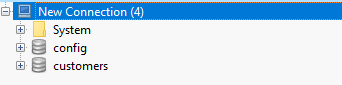
Database Structure: The database structure will look like this, the following database present in the MongoDB.
Example 1: The below example illustrates the basic functionality of the Mongoose Connection dropDatabase() method, using callback function.
Filename: app.js
Step to run the program: To run the application execute the below command from the root directory of the project:
node app.js
Output:
true
GUI Representation of the Database using Robo3T GUI tool:
Example 2: The below example illustrates the basic functionality of the Mongoose Connection dropDatabase() method, using asynchronous function.
Database Structure: The database structure will look like this, the following database present in the MongoDB.
Filename: app.js
Step to run the program: To run the application execute the below command from the root directory of the project:
node app.js
Output:
true
GUI Representation of the Database using Robo3T GUI tool:
Reference: https://mongoosejs.com/docs/api/connection.html#connection_Connection-dropDatabase