|
VOOZH | about |
|
VOOZH | about |
Mongoose is a powerful Object Data Modeling (ODM) library for MongoDB in a Node.js environment. It provides a straightforward way to interact with MongoDB, including features like schema definition, model creation, and database query handling. One key feature of Mongoose is its ability to create and manage indexes automatically, improving query performance.
In Mongoose, a Schema defines the structure of the documents within a MongoDB collection. It includes details about the fields, their data types, validation, and other configurations like default values, indexes, and references to other collections. Schemas are the foundation of Mongoose models, which are used to interact with the database. Schemas help in maintaining consistency across your documents and enable more structured and organized data storage in MongoDB.
Indexes in Mongoose are used to speed up the retrieval of documents by creating a structured data map for quicker searches. Mongoose automatically creates an index for the _id field (which is included in every MongoDB document). Additionally, we can define custom indexes in Mongoose schemas to improve query performance on frequently queried fields.
Mongoose automatically creates an index for the _id field when a new document is created. Let’s explore how this works in practice.
Step 1: Setup Node.js Application using the following command:
mkdir folder_name
cd folder_name
npm init -y
Step 2: Install the required module using the following command:
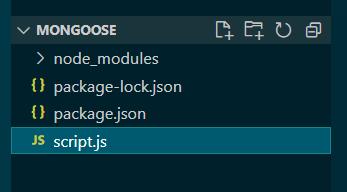
npm install mongooseProject Structure: It will look like the following.
Mongoose automatically creates an index for the _id field when a new document is created. Let’s explore how this works in practice. In this example, we will create some documents and see the default indexes, which is set by the mongoose automatically.
// Require the mongoose module
const mongoose = require('mongoose');

// Path to our Database
const url = 'mongodb://localhost:27017/GFG'

// Connecting to database
mongoose.connect(url)
 .then((ans) => {
 console.log("Connected successfully")
 })
 .catch((err) => {
 console.log("Error in the Connection")
 })

// Calling Schema class
const Schema = mongoose.Schema;

// Creating Structure of the collection
const collection_structure = new Schema({
 name: String,
 marks: Number,
})

// Creating collection
const collections = mongoose.model("GFG", collection_structure)

collections.create({
 name: `Ragavpp`,
 marks: 13,
})
 .then((ans) => {
 console.log("Document inserted")
 })

 .catch((err) => {
 console.log(err.Message);
 })
Step to Run Application: Run the application using the following command from the root directory of the project:
node script.jsOutput:
Connected Successful
Document inserted
Following we can see the default indexes in Atlas GUI:
In this example, we’ll add an index to the mobile field to optimize queries that filter by mobile number.
// Require the mongoose module
const mongoose = require('mongoose');

// Path to our cloud DataBase
const url = 'mongodb://localhost:27017/GFG'

// Connecting to database
mongoose.set('strictQuery', false);

mongoose.connect(url)
 .then((ans) => {
 console.log("Connected Successful")
 })
 .catch((err) => {
 console.log("Error in the Connection")
 })

// Calling Schema class
const Schema = mongoose.Schema;

// Creating Structure of the collection
// And making indexes using mobile
const collection_structure = new Schema({
 name: {
 type: String,
 require: true,
 },
 marks: {
 type: Number,
 default: 0
 },
 mobile: {
 type: Number,
 index: true,
 require: true,
 }
})

// Creating collection
const collections = mongoose.model("GFG", collection_structure)

collections.create({
 name: `Sam Snehil`,
 marks: 88,
 mobile: 9338948473,
})
 .then((ans) => {
 console.log("Document inserted")
 })

 .catch((err) => {
 console.log(err);
 })
Step to Run Application: Run the application using the following command from the root directory of the project:
node script2.jsOutput:
Following we can see the mobile in indexes on Atlas GUI:
Explanation:
When we run this code, the mobile field will be indexed, allowing faster queries on this field. We can verify this in MongoDB Atlas or your local MongoDB instance under the Indexes tab.
Mongoose schemas and indexes are crucial for optimizing the performance of our MongoDB queries in a Node.js application. By understanding how to create and manage indexes effectively, we can improve the speed and scalability of your applications. Mongoose Schema allows us to define the structure and rules for your documents. Mongoose Indexes speed up queries and help manage large datasets efficiently. Ensure that we use indexes wisely to optimize our application’s query performance and ensure smooth operation as our application grows.