|
VOOZH | about |
|
VOOZH | about |
Mongoose is a robust object data modeling (ODM) library for MongoDB and Node.js that makes database interactions easy. One of Mongoose's main features is its SchemaType options, which developers can use to specify the shape and behavior of data in MongoDB. Mastering these options is important to make sure that your data is validated, indexed and managed with in your MongoDB collections.
In this article, we will discuss the various SchemaType options provided by Mongoose with examples so that you can take advantage of these feature-rich options for more effective data modeling and validation.
In Mongoose, a schema type is an attribute of a schema that specifies the type, required, and other properties of a field in a MongoDB collection. Schema types are utilized to ensure the validation of data that is being stored in the collection and to specify how the data should be stored in the database. You can specify a schema type in a Mongoose schema by providing the type of the field and any preferred options
Mongoose schema types have several options that you can use to customize the behavior of your schema. Some of the options available for schema types include:
In the example below, we define a Mongoose schema with a name field of type String. This field is required and has a default value of 'John Doe'. Additionally, the name field is set to be unique, and an index is created for it. The index is also sparse, meaning it will only include documents with a value for name.
We set a validation to ensure the string length is greater than 3. The field also has an alias full_name, so you can reference it with that name in queries. Finally, getter and setter functions are applied: when the name field is accessed, it is converted to uppercase, and when it is set, it is converted to lowercase.
// Creating an example schema
// using different schema type options
const mongoose = require('mongoose');

// Defining schema
let schemaClass = new mongoose.Schema({
 name: {
 type: String,
 required: true,
 default: 'John Doe',
 unique: true,
 index: true,
 sparse: true,
 validate: (value) => value.length > 3,
 alias: 'full_name',
 get: (value) => value.toUpperCase(),
 set: (value) => value.toLowerCase()
 }
});
// creating model from the schema
let Schema = mongoose.model('Schema', schemaClass);

let schema1 = new Schema({
 name: "GeeksForGeeks"
});
// will have a default value of John Doe
let schema2 = new Schema({});

console.log(schema1);
console.log(schema2);
Output:
Explanation:
In this schema, the name field is configured with several options: it is required with a default value of 'John Doe', unique to ensure no duplicates, and indexed for faster querying. The sparse index ensures the index only includes documents with a defined name. A custom validation ensures the name is longer than 3 characters. The field also has an alias 'full_name', and get/set functions automatically convert the name to uppercase when accessed and lowercase when set.
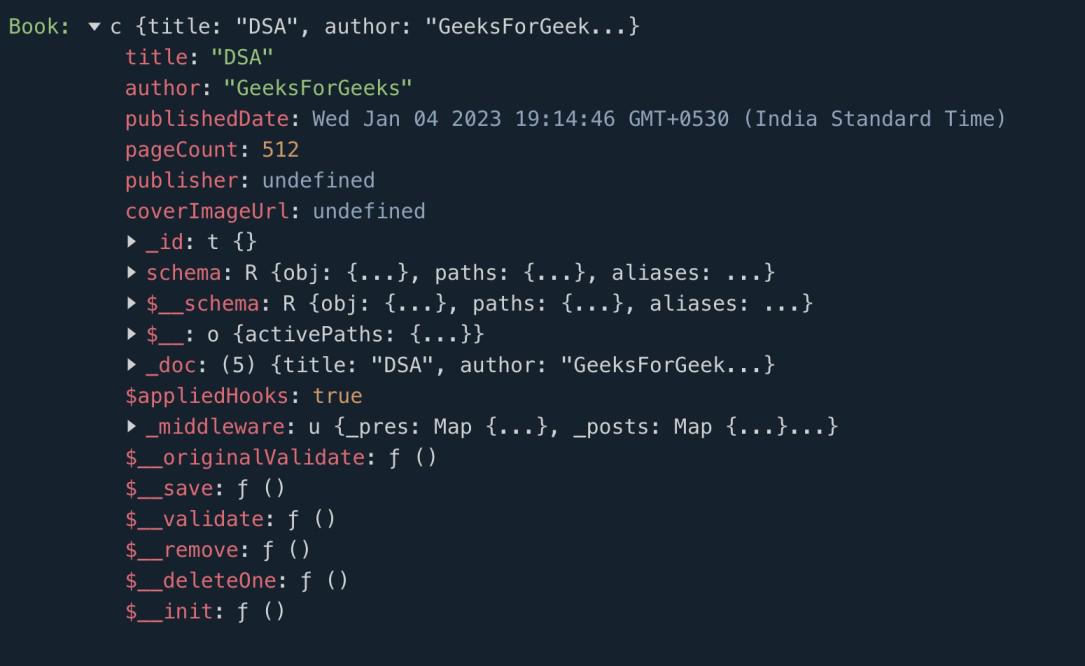
Here’s an example of a book schema. The schema includes a title field, which is a required string; an author field, which is also a required string; a publishedDate field, which is a required date; a pageCount field, which is a required number;
A publisher field, which is an optional string; and a coverImageUrl field, which is an optional string. All required fields must be provided when creating a book document, while the publisher and cover image URL fields are optional.
// Creating an example schema
const mongoose = require('mongoose');

// Defining schema
let bookSchema = new mongoose.Schema({
 title: {
 type: String,
 required: true
 },
 author: {
 type: String,
 required: true
 },
 publishedDate: {
 type: Date,
 required: true
 },
 pageCount: {
 type: Number,
 required: true
 },
 publisher: String,
 coverImageUrl: String
});
// creating model from the schema
let Book = mongoose.model('Book', bookSchema);

let book = new Book({
 title: "DSA",
 author: "GeeksForGeeks",
 publishedDate: new Date(),
 pageCount: 512,
});
console.log("Book:", book);
Output:
This example illustrates the use of the required option:
required: true: Ensures that the title, author, publishedDate, and pageCount fields are mandatory when creating a new book document.publisher and coverImageUrl are optional fields in this example and do not have the required option set.Mongoose SchemaType options offer robust capabilities for data validation, manipulation, and indexing within MongoDB collections. Through the specification of options such as required, default, unique, and validate, developers can ensure data integrity and improve performance. Mastering and utilizing SchemaType options is essential to developing strong and scalable applications with MongoDB and Node.js.