|
VOOZH | about |
|
VOOZH | about |
In Mongoose, the updateOne() method is an essential function for modifying documents in a MongoDB collection. It updates the first document that matches a specified filter, providing a simple and efficient way to update data. This function is similar to the update() method but is limited to updating only one document and does not support the multi or overwrite options.
updateOne() Method in Mongoose?The updateOne() method in Mongoose is used to update a single document that matches a specified filter condition. It performs the update operation on the first document that matches the filter and does not return the updated document itself. Instead, it provides metadata about the update, such as how many documents were affected.
Unlike the update() method, updateOne() does not support the multi or overwrite options, making it more precise for scenarios where you want to update just one document.
multi or overwrite options.Model.updateOne(filter, update, options, callback )
It accepts the following 4 parameters as mentioned above and described below:
updateOne() method returns a Query object. It provides metadata about the update operation, including the number of documents matched and modified.updateOne() Method in MongooseNow, let’s go through some practical examples to demonstrate how the updateOne() method works in Mongoose.
This example demonstrates using Mongoose's updateOne() method to update the first document in the "User" collection where the age is greater than or equal to 5, changing the user's name to "ABCD". The method takes a filter, update, options, and a callback function to handle the result or any errors.
// Filename - index.js

const mongoose = require('mongoose');

// Database connection
mongoose.connect('mongodb://127.0.0.1:27017/geeksforgeeks', {
	useNewUrlParser: true,
	useCreateIndex: true,
	useUnifiedTopology: true,
	useFindAndModify: false
});

// User model
const User = mongoose.model('User', {
	name: { type: String },
	age: { type: Number }
});

// Find all documents matching the condition
// (age >= 5) and update first document
// This function has 4 parameters i.e.
// filter, update, options, callback
User.updateOne({age:{$gte:5}},
	{name:"ABCD"}, function (err, docs) {
	if (err){
		console.log(err)
	}
	else{
		console.log("Updated Docs : ", docs);
	}
});
updateOne() updates the first document where the age is greater than or equal to 5.$set is used to set the name field to "ABCD"Before using the updateOne() function, ensure that you have Mongoose installed in your Node.js project. Follow these steps:
Step 1: You can install this package by using this command.
npm install mongooseStep 2: After installing the mongoose module, you can check your mongoose version in the command prompt using the command.
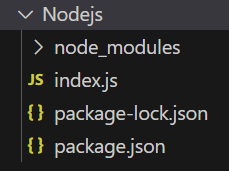
npm version mongooseProject Structure:
👁 NodeProjThe updated dependencies in package.json file will look like:
"dependencies": {
 "mongoose": "^7.6.5",
}
Steps to run the program: Run the following command in the terminal
node index.jsBelow is the sample data in the database before the function is executed, You can use any GUI tool or terminal to see the database, like we have used Robo3T GUI tool as shown below: 👁 Database
Console Output:👁 Image
After the function is executed, You can see the database as shown below: 👁 new Database
So this is how you can use the mongoose updateOne() function which is used to update the first document that matches the condition. This function is the same as the update(), except it does not support the multi or overwrite options.
The updateOne() method in Mongoose is an efficient way to update a single document in a MongoDB collection. It is ideal for cases where you need to modify one document based on specific conditions, without needing to retrieve the updated document itself. For scenarios that require updating multiple documents or returning the updated document, consider using updateMany() or findOneAndUpdate() instead. By understanding how to use updateOne(), you can optimize your database operations in Mongoose and make your applications more efficient.