|
VOOZH | about |
|
VOOZH | about |
MongoDB schema validation helps keep your data organized and correct. With MongoDB validation rules, we can set up guidelines for what data can be stored in our database. This makes it easier to ensure that all the information we save is reliable and useful.
In this article, We will learn about the Schema Validation in MongoDB, When to use Schema Validation and When MongoDB Checks Validation in detail by understanding various aspects
Step 1: We create a collection named of 'students' using the createCollection() command.
Step 2: With the '$jsonShema' command inside the validator we specify the schema validation rules. Here with the required property we give a list of fields that every document must have when inserted into the collection.
Step 3: Give all the fields and their datatypes inside the properties.
// Example schema validation for a collection named 'Students'
db.createCollection("Students", {
 validator: {
 $jsonSchema: {
 bsonType: "object",
 required: ["name", "id", "age", "department"],
 properties: {
 name: {
 bsonType: "string",
 description: "Name must be a string."
 },
 id: {
 bsonType: "int",
 description: "id must be an integer."
 },
 age: {
 bsonType: "int",
 minimum: 10,
 description: "Age must be an integer greater than or equal to 10."
 },
 dept: {
 bsonType: "string",
 description: "Department must be a string."
 }
 }
 }
 }
});
Step 4: Now try to insert the documents one by one into the collection with insertOne() command.
Query:
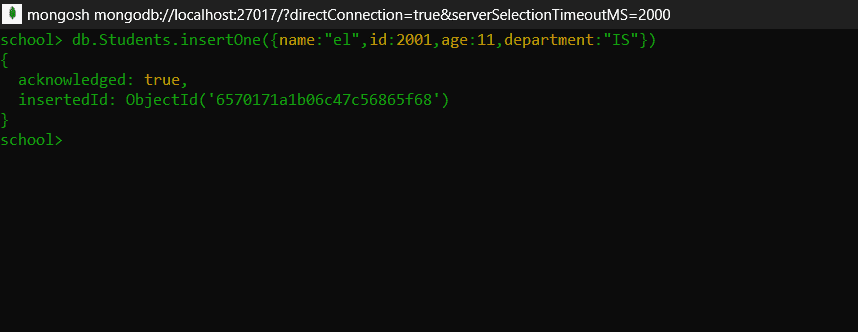
When we insert data according to validation rules it means Valid Document.
//inserting a record into Students
db.Students.insertOne({
 name: "el",
 id: 2001,
 age: 11,
 department: "IS",
});
Output:
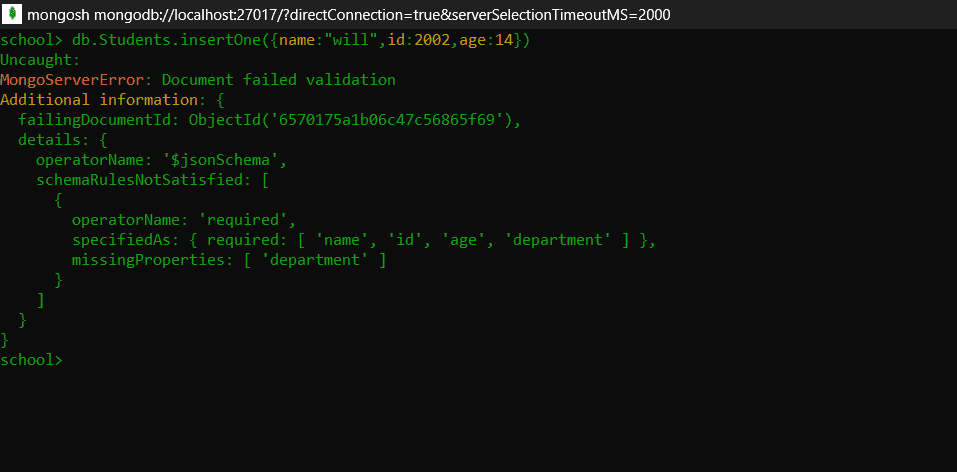
When we will try to add Invalid Documents to our collection.
Query:
//inserting a record into Students
db.Students.insertOne({
 name: "will",
 id: 2002,
 age: 14,
});
Output:
Explanation: Here, you can see the first document consists of all the required fields in the collection so it is inserted successfully. Whereas, the second document is missing the department field, in this case it is considered an invalid document and throws an error as it doesn't meet the criteria specified in the schema validation. Hence MongoDB rejects the document to be inserted into the collection.
We should know that whenever we create a new collection with schema validation, MongoDB checks for validations only during updates and inserts in that collection. When we specify validation rules for a pre-existing, non-empty collection only the documents that are inserted after are checked for validations.
The documents already present in the collection are not checked for validation until they are altered. When we want to update the already existing schema we use 'collMod' command.
db.runCommand({
 collMod: "Students",
 validator: {
 $jsonSchema: {
 bsonType: "object",
 required: ["name", "id", "age", "department", "marks"],
 properties: {
 name: {
 bsonType: "string",
 description: "Name must be a string.",
 },
 id: {
 bsonType: "int",
 description: "ID must be an integer.",
 },
 age: {
 bsonType: "int",
 minimum: 10,
 description: "Age must be an integers greater than or equal to 10.",
 },
 department: {
 bsonType: "string",
 description: "Department must be a string.",
 },
 marks: {
 bsonType: "int",
 minimum: 0
 description: "Marks must be integer greater than or equal to 0.",
 },
 },
 },
 },
});
Explanation: Here we included the marks field in the required property. We used 'collMod' to modify the schema defined earlier.
Note: 'collMod' will fail if the collection has the already existing documents that don't follow the validation rules. So to modify the schema with 'collMod', ensure that the documents already present in the collection must be updated according to the schema or removed.
When a document fails schema validation in MongoDB:
In conclusion, using MongoDB schema validation is important for keeping your data accurate. By applying MongoDB validation rules, you can avoid mistakes and make your database stronger. Good MongoDB data validation leads to better data quality and smoother application performance.