Shard keys are central to MongoDB sharding, as they control how data is split and distributed across shards to improve scalability and performance in a sharded cluster.
A shard key is a field or combination of fields used to distribute data across shards.
Sharding spreads data across multiple machines to support horizontal scaling.
Data is divided into chunks and assigned to shards based on shard key values.
The choice of shard key directly affects overall cluster performance and data distribution.
Importance of Shard Keys
Here are some important points of Shard Keys:
Scalability: Enables horizontal scaling by distributing data across shards.
Query Efficiency: Improves query performance by routing queries to relevant shards.
Load Balancing: Prevents hotspots by distributing workload evenly across the cluster.
Shard Key Specification
The specification of a shard key is one of the most important decisions when designing a MongoDB sharded cluster. It involves choosing one or more fields that will determine how the data is partitioned.
Single or Compound Key: A shard key can be a single field or a combination of fields, allowing flexible data distribution strategies.
Cardinality: High-cardinality shard keys help distribute data evenly across shards, while low cardinality can create hotspots.
Indexing: MongoDB automatically creates an index on the shard key, enabling efficient and targeted query routing.
Read/Write Performance: Choosing the right shard key improves read and write performance by directing operations to specific shards instead of broadcasting across the cluster.
Changing a Document’s Shard Key Value
In some cases, updating a document’s shard key value requires adhering to MongoDB’s constraints and procedures to preserve data integrity, consistency, and correct chunk placement across the cluster.
1. Shard Key Indexes
Shard keys play a critical role in indexing for MongoDB's performance optimization.
Shard key indexes significantly enhance the overall performance of a sharded cluster.
They enable efficient query routing and execution within the cluster.
2. Choosing a Shard Key
Selecting a shard key is a crucial decision in MongoDB's sharding strategy.
A well-chosen shard key can reduce hotspots, ensure even data distribution, and enhance query performance.
The process of selecting an ideal shard key for our application will be explained in detail in our upcoming post.
3. Shard Key Cardinality
Shard key cardinality is crucial for improving MongoDB's sharding speed.
Cardinality refers to the uniqueness of values in a shard key.
Data distribution and query routing in MongoDB are influenced by shard key cardinality.
Understanding shard key cardinality is essential for optimizing MongoDB's scalability.
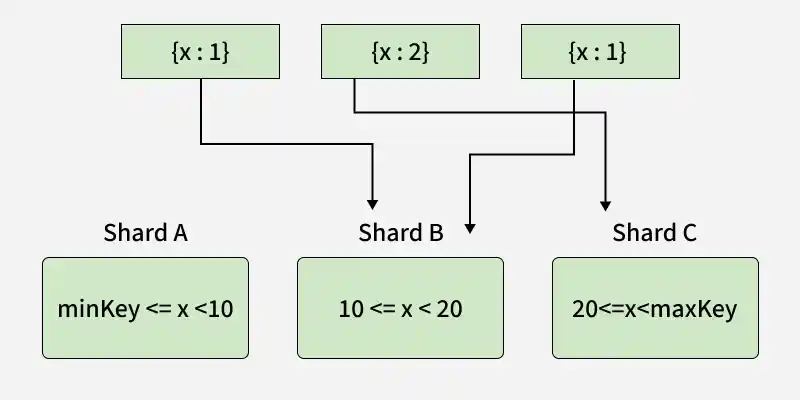
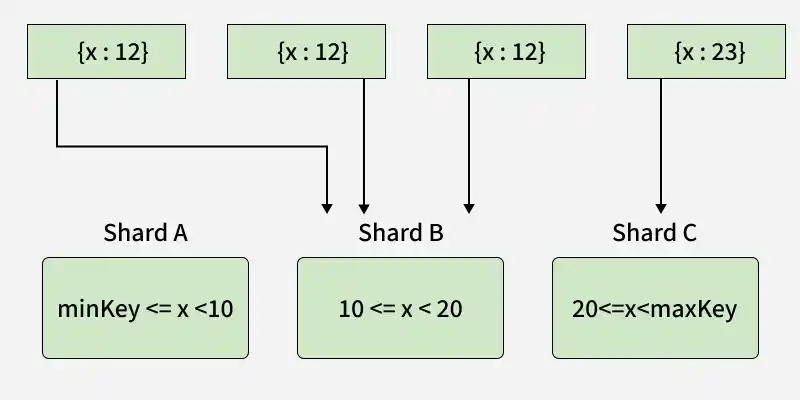
The diagram shows a sharded cluster using field X as the shard key. When X has low cardinality, most inserts go to the same shard range, causing uneven data distribution (hotspots).