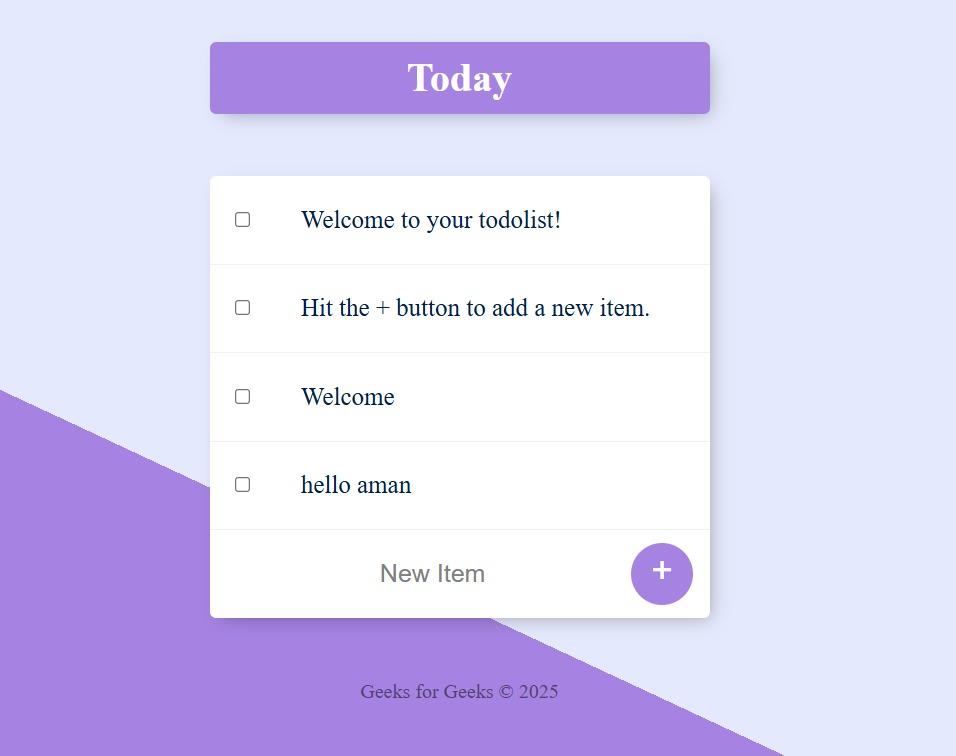
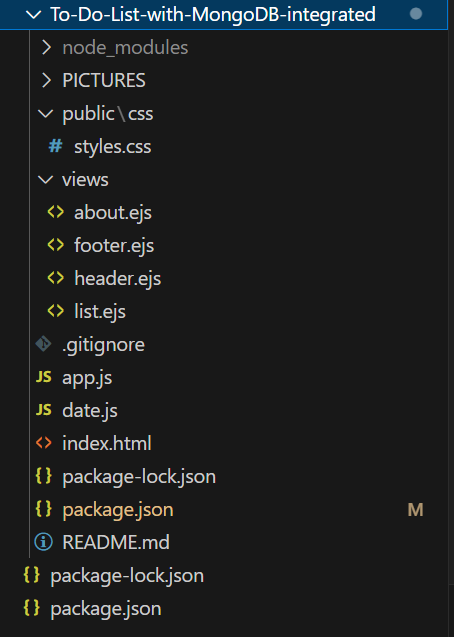
This project is a full-stack CRUD (Create–Read–Update–Delete) web app that manages tasks with a simple, responsive UI. The backend uses Node.js + Express for routing and middleware, EJS for server-side templating, and MongoDB (via Mongoose) for persistence.
App.js: It boots the Express server, connects MongoDB via Mongoose, defines Item/List schemas and routes, renders EJS views, and handles adding/deleting tasks (including auto-created custom lists).
Date.js: It provides two helpers—getDate() and getDay()—that return nicely formatted, locale-based date/weekday strings using toLocaleDateString().
Views: Reusable EJS templates that render dynamic HTML from server data, composing pages with shared partials (header/footer) and list-specific content.
CSS: This CSS creates a clean, card-style to-do UI with a purple diagonal gradient background, centered container, checkable list items with strike-through on completion, and minimal, accessible form controls.
Output
Core Files Explained
Entry Point
App.js: The main server file that connects all parts of the project.
Initializes the Express app and middleware.
Connects to MongoDB using Mongoose.
Defines the routes for displaying, adding, and deleting tasks.
Renders dynamic EJS templates for the frontend.
Date Utility
date.js: Provides date formatting helper functions.
getDate(): Returns the full date (e.g., Tuesday, October 7).
getDay(): Returns only the weekday (e.g., Tuesday).
Database (MongoDB + Mongoose)
Schemas and Models
Item: Represents a single to-do task (name field).
List: Represents a custom list (with name and an array of items).
Database
Connected via mongoose.connect("mongodb://localhost:27017/todolistDB").
Default tasks are created if the collection is empty.
Views (EJS Templates)
header.ejs
Defines the HTML structure and links the main CSS file.
Used as a common header for all pages.
Views (EJS Templates)
header.ejs
Defines the HTML structure and links the main CSS file.
Used as a common header for all pages.
list.ejs
Displays the list title and all tasks (newListItems).
Includes forms to add and delete items.
Dynamically updates based on user actions or custom URLs (e.g., /Work).
footer.ejs
Common footer for all pages with copyright info.
about.ejs
Simple static About page describing the app or author.
Public (Static Files)
public/css/style.css: Defines the UI styling.
Handles layout, typography, buttons, and gradients.
Provides a clean card-style design for the to-do box.
Routes (Express)
GET “/”: Displays the main “Today” list. Inserts default tasks if none exist.
GET “/:customListName” Handles custom routes like /Work or /Home. Creates new custom lists automatically if they don’t exist.
POST “/”: Adds a new item to either the “Today” list or a custom list.
POST “/delete”: Deletes the selected item from the appropriate list.