|
VOOZH | about |
|
VOOZH | about |
Managing images efficiently is a common requirement in modern web applications. MongoDB with Mongoose provides a great method of storing and retrieving images within your database. In this tutorial, we will demonstrate how to upload and fetch images using MongoDB and Mongoose in a Node.js application with simple steps, code examples, and best practices.
Run the following commands to install essential packages. ExpressJS allows us to set up middleware to respond to HTTP Requests.
npm install express --saveThe module "body-parser" enables reading (parsing) HTTP-POST data.
npm install body-parser --saveMongoose is a MongoDB client library providing object modeling for use in an asynchronous environment. Mongoose supports both promises and callbacks.
npm install mongoose --saveMulter is nodejs middleware used for uploading files.
npm install multer --saveDotenv is a zero-dependency module that loads environment variables from a .env file into process.env.
npm install dotenv --saveEJS (Embedded JavaScript) is a templating engine for nodejs. This engine helps to create an HTML page via templates with minimal code.
npm install ejs --savenodemon is a development tool that re-launches the node application when file updates in the code directory are noticed. It enhances the development process while working on node-based applications. Since this is a development tool and not part of our application code, we use `--save-dev` when installing this module:
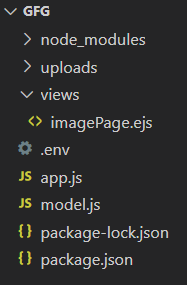
npm install nodemon --save-devNow let's start coding! To upload an image and retrieve an image by MongoDB using Mongoose, follow each of the steps below one by one.
Create a .env file to securely store your MongoDB connection string:
MONGO_URL="mongodb://127.0.0.1:27017/imagesInMongoApp"
PORT=3000
app.js)Set up your Express server to handle file uploads and serve pages
var express = require('express')
var app = express();
var bodyParser = require('body-parser');
var mongoose = require('mongoose')
var imgSchema = require('./model.js');
var fs = require('fs');
var path = require('path');
app.set("view engine", "ejs");
require('dotenv').config();

mongoose.connect(process.env.MONGO_URL)
.then(console.log("DB Connected"))

app.use(bodyParser.urlencoded({ extended: false }))
app.use(bodyParser.json())

var multer = require('multer');

var storage = multer.diskStorage({
 destination: (req, file, cb) => {
 cb(null, 'uploads')
 },
 filename: (req, file, cb) => {
 cb(null, file.fieldname + '-' + Date.now())
 }
});

var upload = multer({ storage: storage });

app.get('/', (req, res) => {
 imgSchema.find({})
 .then((data, err)=>{
 if(err){
 console.log(err);
 }
 res.render('imagepage',{items: data})
 })
});

app.post('/', upload.single('image'), (req, res, next) => {

 var obj = {
 name: req.body.name,
 desc: req.body.desc,
 img: {
 data: fs.readFileSync(path.join(__dirname + '/uploads/' + req.file.filename)),
 contentType: 'image/png'
 }
 }
 imgSchema.create(obj)
 .then ((err, item) => {
 if (err) {
 console.log(err);
 }
 else {
 // item.save();
 res.redirect('/');
 }
 });
});

var port = process.env.PORT || '3000'
app.listen(port, err => {
 if (err)
 throw err
 console.log('Server listening on port', port)
})
model.js)Once we have established a connection to our database and required all the necessary packages, we can now begin defining our server-side logic. So for storing an image in MongoDB, we need to create a schema with mongoose.
For that create the file `model.js` file and define the schema. The key point here is that our data type for the image is a Buffer which lets us save our image as data in the form of arrays.
var mongoose = require('mongoose');
var imageSchema = new mongoose.Schema({
 name: String,
 desc: String,
 img:
 {
 data: Buffer,
 contentType: String
 }
});

module.exports = mongoose.model('Image', imageSchema);
views/imagePage.ejs)This is the HTML template for the "upload page". Notice that the src parameter for the <img> is not a typical URL. This format enables displaying the image stored in binary format in the Mongo database, and we convert it to base64 so that the browser can render it.
Add the following code to the `views/imagePage.ejs`:
<!DOCTYPE html>
<html lang="en">
 <head>
 <meta charset="UTF-8" />
 <meta name="viewport" content="width=device-width, initial-scale=1.0" />
 <title>Image Uploading</title>
 </head>

 <body>
 <h1>To Upload Image on mongoDB</h1>
 <hr />
 <div>
 <form action="/" method="POST" enctype="multipart/form-data">
 <div>
 <label for="name">Image Title</label>
 <input
 type="text"
 id="name"
 placeholder="Name"
 value=""
 name="name"
 required
 />
 </div>
 <div>
 <label for="desc">Image Description</label>
 <textarea
 id="desc"
 name="desc"
 value=""
 rows="2"
 placeholder="Description"
 required
 >
 </textarea>
 </div>
 <div>
 <label for="image">Upload Image</label>
 <input type="file" id="image" name="image" value="" required />
 </div>
 <div>
 <button type="submit">Submit</button>
 </div>
 </form>
 </div>

 <hr />

 <h1>Uploaded Images</h1>
 <div>
 <% items.forEach(function(image) { %>
 <div>
 <div>
 <img
 src="data:image/<%=image.img.contentType%>;base64,
 <%=image.img.data.toString('base64')%>"
 />
 <div>
 <h5><%= image.name %></h5>

 <p><%= image.desc %></p>
 </div>
 </div>
 </div>
 <% }) %>
 </div>
 </body>
</html>
Use nodemon to start your development server:
npx nodemon app.jsOpen your browser and visit:
http://localhost:3000/Output
Open your browser to http://localhost:3000/ . You should now see:
Uploading and retrieving images in MongoDB using Mongoose is straightforward and efficient with this setup. It uses Node.js tools like Express, Multer, and EJS to create a full-stack solution ideal for many web apps. This approach keeps your data in one place and simplifies image management. Start implementing this today to build scalable, user-friendly applications with seamless image handling!