|
VOOZH | about |
|
VOOZH | about |
MongoDB Atlas Search is a full-text search solution integrated with MongoDB Atlas, a multi-cloud database service that supports AWS, Microsoft Azure and Google Cloud Platform. It provides advanced features like autocomplete, fuzzy search and faceted navigation for relevance-based search.
This simple tool eliminates the need for separate search systems by making it ideal for applications with large datasets requiring real-time and context-aware search. In this article, we will learn about MongoDB Atlas Search by understanding its usecases and go through some examples with different text searches to explain how we can use it to enhance the search experience in our applications.
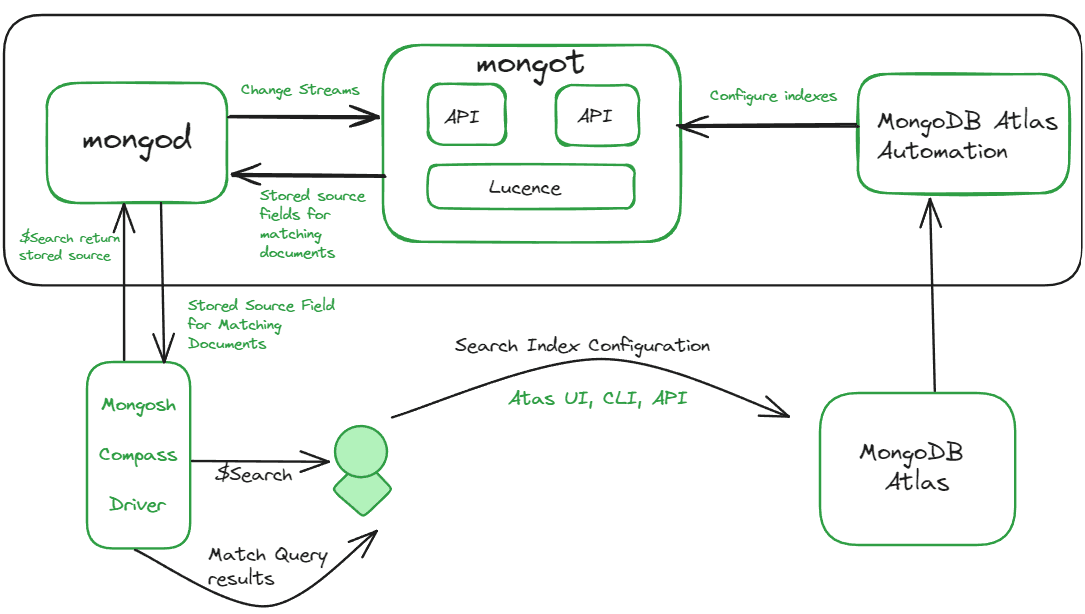
The Atlas Search mongot process, powered by Apache Lucene, works hand-in-hand with MongoDB to deliver a powerful and efficient search experience within the MongoDB Atlas cluster.
The mongot creates specialized maps (indexes) that help to find the relevant information within user data and constantly monitors changes in data through "changestreams," ensuring the search maps always reflect the latest information.
When we submit a search query, mongot acts as our guide, sifting through the maps retrieving the documents that match your request, and sending it back to the user.
It is the mapping between terms and documents that contain those terms, to enable faster retrieval of documents using certain identifiers. We can map the fields to index using the following:
We can create an Atlas Search index using the Atlas UI, Atlas Search API, Atlas CLI, or a supported MongoDB Driver in your preferred language.
Follow the steps below to create an Atlas Search Index using Atlas UI
Step 1: Log into your MongoDB Atlas account.
Step 2: Navigate to the Atlas Search page for your project, select the desired project and cluster, and click on the Atlas Search tab.
Step 3: Click Create Search Index.
Step 4: Select an Atlas Search Configuration Method:
Step 5: Review the "default" index definition for the desired collection.
In the Atlas Search JSON Editor, add the following index definition:
{ "mappings": { "dynamic": true } }Step 7: Click Next.
Step 8: Click Save Changes.
Step 9: Click Create Search Index.
Step 10: Close the You're All Set! Modal Window. After a few minutes, the status column will show Active.
Step 1: Create a file named create-index.js.
Step 2: Copy and paste the following code into the create-index.js file:
const { MongoClient } = require("mongodb");

// connect to your Atlas deployment
const uri =
 "<connection-string>";

const client = new MongoClient(uri);

async function run() {
 try {

 // set namespace
 const database = client.db("sample_mflix");
 const collection = database.collection("movies");

 // define your Atlas Search index
 const index = {
 name: "default",
 definition: {
 /* search index definition fields */
 "mappings": {
 "dynamic": true
 }
 }
 }

 // run the helper method
 const result = await collection.createSearchIndex(index);
 console.log(result);
 } finally {
 await client.close();
 }
}

run().catch(console.dir);
Step 3: Replace the <connection-string> in the query and then save the file
Step 4: Create the index by running the command.
node create-index.jsStep 5: Get the output:
defaultOutput:
After learning all the basics now let's see how to perform search in MongoDB Atlas. We have covered different examples of MongoDB Atlas Search in different scenarios.
In this example, we are searching for documents of students who have "computer science" as their skills in the students collections using text-query search by setting the `query` for the text we are searching for, as per here it is set to "computer science" and `path` to the specified field in which the search will be performed, as per here "skills".
Query:
db.students.aggregate([
 {
 $search: {
 text: {
 query: "computer science",
 path: "skills",
 },
 },
 },
])
Output:
In this example, we are searching for documents a text search within the "students" collection on the "skills" field for the query "programming." The `$sort` stage is then applied to arrange the results based on the relevance score generated by the text search, with the highest scores appearing first. Finally, the `$limit` stage is used to restrict the output to the top 5 documents.
Query:
db.students.aggregate([
 {
 $search: {
 text: {
 query: "programming",
 path: "skills",
 },
 },
 },
 { $sort: { score: { $meta: "textScore" } } },
 { $limit: 5 },
])
Output:
In this example, we are searching for documents within the "students" collection for the term "Data Science" in the "course" field. The `$search` stage initiates the search, specifying the query term, the target field for the search ("Data Science"), and the language for language-specific analysis ("english").
Query:
db.students.createIndex(
 { "course": "text" }, { default_language: "english" }
);

db.students.find({
 $text: {
 $search: "Data Scienec",
 $language: "english"
 }
 });
Output:
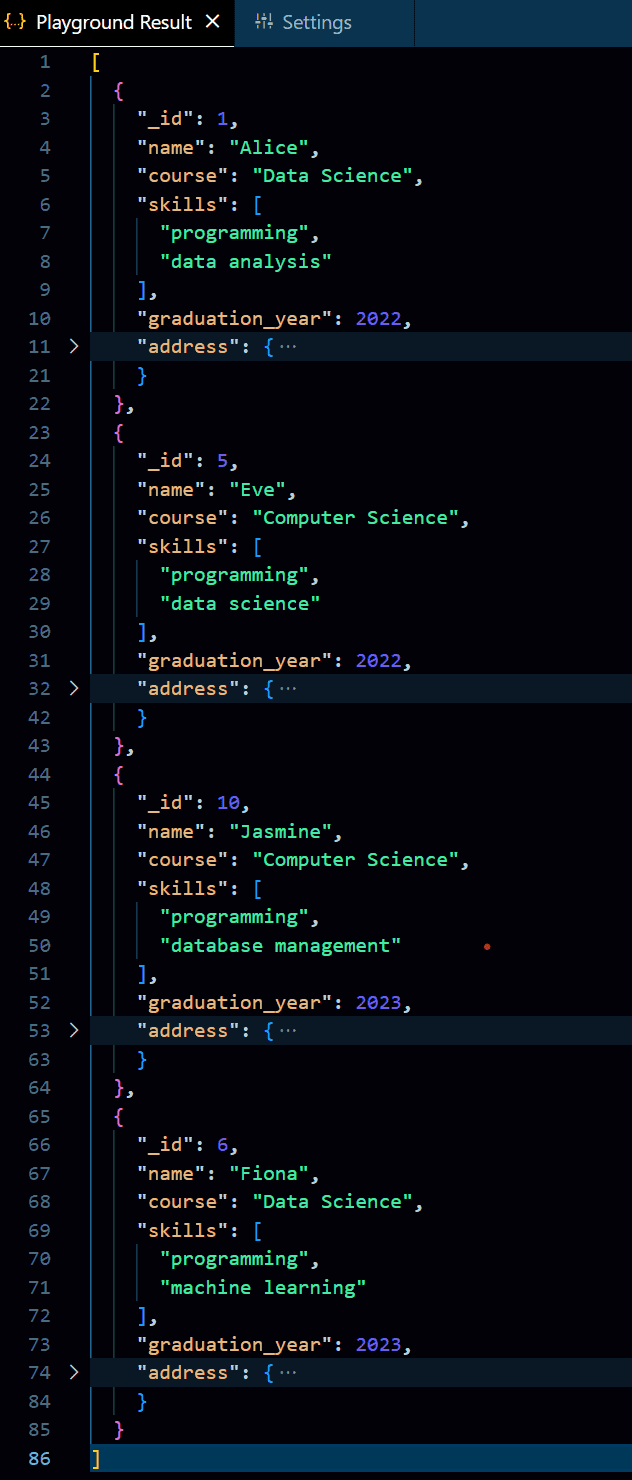
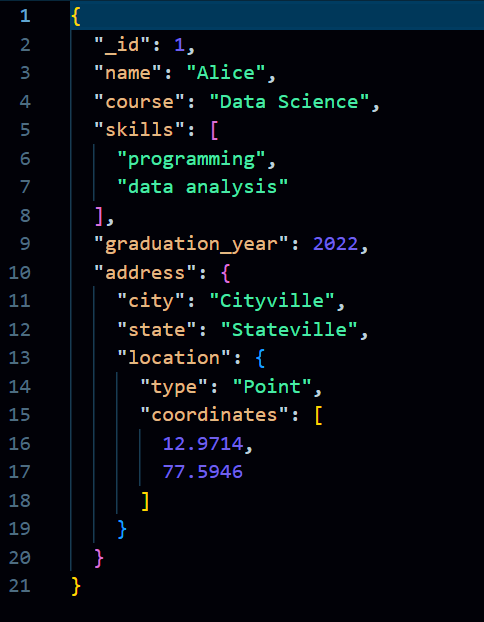
In this example, we are performing a geospatial search within the "students" collection to get a set of documents where the "address.location" field is within a 5000-meter radius of the specified coordinates.
The $search` stage utilizes a compound query, specifically a "should" clause, indicating that the documents should match at least one of the specified conditions,`geo`clause checks for proximity to a specified location, `path`: "address.location" indicates the field containing geospatial coordinates, `near`specifies the desired location as a point with longitude and latitude coordinates and `maxDistance` : 5000 sets the maximum distance from the specified point in meters.
Query:
db.students.aggregate([
 {
 $search: {
 compound: {
 should: [
 {
 near: {
 path: "address.location",
 geometry: {
 type: "Point",
 coordinates: [12.9714,77.5946],
 },
 maxDistance: 5000, // in meters
 },
 },
 ],
 },
 },
 },
])
Output:
In this example, we are performing a faceted navigation to get a structured summary of the distribution of "data science" across different facets such as courses, skills, and graduation years within the "students" collection.
By performing a text search for the query "data science" across the "course" and "skills" fields of the documents in the first stage, then in the second stage utilizes the `$facet` operator to organize the results into distinct facets, namely "courses," "skills," and "graduation_years." Each facet is then processed using `$sortByCount` to determine the frequency of occurrences for unique values within the associated categories.
Query:
db.students.aggregate([
 {
 $search: {
 text: {
 query: "data science",
 path: ["course", "skills"],
 },
 },
 },
 {
 $facet: {
 courses: [{ $sortByCount: "$course" }],
 skills: [{ $sortByCount: "$skills" }],
 graduation_years: [{ $sortByCount: "$graduation_year" }],
 },
 },
])
Output:
Let's look at the differences between MongoDB Search and Atlas Search.
| Feature | MongoDB Search | Atlas Search |
|---|---|---|
| Functionality | Basic text search functionality using text indexes | Advanced full-text search capabilities with Apache Lucene integration |
| Customization | Limited customization options | Extensive customization options for search queries, including fuzzy search, autocomplete, synonyms, and custom scoring |
| Integration | Integrated within MongoDB | Integrated into MongoDB Atlas for seamless use |
| Performance | Basic search capabilities | High-performance search engine with rich feature set |
| Use Cases | Suitable for simple text searches | Ideal for complex search requirements in applications with large datasets |
| Maintenance | Requires manual setup and maintenance | Fully managed solution within MongoDB Atlas |
Overall, MongoDB Atlas Search offers a scalable, high-performance search solution, ideal for handling complex queries across various applications like e-commerce and CMS platforms. Its seamless integration with MongoDB Atlas ensures ease of use, delivering fast and accurate results. With customizable features, it is the preferred choice for developers seeking advanced full-text search without extra maintenance.