|
VOOZH | about |
|
VOOZH | about |
Mongoose is a powerful Object Data Modeling (ODM) library for MongoDB and Node.js. One of its most useful features is the populate() method, which allows us to efficiently fetch related documents from other collections, providing a powerful way to link and display data in a more readable and structured form. In this article, we will explain how the populate() method works, its syntax, and practical examples.
populate()?The Mongoose populate() method is used to replace a field in a document with the corresponding document from another collection. It is similar to SQL JOINs, but it works within the MongoDB ecosystem by using references stored as ObjectIds.
populate() simplifies relationships between different documents in various collections, making it an essential tool for developers working with MongoDB in Node.js. By utilizing references and the populate() method, we can fetch related data seamlessly without writing multiple queries or dealing with complex joins manually.
populate() Method Work?When we define a schema in Mongoose, we can create relationships between collections by using the ref property. The ref property stores the reference to another collection, allowing you to populate fields with the data from the referenced collection.
For example, consider a scenario where you have a Product model that references a Customer model. Using the populate() method, we can fetch all the products along with their associated customer information.
Syntax:
Model.populate( doc, options, callback );
Parameters:
Let’s walk through an example to better understand how to use the populate() method in a Mongoose-based application.
Initialize a new Node.js application with the following command:
npm initAfter creating the NodeJS application, Install the required module using the following command:
npm install mongooseProject Structure: The project structure will look like this:
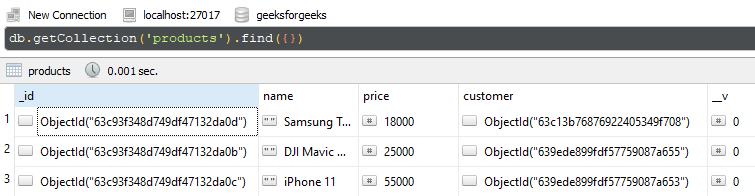
Database Structure: The database structure will look like this, the following documents are present in the collection.
populate()In this example, we have established a database connection using mongoose and defined two models over customerSchema, and productSchema. In the end, we are accessing populate() method over the Product model and providing the customer model as a reference to point and populate the referenced documents from both collections.
Filename: app.js
// Require mongoose module
const mongoose = require("mongoose");

// Set Up the Database connection
const URI = "mongodb://localhost:27017/geeksforgeeks";

let connectionObject = mongoose.createConnection(URI, {
 useNewUrlParser: true,
 useUnifiedTopology: true,
});

let customerSchema = new mongoose.Schema({
 name: String,
 address: String,
 orderNumber: Number,
})

let Customer =
 connectionObject.model("Customer", customerSchema);

let productSchema = new mongoose.Schema({
 name: String,
 price: Number,
 customer: {
 type: mongoose.ObjectId,
 ref: 'Customer'
 },
})

let Product =
 connectionObject.model("Product", productSchema);

Product.find().populate("customer").then(res => {
 console.log(res);
});
Step to run the program: To run the application execute the below command from the root directory of the project:
node app.jsOutput:
[
 {
 _id: new ObjectId("63c93f348d749df47132da0d"),
 name: 'Samsung TV 32',
 price: 18000,
 customer: {
 _id: new ObjectId("63c13b76876922405349f708"),
 name: 'Mivaan',
 address: 'IND',
 orderNumber: 9,
 __v: 0
 },
 __v: 0
 },
 {
 _id: new ObjectId("63c93f348d749df47132da0b"),
 name: 'DJI Mavic Mini 2',
 price: 25000,
 customer: {
 _id: new ObjectId("639ede899fdf57759087a655"),
 name: 'Chintu',
 address: 'IND',
 orderNumber: 9,
 __v: 0
 },
 __v: 0
 },
 {
 _id: new ObjectId("63c93f348d749df47132da0c"),
 name: 'iPhone 11',
 price: 55000,
 customer: {
 _id: new ObjectId("639ede899fdf57759087a653"),
 name: 'Aditya',
 address: 'Mumbai',
 orderNumber: 20,
 __v: 0
 },
 __v: 0
 }
]
To populate only specific fields from a referenced document, we can use the select option in the populate() method. This is useful when we need to fetch only certain fields rather than the entire document, improving performance and reducing unnecessary data retrieval.
Filename: app.js
// Require mongoose module
const mongoose = require("mongoose");

// Set Up the Database connection
const URI = "mongodb://localhost:27017/geeksforgeeks";

let connectionObject = mongoose.createConnection(URI, {
 useNewUrlParser: true,
 useUnifiedTopology: true,
});

let customerSchema = new mongoose.Schema({
 name: String,
 address: String,
 orderNumber: Number,
})

let Customer =
 connectionObject.model("Customer", customerSchema);

let productSchema = new mongoose.Schema({
 name: String,
 price: Number,
 customer: {
 type: mongoose.ObjectId,
 ref: 'Customer'
 },
})

let Product =
 connectionObject.model("Product", productSchema);

let products;

Product.find({ name: "Samsung TV 32" }).then(res => {
 products = res;
 Customer.populate(products, { path: "customer" }).then(res => {
 console.log(res);
 })
});
Step to run the program: To run the application execute the below command from the root directory of the project:
node app.jsOutput:
[
 {
 _id: new ObjectId("63c93f348d749df47132da0d"),
 name: 'Samsung TV 32',
 price: 18000,
 customer: {
 _id: new ObjectId("63c13b76876922405349f708"),
 name: 'Mivaan',
 address: 'IND',
 orderNumber: 9,
 __v: 0
 },
 __v: 0
 }
]
populate() vs. lookup() in MongooseBoth populate() and lookup()perform similar tasks in terms of joining data from different collections. However, they have key differences:
populate(): This is a Mongoose method that works in the context of document models and references. It makes the code easier to work with in terms of object-relational mapping (ORM).lookup(): This is a MongoDB aggregation pipeline operator. It allows you to perform more advanced, query-based operations to join data from multiple collections. lookup() is more flexible and can handle complex aggregation queries, while populate() is simpler and works best with references in your schema.The Mongoose populate() method is a powerful tool for handling references between collections in MongoDB. It simplifies the process of joining data across collections and allows us to retrieve related data in a single query. Understanding when and how to use populate() in your application is essential for efficient data retrieval and optimal performance. This article should provide us with a clear understanding of how to utilize populate() in your Mongoose-based Node.js applications.