VOOZH about

URL: https://minecraft.wiki/w/Pocket_Edition_Pre-release

⇱ Pocket Edition Demo – Minecraft Wiki


Pocket Edition Demo

From Minecraft Wiki
(Redirected from Pocket Edition Pre-release)
Jump to navigation Jump to search
πŸ‘ Image
This article is about the development version. For the version the demo is available as, see Pocket Edition Lite.
πŸ‘ Image
Not to be confused with Demo Mode.
This page documents a version of the game that was only released privately.
 
While there is proof of this version's existence, it was never released to the public.
Minecraft - Pocket Edition Demo
Edition Pocket Edition
Date developed May 25 – June 7, 2011
Downloads Client not archived
Protocol version Pending
Demo v0.1.0 alpha β–Ίβ–Ί
{
 "title": "Minecraft - Pocket Edition Demo",
 "images": [
 "Pocket Edition Demo.jpg"
 ],
 "rows": [
 {
 "field": "''(link to Pocket Edition article, displayed as Pocket Edition)''",
 "label": "(link to Edition article, displayed as Edition)"
 },
 {
 "field": "May 25 – June 7, 2011",
 "label": "Date developed"
 },
 {
 "field": "Client not archived",
 "label": "Downloads"
 },
 {
 "field": "(link to Template:Protocol version#Unknown version article, displayed as Pending)(link to Category:Unknown protocol version article, displayed as Category:Unknown protocol version)",
 "label": "(link to Protocol version article, displayed as Protocol version)"
 }
 ],
 "invimages": [],
 "footer": "<table style=\"margin: auto; word-break: break-word;\">\n<tr style=\"background: inherit;\">\n<td style=\"padding: 0.4em\" rowspan=\"2\"></td>\n<td rowspan=\"2\" style=\"padding: 0.4em\">'''Demo'''</td>\n<td style=\"padding: 0.4em\" rowspan=\"2\">[[Pocket Edition v0.1.0 alpha| v0.1.0 alpha <span style=\"margin-right:-0.35em\">β–Ί</span>β–Ί]]</td>\n</tr>\n<tr style=\"background: inherit;\">\n</tr>\n</table>"
}
πŸ‘ Image
There is a guide for this update!
 
See Bedrock Edition guides/Pocket Edition Demo for a guide to all of the new features introduced in Pocket Edition Demo.
πŸ‘ Image
Notch playing the demo at E3 2011

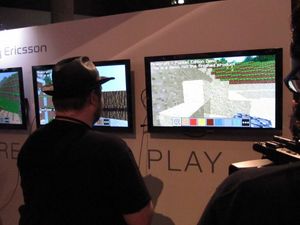
Minecraft - Pocket Edition Demo[1] was the first known developmental version of Minecraft: Pocket Edition. This version was never publicly released, but was playable at E3 2011 (June 7–9, 2011) and given to many individuals for private testing and showcasing.

Features

[edit | edit source]
Demo block and item additionsπŸ‘ Invicon Air.png: Inventory sprite for Air in Minecraft as shown in-game linking to Air with description: Air
πŸ‘ Invicon Sand.png: Inventory sprite for Sand in Minecraft as shown in-game linking to Sand with description: Sand
πŸ‘ Invicon Oak Leaves.png: Inventory sprite for Oak Leaves in Minecraft as shown in-game linking to Oak Leaves with description: Oak Leaves
πŸ‘ Invicon Birch Leaves.png: Inventory sprite for Birch Leaves in Minecraft as shown in-game linking to Birch Leaves with description: Birch Leaves
πŸ‘ Invicon Spruce Leaves.png: Inventory sprite for Spruce Leaves in Minecraft as shown in-game linking to Spruce Leaves with description: Spruce Leaves
πŸ‘ Invicon Light Gray Wool.png: Inventory sprite for Light Gray Wool in Minecraft as shown in-game linking to Light Gray Wool with description: Light Gray Wool
πŸ‘ Invicon Gray Wool.png: Inventory sprite for Gray Wool in Minecraft as shown in-game linking to Gray Wool with description: Gray Wool
πŸ‘ Invicon Black Wool.png: Inventory sprite for Black Wool in Minecraft as shown in-game linking to Black Wool with description: Black Wool
πŸ‘ Invicon Brown Wool.png: Inventory sprite for Brown Wool in Minecraft as shown in-game linking to Brown Wool with description: Brown Wool
πŸ‘ Invicon Red Wool.png: Inventory sprite for Red Wool in Minecraft as shown in-game linking to Red Wool with description: Red Wool
πŸ‘ Invicon Orange Wool.png: Inventory sprite for Orange Wool in Minecraft as shown in-game linking to Orange Wool with description: Orange Wool
πŸ‘ Invicon Yellow Wool.png: Inventory sprite for Yellow Wool in Minecraft as shown in-game linking to Yellow Wool with description: Yellow Wool
πŸ‘ Invicon Lime Wool.png: Inventory sprite for Lime Wool in Minecraft as shown in-game linking to Lime Wool with description: Lime Wool
πŸ‘ Invicon Green Wool.png: Inventory sprite for Green Wool in Minecraft as shown in-game linking to Green Wool with description: Green Wool
πŸ‘ Invicon Cyan Wool.png: Inventory sprite for Cyan Wool in Minecraft as shown in-game linking to Cyan Wool with description: Cyan Wool
πŸ‘ Invicon Light Blue Wool.png: Inventory sprite for Light Blue Wool in Minecraft as shown in-game linking to Light Blue Wool with description: Light Blue Wool
πŸ‘ Invicon Blue Wool.png: Inventory sprite for Blue Wool in Minecraft as shown in-game linking to Blue Wool with description: Blue Wool
πŸ‘ Invicon Purple Wool.png: Inventory sprite for Purple Wool in Minecraft as shown in-game linking to Purple Wool with description: Purple Wool
πŸ‘ Invicon Magenta Wool.png: Inventory sprite for Magenta Wool in Minecraft as shown in-game linking to Magenta Wool with description: Magenta Wool
πŸ‘ Invicon Pink Wool.png: Inventory sprite for Pink Wool in Minecraft as shown in-game linking to Pink Wool with description: Pink Wool
πŸ‘ Invicon Sandstone.png: Inventory sprite for Sandstone in Minecraft as shown in-game linking to Sandstone with description: Sandstone
πŸ‘ Invicon Grass Block.png: Inventory sprite for Grass Block in Minecraft as shown in-game linking to Grass Block with description: Grass Block
πŸ‘ Invicon Dirt.png: Inventory sprite for Dirt in Minecraft as shown in-game linking to Dirt with description: Dirt
πŸ‘ Invicon Stone.png: Inventory sprite for Stone in Minecraft as shown in-game linking to Stone with description: Stone
πŸ‘ Invicon Cobblestone.png: Inventory sprite for Cobblestone in Minecraft as shown in-game linking to Cobblestone with description: Cobblestone
πŸ‘ Invicon Oak Planks.png: Inventory sprite for Oak Planks in Minecraft as shown in-game linking to Oak Planks with description: Oak Planks
πŸ‘ Invicon Glass.png: Inventory sprite for Glass in Minecraft as shown in-game linking to Glass with description: Glass
πŸ‘ Invicon Block of Diamond.png: Inventory sprite for Block of Diamond in Minecraft as shown in-game linking to Block of Diamond with description: Block of Diamond
πŸ‘ Invicon Block of Gold.png: Inventory sprite for Block of Gold in Minecraft as shown in-game linking to Block of Gold with description: Block of Gold
πŸ‘ Invicon Block of Iron.png: Inventory sprite for Block of Iron in Minecraft as shown in-game linking to Block of Iron with description: Block of Iron
πŸ‘ Invicon Obsidian.png: Inventory sprite for Obsidian in Minecraft as shown in-game linking to Obsidian with description: Obsidian
πŸ‘ Invicon Bricks.png: Inventory sprite for Bricks in Minecraft as shown in-game linking to Bricks with description: Bricks
πŸ‘ Invicon Ladder.png: Inventory sprite for Ladder in Minecraft as shown in-game linking to Ladder with description: Ladder
πŸ‘ Invicon Oak Log.png: Inventory sprite for Oak Log in Minecraft as shown in-game linking to Oak Log with description: Oak Log
πŸ‘ Invicon Birch Log.png: Inventory sprite for Birch Log in Minecraft as shown in-game linking to Birch Log with description: Birch Log
πŸ‘ Invicon Spruce Log.png: Inventory sprite for Spruce Log in Minecraft as shown in-game linking to Spruce Log with description: Spruce Log
πŸ‘ Invicon Rose BE.png: Inventory sprite for Rose in Minecraft as shown in-game linking to Rose with description: Rose
πŸ‘ Invicon Torch.png: Inventory sprite for Torch in Minecraft as shown in-game linking to Torch with description: Torch
πŸ‘ Invicon Sugar Cane.png: Inventory sprite for Sugar Cane in Minecraft as shown in-game linking to Sugar Cane with description: Sugar Cane
πŸ‘ Invicon Red Mushroom.png: Inventory sprite for Red Mushroom in Minecraft as shown in-game linking to Red Mushroom with description: Red Mushroom
πŸ‘ Invicon Brown Mushroom.png: Inventory sprite for Brown Mushroom in Minecraft as shown in-game linking to Brown Mushroom with description: Brown Mushroom
πŸ‘ Invicon Dandelion.png: Inventory sprite for Dandelion in Minecraft as shown in-game linking to Dandelion with description: Dandelion
πŸ‘ Invicon TNT.png: Inventory sprite for TNT in Minecraft as shown in-game linking to TNT with description: TNT
πŸ‘ Invicon Smooth Stone Slab.png: Inventory sprite for Smooth Stone Slab in Minecraft as shown in-game linking to Smooth Stone Slab with description: Smooth Stone Slab
πŸ‘ Invicon Snow.png: Inventory sprite for Snow in Minecraft as shown in-game linking to Snow with description: Snow
πŸ‘ Invicon Water.png: Inventory sprite for Water in Minecraft as shown in-game linking to Water with description: Water

Blocks

[edit | edit source]

Version exclusive: Blocks were also 2D in the inventory.

Unobtainable

Entities

[edit | edit source]

Terrain features

[edit | edit source]

General

[edit | edit source]
  • Inventory hotbar had a smaller look and contained 8 item slots, with a 9th functioning as an inventory button.
  • Blocks in the item form use their own block texture (if there are several, then side texture).

Older versions

[edit | edit source]

Mojang demo

[edit | edit source]

An older version of the Demo is known to exist.[1] Made on May 25, 2011, this version has a few differences from the version showcased at E3 2011.

Known differences from the version showcased at E3 include:

  • This version lacks an inventory button, instead a block of iron is in the 8th slot, with the ladder on the 9th slot instead of the 8th slot.
  • When the crosshair is facing a block in this version, a white overlay is not shown.
  • The water texture appears to be different from the version showcased at E3, however this might just be due to hardware.
  • TNT is obtainable in this version, despite being unobtainable in the E3 demo.

Sony Ericsson demo

[edit | edit source]

A separate Sony Ericsson development version was shown on June 2, 2011.

Changes from the earlier Mojang demo include:

  • Inventory buttons added
  • TNT can be placed without edits and explodes

Trivia

[edit | edit source]
  • The inventory and hotbar block icons were seen in 2D instead of 3D.
  • The rose was going to be identical to Java Edition's rose, but was replaced with a cyan texture because of hardware issues.[2] Using the red rose texture on an Xperia Play device causes noticeable ghosting of red pixels.
  • The first internal version only had an ASCII renderer.[3]

Gallery

[edit | edit source]

Videos featuring the demo

[edit | edit source]

References

[edit | edit source]
  1. ↑ a b "Minecraft - Pocket Edition on Xperia Play" – Minecraft on YouTube, May 25, 2011
  2. ↑ "@Michaeldz360 The cyan flowers was an attempt to get rid of a hardware-related problem. We don't plan to add them to the PC version" – @jeb_ (Jens Bergensten) on X (formerly Twitter), June 9, 2011
  3. ↑ "Pocket Edition is 5 years old!" by Marsh Davies – Minecraft.net, December 2, 2016.

Navigation

[edit | edit source]
Retrieved from "https://minecraft.wiki/w/Pocket_Edition_Demo?oldid=3611548"

Navigation menu