|
VOOZH | about |
|
VOOZH | about |
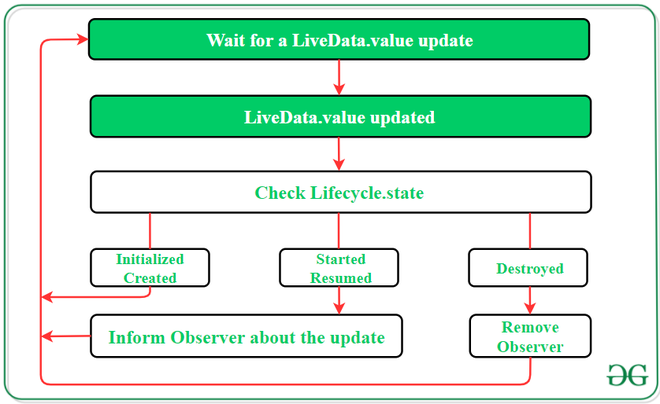
LiveData is one of the android architecture components. LiveData is an observable data holder class. What is the meaning of observable here the observable means live data can be observed by other components like activity and fragments (Ui Controller). The most important thing about LiveData is it has the knowledge about the Life cycle of its observers like activity or fragment. That means Live data only updates the app components like Activity or Fragments which are in active life cycle state. LiveData notifies the observer(Activity or Fragment) which are in Started or Resumed life cycle state. Inactive observers registered to watch LiveData objects aren't notified about changes. Here inactive observers mean which are not in the state of Started or Resumed. One can register an observer paired with an object that implements the LifecycleOwner interface which we will see in our example. This relationship allows the observer to be removed when the state of the corresponding Lifecycle object changes to DESTROYED.
This component is an observable data holder class i.e, the contained value can be observed. LiveData is a lifecycle-aware component and thus it performs its functions according to the lifecycle state of other application components. Further, if the observer’s lifecycle state is active i.e., either STARTED or RESUMED, only then LiveData updates the app component. LiveData always checks the observer’s state before making any update to ensure that the observer must be active to receive it. If the observer’s lifecycle state is destroyed, LiveData is capable to remove it, and thus it avoids memory leaks. It makes the task of data synchronization easier.
👁 LiveDataIt is necessary to implement onActive and onInactive methods by LiveData:
In order to observe a LiveData Component observer(LifecycleOwner, Observer<T>) method is called:
In this example we will just create a simple counter app, that just counts 5 seconds, you can do anything using LiveData but for now let's build this small app.
dependencies {
 ...
 implementation ("androidx.lifecycle:lifecycle-viewmodel-ktx:2.8.7")
 implementation ("androidx.lifecycle:lifecycle-livedata-ktx:2.8.7")
 implementation ("androidx.lifecycle:lifecycle-runtime-ktx:2.8.7")
 implementation ("androidx.core:core-ktx:1.15.0")
}
Navigate to the app > res > layout > activity_main.xml and add the below code to that file. Below is the code for the activity_main.xml file.
activity_main.xml:
Create a Kotlin class file MainViewModel.kt. Our MainActivity class file extends the ViewModel class.
MainViewModel.kt:
Note: Here we are using MutableLiveData right. but the question is why? because there is already LiveData is available, MutableLiveData extends LiveData class and two functions setValue() and postValue() are publicly available for use.
Go to the MainActivity.kt file and refer to the following code. Below is the code for the MainActivity.kt file.
MainActivity.kt:
Note: Here inside Observe() "this" is the Life cycle owner as we discussed above to observe the value, we should pass the Lifecycle Owner. Here this means MainActivity which is the observer here.