|
VOOZH | about |
|
VOOZH | about |
In Android, whenever we want to bind some data which we get from any data source (e.g. ArrayList, HashMap, SQLite, etc.) with a UI component(e.g. ListView, GridView, etc.) then Adapter comes into the picture. Basically Adapter acts as a bridge between the UI component and data sources. Here Simple Adapter is one type of Adapter. It is basically an easy adapter to map static data to views defined in our XML file(UI component) and is used for customization of List or Grid items.
Here we use an ArrayList of Map (e.g. hashmap, mutable map, etc.) for data-backing. Each entry in an ArrayList is corresponding to one row of a list. The Map contains the data for each row. Now to display the row we need a view for which we used to specify a custom list item file (an XML file).
SimpleAdapter(Context context, List<? extends Map<String, ?>> data, int resource, String[] from, int[] to)
Parameters | DataType | Explanation |
|---|---|---|
| context | Context | When we make an object of SimpleAdapter class It is used to pass the context ( The reference of current activity). |
| data | List<? extends Map<String, ?>> | It means a List of Maps whose key's type is String and Value can be any datatype. Each element of the List is different Maps that contain the data of each row and should include all the entries specified in the “from” string array. In our project, we shall use ArrayList. |
| resource | Int | This parameter is used to pass the resource id of the layout ( XML file ) which should contain the different views of each row of the list. The layout file should include at least those named views defined in "to". |
| from | Array of String | A list of column names that will be added to the Map associated with each item. In this array, there should be a column name for each item (Views) of each row of the list. |
| to | Array of int | This array parameter stores the ids of different views that should display the column in the “from” parameter. These should all be TextViews. The first N views in this list are given the values of the first N columns in the “from” parameter. |
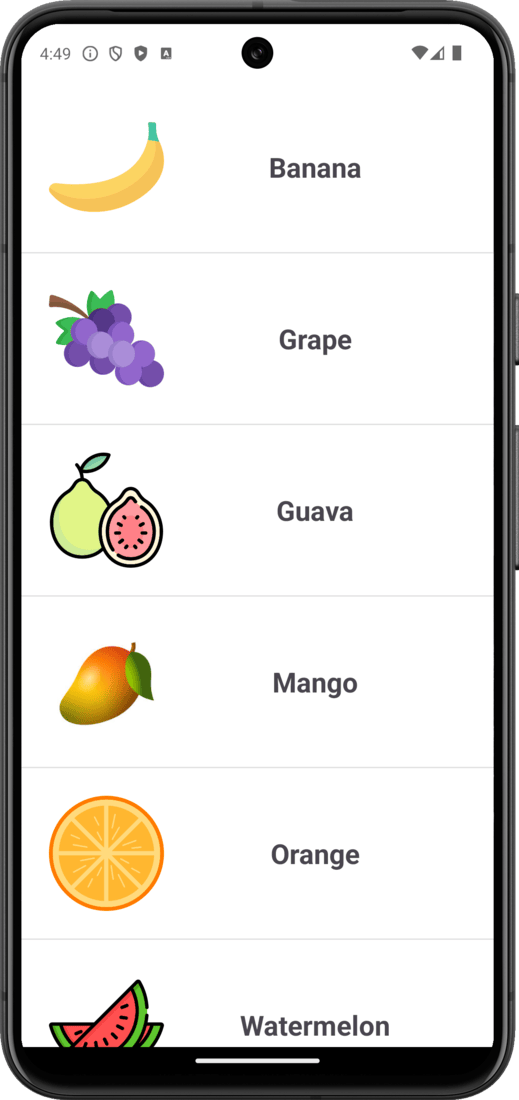
A sample image is given below to get an idea about what we are going to do in this article. In this project, we are going to make this application which has a list of some fruits and in each row of the list has a fruit image and name.
Note that we are going to implement this same project in both Kotlin and Java languages. Now you choose your preferred language.
To create a new project in Android Studio please refer to How to Create/Start a New Project in Android Studio.
Note: Select Java/Kotlin as the programming language.
In the activity_main.xml file, create a ListView inside a ConstraintLayout. Below is the code for the activity_main.xml file.
activity_main.xml:
Create a new Layout Resource file and name it as list_row_items.
list_row_items.xml:
Here we will show you how to implement SimpleAdapter both in Java and Kotlin. Now you choose your preferred one. Below is the code for the MainActivity file. Comments are added inside the code to understand the code in more detail.
MainActivity File:
SimpleAdapter holds data and sends the data to the adapter view then the view can take the data from the adapter view and shows the data on the ListView which we have created earlier.
For learning more about the topic you can check - Custom SimpleAdapter in Android with Example