|
VOOZH | about |
|
VOOZH | about |
Developers always prefer clean and structured code for projects. Organizing the codes according to a design pattern helps in the maintenance of the software. By having knowledge of all crucial logic parts of the android application, it is easier to add and remove app features. Further, design patterns also assure that all the codes get covered in Unit Testing without the interference of other classes.
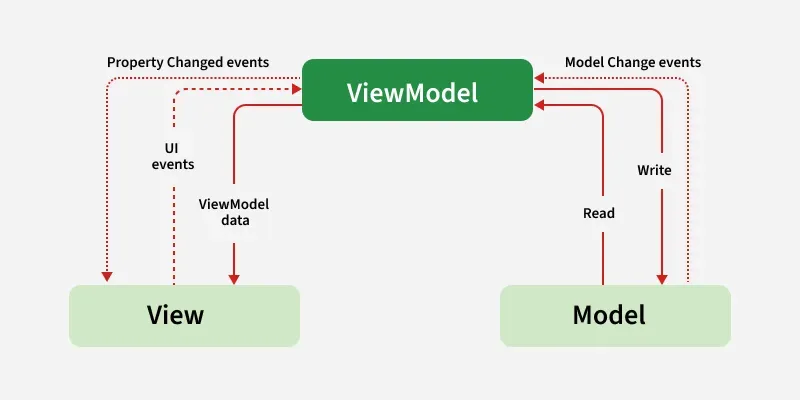
Model — View — ViewModel (MVVM) is the industry-recognized software architecture pattern that overcomes all drawbacks of MVP and MVC design patterns. MVVM suggests separating the data presentation logic(Views or UI) from the core business logic part of the application.
MVVM pattern has some similarities with the MVP(Model — View — Presenter) design pattern as the Presenter role is played by ViewModel. However, the drawbacks of the MVP pattern has been solved by MVVM in the following ways:
There are 2 ways to implement MVVM design pattern in Android projects:
Google releases the Data Binding Library for Android that allows the developers to bind UI components in the XML layouts with the application's data repositories. This helps in minimizing the code of core application logic that binds with View. Further, Two - way Data Binding is done for binding the objects to the XML layouts so that object and the layout both can send data to each other. This point can be visualized by the example of this tutorial.
Syntax for the two way data binding is @={variable}
Here is an example of a single activity User-Login android application to show the implementation of the MVVM architecture pattern on projects. The application will ask the user to input the Email ID and password. Based on the inputs received the ViewModel notifies the View what to show asa toast message. The ViewModel will not have a reference to the View.
To enable Data Binding in the android application, following codes needs to be added in the app’s build.gradle.kts (Module:app) file:
android {
 // add this
   buildFeatures {
 dataBinding = true
 }
}
plugins {
 alias(libs.plugins.android.application)
 alias(libs.plugins.kotlin.android)
 alias(libs.plugins.google.gms.google.services)
 id("kotlin-kapt") // add this
}
Create a new class named Model to which will hold the Email ID and password entered by the user. Below is the code to implement the proper Model class.
Model Class:
This class will contain all the methods which are needed to be called in the application layout. The ViewModel class will extend BaseObservable because it converts the data into streams and notifies the View when the toast message property will change.
ViewModel Class:
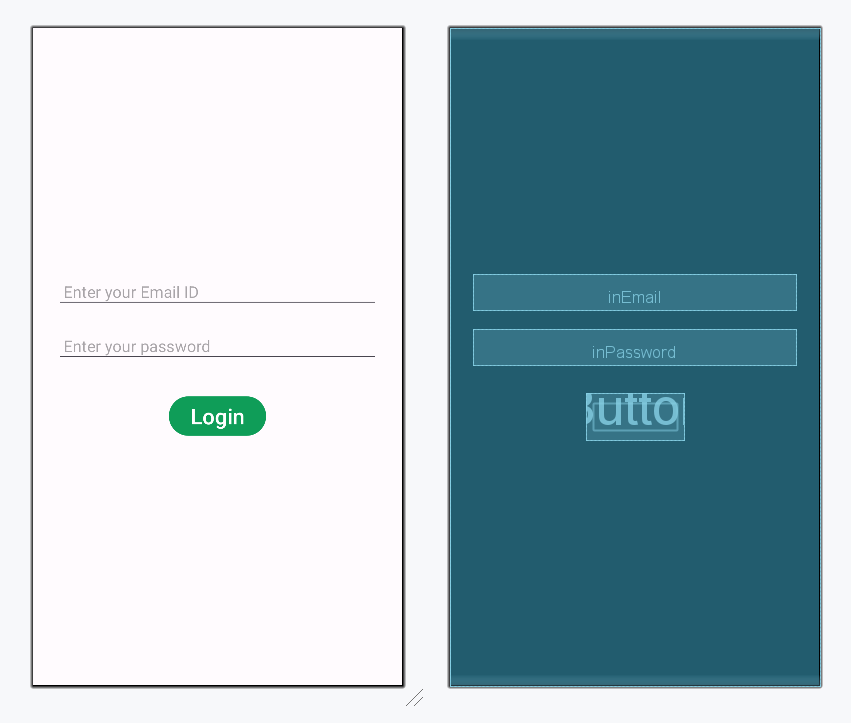
Open the activity_main.xml file and add 2 EditText to get inputs for Email and Password. One Login Button is also required to validate the user's input and display appropriate Toast message. Below is the code for designing a proper activity layout.
Note: For the proper functioning of Data Binding Library, it is required to set the layout tag at the top. The constraint layout tag of XML will not work in this case.
activity_main.xml:
Design UI:
The View class is responsible for updating the UI of the application. According to the changes in the toast message provided by ViewModel, the Binding Adapter would trigger the View layer. The setter of Toast message will notify the observer(View) about the changes in data. After that, View will take appropriate actions.
MainActivity File: