|
VOOZH | about |
|
VOOZH | about |
This article is for all the beginners who have just started Android development Tools on Eclipse IDE for developing Android applications. Most of the beginners often face errors while developing the android applications. The errors which we are going to discuss in this article are not syntax errors. These errors occur automatically (in most cases) and sometimes because of a user’s mistake. The article deals with the errors, the probable cause of the errors, and their possible solutions. My Environment is:
ERROR #1: Eclipse IDE does not start
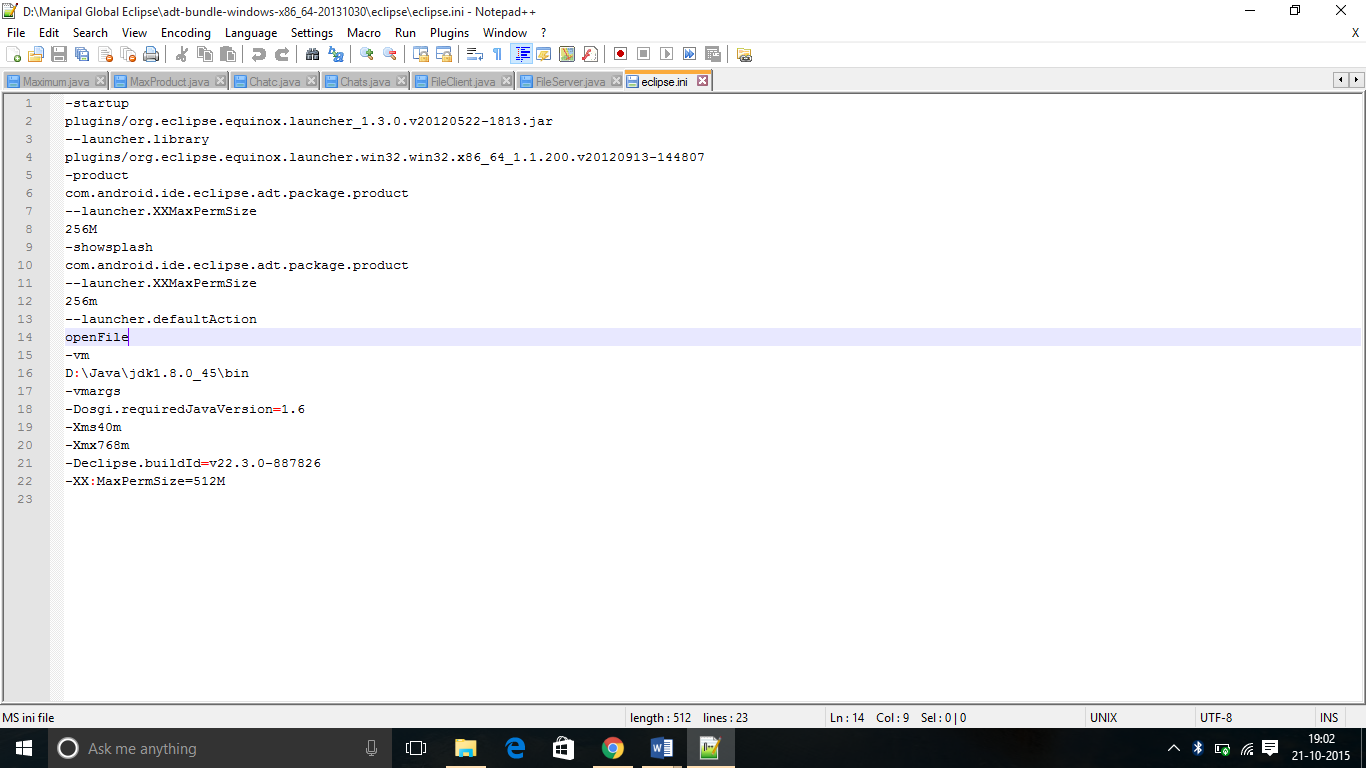
In the Windows 10 operating system, it is seen by some users that the Eclipse IDE does not start even after double-clicking the Eclipse icon. You may have tried :
Probable Cause
Corruption of the eclipse.ini file due to changes in the version of the jdk, or due to multiple installations of eclipse.
Possible Solution
ERROR #2: Missing R.java file
The R.java file which is automatically generated whenever a new project is created, If it is not being created,it leads to many errors when we try to access any resource item You may have tried:
Probable Cause
Bad resources (e.g. layouts with errors)
Possible Solution
Solution 1 :
Solution 2 :
ERROR #3: App has stopped working unexpectedly
This error occurs when the app is deployed on to the emulator or the android phone. This error cannot be detected at the time of compilation.
Probable Cause
Activity file missing
Possible Solution
ERROR #4: Android.Manifest file does not declare a Java package
The following is the error message that might be getting displayed:
[2015-10-25 10:43:19 - com.android.ide.eclipse.adt.internal.project.AndroidManifestHelper] Unable to read /media/DATA/code/Android/XXX/AndroidManifest.xml: org.eclipse.core.internal.resources.ResourceException: Resource is out of sync with the file system: '/XXX/AndroidManifest.xml'.
Probable Cause
This error occurs when user edits a workbench resource outside of Eclipse.
Possible Solutions
Solution 1 :
There are generally two common approaches that are followed and have found to be useful for resolving errors for most of the users. I Select the "Refresh" project option. (Right click on the project, and then select "Refresh".)
👁 4Solution 2 :
If solution 1 does not work, then try to "Clean" the project.
Steps for cleaning Project:
ERROR #6 : Emulator does not start
Probable Cause
Possible Solutions
Solution 1 :
Solution 2 :