|
VOOZH | about |
|
VOOZH | about |
Developing an android application by applying a software architecture pattern is always preferred by the developers. An architecture pattern gives modularity to the project files and assures that all the codes get covered in Unit testing. It makes the task easy for developers to maintain the software and to expand the features of the application in the future. There are some architectures that are very popular among developers and one of them is the Model—View—Controller(MVC) Pattern.
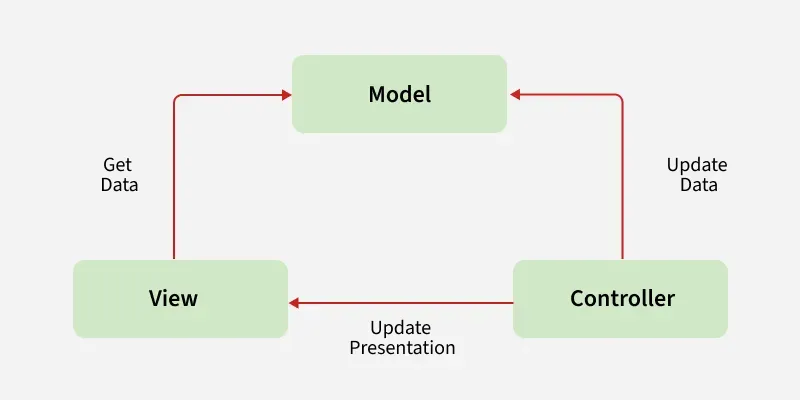
The MVC pattern suggests splitting the code into 3 components. While creating the class/file of the application, the developer must categorize it into one of the following three layers:
In spite of applying MVC schema to give a modular design to the application, code layers do depend on each other. In this pattern, View and Controller both depend upon the Model. Multiple approaches are possible to apply the MVC pattern in the project:
In MVC architecture, application data is updated by the controller and View gets the data. Since the Model component is separated, it could be tested independently of the UI. Further, if the View layer respects the single responsibility principle then their role is just to update the Controller for every user event and just display data from the Model, without implementing any business logic. In this case, UI tests should be enough to cover the functionalities of the View.
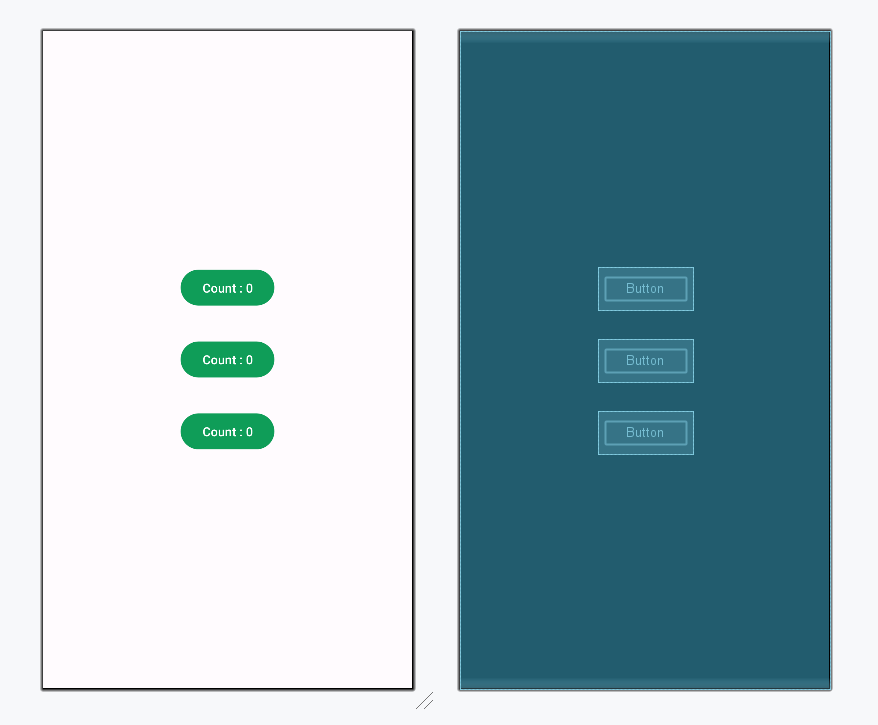
To understand the implementation of the MVC architecture pattern more clearly, here is a simple example of an android application. This application will have 3 buttons and each one of them displays the count that how many times the user has clicked that particular button. To develop this application the code has been separated in the following manner:
Below is the complete step-by-step implementation of this android application using the MVC architecture pattern:
Note: Following steps are performed on Android Studio version 4.0
Open the activity_main.xml file and add 3 Buttons to it which will display the count values as per the number of times the user clicks it. Below is the code for designing a proper activity layout.
activity_main.xml:
Create a new class named Model to separate all data and its operations. This class will not know the existence of View Class.
Model Class:
This class will establish the relationship between View and Model. The data provided by the Model will be used by View and the appropriate changes will be made in the activity.
MainActivity File: