|
VOOZH | about |
|
VOOZH | about |
ShimmerLayout can be used to add a Shimmer Effect to the Android Application. ShimmerLayout indicates to the user that content is loading and will improve the overall experience, providing a visual cue rather than just a blank screen. This is especially helpful during API data fetching or some other long-running operations, for it reassures users that content is coming and improves perceived performance. Therefore it is better to add ShimmerLayout rather than showing the blank screen as it notifies the user that the layout is in the loading state.
The code has been given in both Java and Kotlin Programming Language for Android.
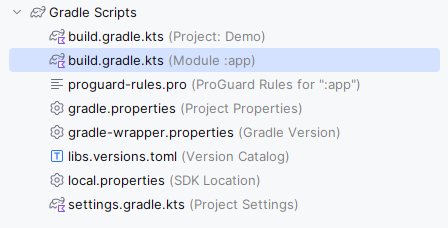
1. Add the support library in the Module-level build.gradle file and add dependency in the dependencies section. It allows the developer to use the inbuilt function directly.
Add dependency in the file:
dependencies {
 implementation("com.facebook.shimmer:shimmer:0.5.0")
}
2. Navigate to app > res > values > colors.xml and add the following color code to be used as shimmer color:
<resources>
 <color name="shimmer_color">#CECFD2</color>
</resources>
3. Create two new layouts in app > res > layout with the name item_list.xml and item_list_shimmer.xml and add the following code. The item_list.xml file will be used for recycler view items and the item_list_shimmer.xml will be used as a placeholder for the shimmer effect.
4. Add the following code in the activity_main.xml file. In this file, add ShimmerFrameLayout and its child view aligned with the recycler view.
activity_main.xml:
5. Create an adapter for the recycler view with the name Adapter and add the following code:
6. Create an data class for the adapter with the name User.kt and add the following code:
7. Add the following code to the MainActivity file. In this file, the startShimmer method is used to start the animation on ShimmerFrameLayout.
ShimmerLayout is a really useful component that helps to enhance user experience by providing an animated placeholder. Remember to correctly manage the lifecycle of the shimmer animation lest you run into performance issues.