|
VOOZH | about |
|
VOOZH | about |
In this article, we will be building a project on Xylophone using Java/Kotlin and XML in android. Xylophone originally is an instrument played by striking a row of wooden bars. This application will be implementing a Xylophone-like instrument that is capable of producing sounds. We will create few Buttons in this app that will act as keys of the instrument when struck. This is going to be a single activity application. A sample video is given below to get an idea about what we are going to do in this article.
To create a new project in Android Studio please refer to How to Create/Start a New Project in Android Studio. Note that select Java as the programming language.
We need to add colors in the value of the resources directory. We will be using these colors for our Buttons. Navigate to app > res > values > colors.xml and add the following colors.
Save these audio notes in the app > res > raw directory
Note: Reference article: Resource Raw Folder in Android Studio
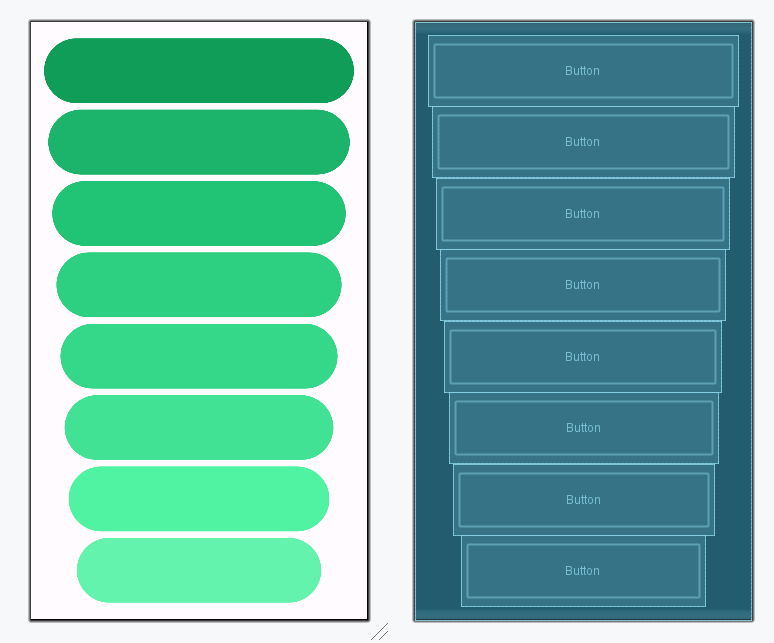
The XML codes are used to build the structure of the activity as well as its styling part. In this XML file, we will create a LinearLayout with vertical orientation. This will contain seven Buttons each. The width of the button reduces as we go down to give it a look of a xylophone and also to symbolize that the smaller the button less is the note sound. Below is the code for the activity_main.xml file.
Design UI:
In the MainActivity we need to create a new SoundPool. A Soundpool uses MediaPlayer library services to load audio files. We will create a function for each key button with a different audio note. Below is the code for the MainActivity.java file. Comments are added inside the code to understand the code in more detail.