|
VOOZH | about |
|
VOOZH | about |
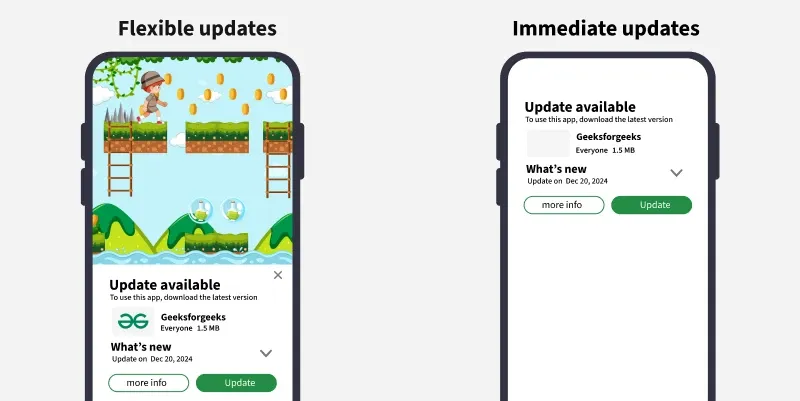
Normally to check for an app's update, a user need to open play store, navigate to the app's page and click on check for updates. But, what if we can notify the user as soon as there's an update release for the app on the app's screen itself. That's where In-App Updates comes into motion. In-app updates is a Google Play Core libraries feature that prompts the user to update their app immediately when the user opens it.
There are two types of updates flows:
To create a new project in the Android Studio, please refer to How to Create/Start a New Project in Android Studio?
Navigate to Gradle Scripts > build.gradle.kts (Module: app) and add the following dependencies under the dependencies{} scope.
dependencies {
 ...
 implementation ("com.google.android.play:app-update:2.1.0")
 implementation ("com.google.android.play:app-update-ktx:2.1.0")
}
Navigate to Gradle Scripts > build.gradle.kts (Module: app) and add the following code anywhere under the android{} scope.
android {
 ...
 buildFeatures {
 viewBinding = true
 }
 ...
}
Now, select on the Sync prompt on the top-right corner of the code screen.
Navigate to app > java > {package-name} > MainActivity. First, initialize the App Update Manager and Activity Result Launcher
// kotlin
private lateinit var appUpdateManager: AppUpdateManager
private lateinit var activityResultLauncher: ActivityResultLauncher<IntentSenderRequest>

// java
private AppUpdateManager appUpdateManager;
private ActivityResultLauncher<IntentSenderRequest> activityResultLauncher;
Then, create a function to check for app updates and call the function in the overridden onCreate() method.
Now, you might have noticed we have registered a listener to out app update manager to listen for update complement. This will help us prompting the user to restart the app in order to finish pending installations.
First, create the listener
Then, create the function for a snackbar prompting to restart the app and finish installation.
Now, override the onResume() method to prompt user for the restart since the app will be temporarily paused due to the update. Also, remember to override the onStop() method to unregister the listener.
Here's the entire code for the MainActivity file.