|
VOOZH | about |
|
VOOZH | about |
React Native is a popular framework created by Facebook that allows developers to build native mobile applications using JavaScript. It enables a single codebase to power apps on multiple platforms with a native look and feel.
Now , we will learn how to create a Snackbar in React Native using a Material Design–based library. Snackbars are lightweight messages that provide brief feedback along with optional user actions.
Here are the step by step implementation of Snackbar in React Native:
Step 1: Create a project in react-native using the following command:
npx react-native init DemoProjectStep 2: Install react-native paper using the following command:
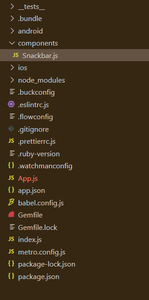
npm install react-native-paperStep 3: Create a components folder inside your project. Inside the components folder create a file Snackbar.js
Project Structure: It will look like this.
In Snackbar.js, we have imported Snackbar items directly from the react-native-paper library. It uses the following props :
1. visible: It can be true or false to show or hide the Snackbar
2. action: Label and press callback for the action button. It should contain the following properties:
3. onDismiss: It is a Callback function called when Snackbar is dismissed. The visible prop needs to be updated when this is called.
Filename: Snackbar.js
Now, import this file to your App.js
Filename: App.js
Step to run the application: Run the application using the following command :
npx react-native run-androidOutput: