FlatList is a React Native component used to display large, dynamic lists in a smooth and scrollable layout. It efficiently renders only the visible items to provide better performance and user experience.
Renders only visible items instead of the entire list.
Automatically handles scrolling and layout updates.
Suitable for large and frequently changing data sets.
FlatList receives the data array and renders each item as a Text component using renderItem.
keyExtractor assigns a unique key to each list item to ensure efficient rendering and updates.
FlatList methods allow direct control over scrolling behavior and access to the underlying native scroll components.
flashScrollIndicators(): Temporarily shows the scroll bars to indicate that scrolling is available.
getNativeScrollRef(): Returns a reference to the native ScrollView component.
getScrollResponder(): Provides access to the internal scroll responder for advanced control.
getScrollableNode(): Returns a handle to the native scrollable node.
scrollToEnd(): Scrolls the list to the very end of the content.
scrollToIndex(): Scrolls the list to a specific item based on its index.
Implementing FlatList Component
It involves supplying data and a render function to efficiently display a scrollable list of items in React Native.
Step 1: Create a React Native Project
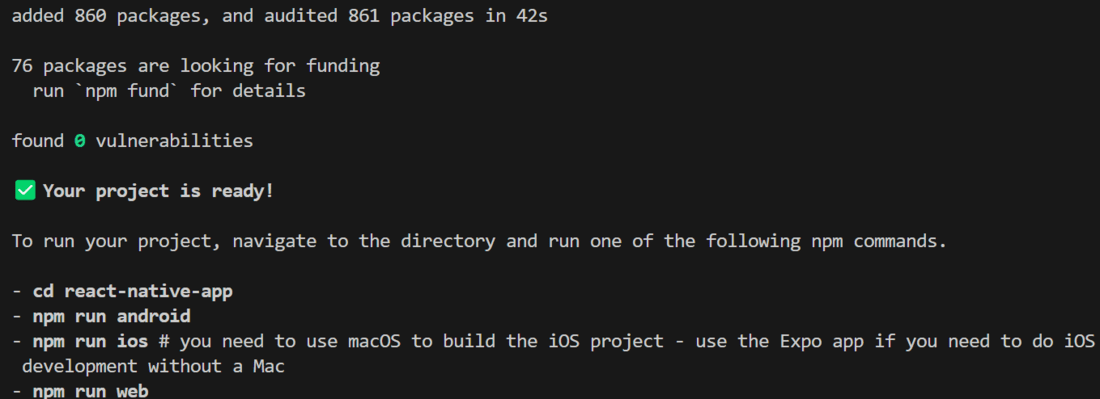
Now, create a project with the following command.
npx create-expo-app app-name --template
Note: Replace the app-name with your app name for example : react-native-demo-app
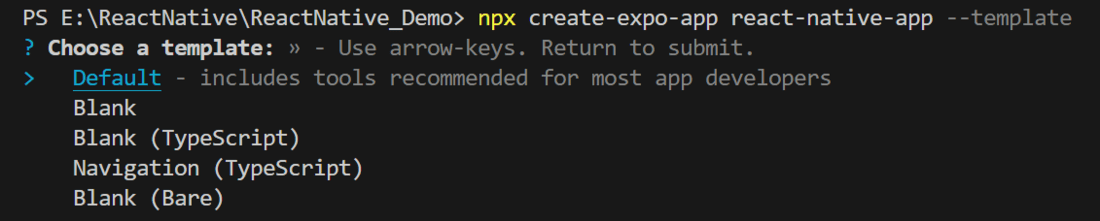
Next, you might be asked to choose a template. Select one based on your preference as shown in the image below. I am selecting the blank template because it will generate a minimal app, as clean as an empty canvas in JavaScript.