VOOZH about

URL: https://minecraft.wiki/w/Cow_Horse

⇱ Java Edition 2.0 – Minecraft Wiki


Java Edition 2.0

From Minecraft Wiki
(Redirected from Cow Horse)
Jump to navigation Jump to search
πŸ‘ Image
For the preview version, see Java Edition 2.0 (preview).
This article documents an April Fools' Day joke version.
 
There is no proper release version or development version of Java Edition called Minecraft 2.0 or Java Edition 2.0.
This page documents a version of the game that was initially only released privately.
 
This version was never intended to be released to the public, but it is available in archived copies.
Minecraft 2.0
Edition Java Edition
Release date April 1, 2013
Development versions
Downloads Blue[note 1]

Client (.json)
Server
Red[note 2]
Client (.json)
Server
Purple[note 3]
Client (.json)
Server

Protocol version Blue: 90
Red: 91
Purple: 92
Minimum Java version Java SE 5
Cache ID Unspecified
2.0 15w14a β–Ίβ–Ί
{
 "title": "Minecraft 2.0",
 "images": [
 "Java Edition 2.0 banner.jpg",
 "Java Edition 2.0.png"
 ],
 "rows": [
 {
 "field": "''(link to Java Edition article, displayed as Java Edition)''",
 "label": "(link to Edition article, displayed as Edition)"
 },
 {
 "field": "April 1, 2013",
 "label": "Release date"
 },
 {
 "field": "<div class=\"hlist\"><span style=\"white-space:nowrap;\">(link to :Category:Java Edition 2.0 previews article, displayed as '''Previews''') (1) </span><br/>((link to Java Edition 2.0/Development versions article, displayed as View all))</div>",
 "label": "<span style=\"white-space: normal;\">Development versions</span>"
 },
 {
 "field": "'''Blue'''<br />\n[https://archive.org/download/2point-0-blue/2point0_blue.jar Client] ([https://archive.org/download/2point-0-blue/2point0_blue.json .json])<br />\n[https://archive.org/download/2point-0-blue/2point0_blue_server.jar Server]<br />\n'''Red'''<br />\n[https://archive.org/download/2point-0-red/2point0_red.jar Client] ([https://archive.org/download/2point-0-red/2point0_red.json .json])<br />\n[https://archive.org/download/2point-0-red/2point0_red_server.jar Server]<br />\n'''Purple'''<br />\n[https://archive.org/download/2point-0-purple/2point0_purple.jar Client] ([https://archive.org/download/2point-0-purple/2point0_purple.json .json])<br />\n[https://archive.org/download/2point-0-purple/2point0_purple_server.jar Server]",
 "label": "(link to Tutorial:Installing a version#Manual version installation article, displayed as Downloads)"
 },
 {
 "field": "Blue: 90<br />Red: 91<br />Purple: 92",
 "label": "(link to Protocol version article, displayed as Protocol version)"
 },
 {
 "field": "<span class=\"plainlinks\">[https://en.wikipedia.org/wiki/Java_version_history#Java_SE_5 Java SE 5]</span>",
 "label": "<span style=\"white-space: normal;\">Minimum Java version</span>"
 },
 {
 "field": "Unspecified(link to Category:Pending al_version article, displayed as Category:Pending al_version)",
 "label": "(link to al_version article, displayed as Cache ID)"
 }
 ],
 "invimages": [],
 "footer": "<table style=\"margin: auto; word-break: break-word;\">\n<tr style=\"background: inherit;\">\n<td style=\"padding: 0.4em\" rowspan=\"2\"></td>\n<td rowspan=\"2\" style=\"padding: 0.4em\">'''2.0'''</td>\n<td style=\"padding: 0.4em\" rowspan=\"2\">[[Java Edition 15w14a| 15w14a <span style=\"margin-right:-0.35em\">β–Ί</span>β–Ί]]</td>\n</tr>\n<tr style=\"background: inherit;\">\n</tr>\n</table>"
}
πŸ‘ Image
Super Hostile mode.

On April 1, 2013, Mojang released a hoax announcement for Minecraft 2.0, a new game they had supposedly been working on for two years, describing how it would "bring blocky simulation games to the next level".[1] The post also contained a changelog comprised mostly of nonsensical changes, such as a new slab of TNT called the etho slab, and the addition of blocks of coal (which did not exist at the time).

Although lacking most of the promised additions, Minecraft 2.0 was produced and distributed to select celebrity individuals[1] to showcase to the public as part of the joke. Minecraft 2.0 is a fork of 1.5.1, and is the only joke release not available through the Minecraft Launcher.

A special preview edition of 2.0 was released to YouTubers earlier to prepare their April 1 videos.

Despite being a joke, some of the features in this version were implemented in subsequent release versions.

Versions

[edit | edit source]

There were 3 versions of this update:

  • Red
    • Has super hostile mode
  • Blue
    • Has most of the features described here
  • Purple
    • Contains everything in Red and Blue versions

Additions

[edit | edit source]
2.0 block and item additionsπŸ‘ Invicon Etho Slab.png: Inventory sprite for Etho Slab in Minecraft as shown in-game linking to Etho Slab with description: Etho Slab
πŸ‘ Invicon Torch (Burnt-out).png: Inventory sprite for Torch (Burnt-out) in Minecraft as shown in-game linking to Torch (Burnt-out) with description: Torch (Burnt-out)
πŸ‘ Invicon Block of Coal (April Fools' joke).png: Inventory sprite for Block of Coal (April Fools' joke) in Minecraft as shown in-game linking to Block of Coal (April Fools' joke) with description: Block of Coal
πŸ‘ Invicon White Tinted Glass.png: Inventory sprite for White Tinted Glass in Minecraft as shown in-game linking to White Tinted Glass with description: White Tinted Glass
πŸ‘ Invicon Light Gray Tinted Glass.png: Inventory sprite for Light Gray Tinted Glass in Minecraft as shown in-game linking to Light Gray Tinted Glass with description: Light Gray Tinted Glass
πŸ‘ Invicon Gray Tinted Glass.png: Inventory sprite for Gray Tinted Glass in Minecraft as shown in-game linking to Gray Tinted Glass with description: Gray Tinted Glass
πŸ‘ Invicon Black Tinted Glass.png: Inventory sprite for Black Tinted Glass in Minecraft as shown in-game linking to Black Tinted Glass with description: Black Tinted Glass
πŸ‘ Invicon Brown Tinted Glass.png: Inventory sprite for Brown Tinted Glass in Minecraft as shown in-game linking to Brown Tinted Glass with description: Brown Tinted Glass
πŸ‘ Invicon Red Tinted Glass.png: Inventory sprite for Red Tinted Glass in Minecraft as shown in-game linking to Red Tinted Glass with description: Red Tinted Glass
πŸ‘ Invicon Orange Tinted Glass.png: Inventory sprite for Orange Tinted Glass in Minecraft as shown in-game linking to Orange Tinted Glass with description: Orange Tinted Glass
πŸ‘ Invicon Yellow Tinted Glass.png: Inventory sprite for Yellow Tinted Glass in Minecraft as shown in-game linking to Yellow Tinted Glass with description: Yellow Tinted Glass
πŸ‘ Invicon Lime Tinted Glass.png: Inventory sprite for Lime Tinted Glass in Minecraft as shown in-game linking to Lime Tinted Glass with description: Lime Tinted Glass
πŸ‘ Invicon Green Tinted Glass.png: Inventory sprite for Green Tinted Glass in Minecraft as shown in-game linking to Green Tinted Glass with description: Green Tinted Glass
πŸ‘ Invicon Cyan Tinted Glass.png: Inventory sprite for Cyan Tinted Glass in Minecraft as shown in-game linking to Cyan Tinted Glass with description: Cyan Tinted Glass
πŸ‘ Invicon Light Blue Tinted Glass.png: Inventory sprite for Light Blue Tinted Glass in Minecraft as shown in-game linking to Light Blue Tinted Glass with description: Light Blue Tinted Glass
πŸ‘ Invicon Blue Tinted Glass.png: Inventory sprite for Blue Tinted Glass in Minecraft as shown in-game linking to Blue Tinted Glass with description: Blue Tinted Glass
πŸ‘ Invicon Purple Tinted Glass.png: Inventory sprite for Purple Tinted Glass in Minecraft as shown in-game linking to Purple Tinted Glass with description: Purple Tinted Glass
πŸ‘ Invicon Magenta Tinted Glass.png: Inventory sprite for Magenta Tinted Glass in Minecraft as shown in-game linking to Magenta Tinted Glass with description: Magenta Tinted Glass
πŸ‘ Invicon Pink Tinted Glass.png: Inventory sprite for Pink Tinted Glass in Minecraft as shown in-game linking to Pink Tinted Glass with description: Pink Tinted Glass

Blocks

[edit | edit source]

πŸ‘ Image
Etho slab

  • Has a data value of 160.
    • Also has a double slab variant with the ID 159.
  • Can be crafted with 3 TNT:
Ingredients Crafting recipe
TNT
  • Like other slabs, it can be placed on the lower or upper half of a block.
  • Functions identically to normal TNT; however, when it explodes, it spawns an anvil over any mobs in its range, including players.
    • This and the block's name are references to EthosLab, who is a Minecraft YouTuber who often tries to kill players with falling anvils.

πŸ‘ Image
Torch (burnt-out)

πŸ‘ Image
Block of coal

  • Has a data value of 162.
  • Just like the other mineral blocks, it is crafted with 9 coal:
Ingredients Crafting recipe
Coal
πŸ‘ Invicon Coal.png: Inventory sprite for Coal in Minecraft as shown in-game linking to Coal with description: Coal

πŸ‘ Invicon Block of Coal Revision 1.png: Inventory sprite for Block of Coal in Minecraft as shown in-game linking to Block of Coal (Joke) with description: Block of Coal
  • When crafted back into regular coal, the produced coal does not stack with other coal in the inventory, due to having a data value of 32767.
  • Shows various speech bubbles when punched, and eventually strikes the ground with lightning if punched enough times.
  • Was a joke, but blocks of coal were added in the next major update.

πŸ‘ Invicon White Tinted Glass.png: Sprite image for White Tinted Glass in Minecraft
πŸ‘ Invicon Light Gray Tinted Glass.png: Sprite image for Light Gray Tinted Glass in Minecraft
πŸ‘ Invicon Gray Tinted Glass.png: Sprite image for Gray Tinted Glass in Minecraft
πŸ‘ Invicon Black Tinted Glass.png: Sprite image for Black Tinted Glass in Minecraft
πŸ‘ Invicon Pink Tinted Glass.png: Sprite image for Pink Tinted Glass in Minecraft
πŸ‘ Invicon Red Tinted Glass.png: Sprite image for Red Tinted Glass in Minecraft
πŸ‘ Invicon Orange Tinted Glass.png: Sprite image for Orange Tinted Glass in Minecraft
πŸ‘ Invicon Yellow Tinted Glass.png: Sprite image for Yellow Tinted Glass in Minecraft
πŸ‘ Invicon Lime Tinted Glass.png: Sprite image for Lime Tinted Glass in Minecraft
πŸ‘ Invicon Green Tinted Glass.png: Sprite image for Green Tinted Glass in Minecraft
πŸ‘ Invicon Light Blue Tinted Glass.png: Sprite image for Light Blue Tinted Glass in Minecraft
πŸ‘ Invicon Cyan Tinted Glass.png: Sprite image for Cyan Tinted Glass in Minecraft
πŸ‘ Invicon Blue Tinted Glass.png: Sprite image for Blue Tinted Glass in Minecraft
πŸ‘ Invicon Purple Tinted Glass.png: Sprite image for Purple Tinted Glass in Minecraft
πŸ‘ Invicon Magenta Tinted Glass.png: Sprite image for Magenta Tinted Glass in Minecraft
πŸ‘ Invicon Brown Tinted Glass.png: Sprite image for Brown Tinted Glass in Minecraft
Tinted Glass

  • Has a data value of 163.
  • Is opaque.
  • Crafted from glass with any color the dye exists for, and yields 8 tinted glass of the corresponding color:
Ingredients Crafting recipe
Glass +
Bone Meal or 
Light Gray Dye or 
Gray Dye or 
Ink Sac or 
Pink Dye or 
Red Dye or 
Orange Dye or 
Yellow Dye or 
Lime Dye or 
Green Dye or 
Light Blue Dye or 
Cyan Dye or 
Lapis Lazuli or 
Purple Dye or 
Magenta Dye or 
Cocoa Beans
πŸ‘ Invicon Glass.png: Inventory sprite for Glass in Minecraft as shown in-game linking to Glass with description: Glass
πŸ‘ Invicon Bone Meal.png: Inventory sprite for Bone Meal in Minecraft as shown in-game linking to Bone Meal with description: Bone Meal
πŸ‘ Invicon Light Gray Dye.png: Inventory sprite for Light Gray Dye in Minecraft as shown in-game linking to Light Gray Dye with description: Light Gray Dye
πŸ‘ Invicon Gray Dye.png: Inventory sprite for Gray Dye in Minecraft as shown in-game linking to Gray Dye with description: Gray Dye
πŸ‘ Invicon Ink Sac.png: Inventory sprite for Ink Sac in Minecraft as shown in-game linking to Ink Sac with description: Ink Sac
πŸ‘ Invicon Pink Dye.png: Inventory sprite for Pink Dye in Minecraft as shown in-game linking to Pink Dye with description: Pink Dye
πŸ‘ Invicon Red Dye.png: Inventory sprite for Red Dye in Minecraft as shown in-game linking to Red Dye with description: Red Dye
πŸ‘ Invicon Orange Dye.png: Inventory sprite for Orange Dye in Minecraft as shown in-game linking to Orange Dye with description: Orange Dye
πŸ‘ Invicon Yellow Dye.png: Inventory sprite for Yellow Dye in Minecraft as shown in-game linking to Yellow Dye with description: Yellow Dye
πŸ‘ Invicon Lime Dye.png: Inventory sprite for Lime Dye in Minecraft as shown in-game linking to Lime Dye with description: Lime Dye
πŸ‘ Invicon Green Dye.png: Inventory sprite for Green Dye in Minecraft as shown in-game linking to Green Dye with description: Green Dye
πŸ‘ Invicon Light Blue Dye.png: Inventory sprite for Light Blue Dye in Minecraft as shown in-game linking to Light Blue Dye with description: Light Blue Dye
πŸ‘ Invicon Cyan Dye.png: Inventory sprite for Cyan Dye in Minecraft as shown in-game linking to Cyan Dye with description: Cyan Dye
πŸ‘ Invicon Lapis Lazuli.png: Inventory sprite for Lapis Lazuli in Minecraft as shown in-game linking to Lapis Lazuli with description: Lapis Lazuli
πŸ‘ Invicon Purple Dye.png: Inventory sprite for Purple Dye in Minecraft as shown in-game linking to Purple Dye with description: Purple Dye
πŸ‘ Invicon Magenta Dye.png: Inventory sprite for Magenta Dye in Minecraft as shown in-game linking to Magenta Dye with description: Magenta Dye
πŸ‘ Invicon Cocoa Beans.png: Inventory sprite for Cocoa Beans in Minecraft as shown in-game linking to Cocoa Beans with description: Cocoa Beans
πŸ‘ Invicon Glass.png: Inventory sprite for Glass in Minecraft as shown in-game linking to Glass with description: Glass

πŸ‘ Invicon White Tinted Glass.png: Inventory sprite for White Tinted Glass in Minecraft as shown in-game linking to White Tinted Glass with description: White Tinted Glass
8
πŸ‘ Invicon Light Gray Tinted Glass.png: Inventory sprite for Light Gray Tinted Glass in Minecraft as shown in-game linking to Light Gray Tinted Glass with description: Light Gray Tinted Glass
8
πŸ‘ Invicon Gray Tinted Glass.png: Inventory sprite for Gray Tinted Glass in Minecraft as shown in-game linking to Gray Tinted Glass with description: Gray Tinted Glass
8
πŸ‘ Invicon Black Tinted Glass.png: Inventory sprite for Black Tinted Glass in Minecraft as shown in-game linking to Black Tinted Glass with description: Black Tinted Glass
8
πŸ‘ Invicon Pink Tinted Glass.png: Inventory sprite for Pink Tinted Glass in Minecraft as shown in-game linking to Pink Tinted Glass with description: Pink Tinted Glass
8
πŸ‘ Invicon Red Tinted Glass.png: Inventory sprite for Red Tinted Glass in Minecraft as shown in-game linking to Red Tinted Glass with description: Red Tinted Glass
8
πŸ‘ Invicon Orange Tinted Glass.png: Inventory sprite for Orange Tinted Glass in Minecraft as shown in-game linking to Orange Tinted Glass with description: Orange Tinted Glass
8
πŸ‘ Invicon Yellow Tinted Glass.png: Inventory sprite for Yellow Tinted Glass in Minecraft as shown in-game linking to Yellow Tinted Glass with description: Yellow Tinted Glass
8
πŸ‘ Invicon Lime Tinted Glass.png: Inventory sprite for Lime Tinted Glass in Minecraft as shown in-game linking to Lime Tinted Glass with description: Lime Tinted Glass
8
πŸ‘ Invicon Green Tinted Glass.png: Inventory sprite for Green Tinted Glass in Minecraft as shown in-game linking to Green Tinted Glass with description: Green Tinted Glass
8
πŸ‘ Invicon Light Blue Tinted Glass.png: Inventory sprite for Light Blue Tinted Glass in Minecraft as shown in-game linking to Light Blue Tinted Glass with description: Light Blue Tinted Glass
8
πŸ‘ Invicon Cyan Tinted Glass.png: Inventory sprite for Cyan Tinted Glass in Minecraft as shown in-game linking to Cyan Tinted Glass with description: Cyan Tinted Glass
8
πŸ‘ Invicon Blue Tinted Glass.png: Inventory sprite for Blue Tinted Glass in Minecraft as shown in-game linking to Blue Tinted Glass with description: Blue Tinted Glass
8
πŸ‘ Invicon Purple Tinted Glass.png: Inventory sprite for Purple Tinted Glass in Minecraft as shown in-game linking to Purple Tinted Glass with description: Purple Tinted Glass
8
πŸ‘ Invicon Magenta Tinted Glass.png: Inventory sprite for Magenta Tinted Glass in Minecraft as shown in-game linking to Magenta Tinted Glass with description: Magenta Tinted Glass
8
πŸ‘ Invicon Brown Tinted Glass.png: Inventory sprite for Brown Tinted Glass in Minecraft as shown in-game linking to Brown Tinted Glass with description: Brown Tinted Glass
8
πŸ‘ Image
The pink wither compared to the regular wither.
πŸ‘ Image
A large swarm of redstone bugs.

Aside from the pink wither, the mobs added are variants of preexisting mobs.

πŸ‘ Image
πŸ‘ Image
Horses and ponies

  • Textures are called cow_horse and pig_horse.
  • These "horses" and "ponies" can sometimes be obtained when cows or pigs are spawned with spawn eggs.
  • They follow a player holding an apple or sugar, but they breed like normal cows and pigs.
  • Were a joke, but horses were added in the next major update, although with a completely different appearance compared to the "horses" in this version.

πŸ‘ Image
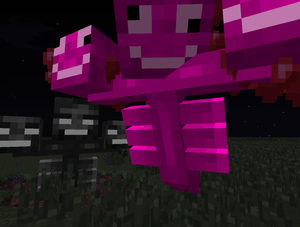
Pink wither

  • Attracted to sugar, restores health to all surrounding mobs, and applies bone meal to all eligible neighboring blocks.
  • It also has the ability to grow roses, dandelions, grass and ferns on grass blocks, due to the bone meal.
  • Starts off with one head. Feeding it sugar grows another head (up to three) and increases the range of these effects.
  • Pink withers are spawned by placing pink wool with a flower pot containing a rose on top.
  • Just like their evil counterpart, they drop nether stars.
  • It is still classified as a hostile mob, though its behavior is not hostile.
  • The pink wither is also considered undead, and is hurt by potions of Healing and healed by potions of Harming.
  • Unlike the normal wither, the pink wither can't fly and has no health bar.
  • In the version .jar file the texture is named wither_pink.
  • Pink withers were also seen in 15w14a, another April Fools snapshot.

πŸ‘ Image
Diamond chicken

πŸ‘ Image
Redstone bug

  • Has the appearance of a silverfish, but with a shade of red that is the same as the redstone it spawns over.
  • Spawns when a redstone error is activated, on the spot of the error.
  • Has the same AI as regular silverfish.

Changes

[edit | edit source]

Blocks

[edit | edit source]

Dropper

  • Has been renamed to "Flopper". However, its interface still displays "Dropper".
  • Changes anything it drops to a raw fish.

Furnace

  • Has a new tag [Short] Heat that can reach from 0 to 700.
  • The tag increases every tick the furnace is lit with a 50% probability.
  • It decreases with a 25% probability every tick it is not lit.
  • The furnace has a higher chance of spawning a large smoke particle the higher the [Short] Heat tag is.
  • When [Short] Heat reaches 700 the furnace has a 25% chance of exploding every tick.
  • The explosion has a power of 5 and creates fire.

Torches

Chickens

Pigs, mooshrooms, cows, sheep and chickens

  • New tag Fatness with a default value of 0.
  • Increases every time they are fed with the item to breed them.
  • The size of body increases except for chickens.
  • When the Fatness reaches 10 or higher the animal explodes without destroying any blocks.
  • They drop up to two times their Fatness items.

Sheep

Zombie pigmen

General

[edit | edit source]

Mobs

  • "Super Hostile Mode" is an occasional event (every 2–5 minutes on purple version).
    • This mode consists of a shower of lightning bolts around the player (and usually striking the player at least once), while spawning a large number of powerful monsters in the area and applying the Blindness status effect to the player. These spawns include not only heavily armed and armored zombies and skeletons, and multiple charged creepers, but even the occasional blaze and other monsters that do not usually spawn in the Overworld. This is a reference to Vechs' Super Hostile series of maps. All of these are apparently triggered by "punching wood" or crafting anything. Naturally, these are some of the first things a Survival player needs to do.

Options

  • Added a new option for "Super HD Graphics". When this option is turned on, it makes all textures monochrome except for recolored/secondary layer textures, such as grass side overlay or the colored glass. The "Super HD Graphics" mode does not affect the game's performance.

Speech bubbles

  • Blocks and mobs can have speech bubbles containing text above their heads, simulating talking.
  • List of all quotes:
    • That hurts :(
    • My eye!
    • ..zzZZZ
    • Why!?
    • I'll be back!
    • You didn't ....
    • Oof
    • (&%!@*#&%!@$#
    • Ouch
    • Hi there!
    • That tickles
    • Who's there!
    • I thought we were friends
    • You're mean!
    • Whiiii
    • Not dropping anything!
    • I like you!
    • I HATE you!
    • YOU NO TAKE .. COBBLE!
    • I'm diamond
    • You punched me
    • Stop punching me
    • I'm dirt
    • Mummy?
    • SSSSSSST
    • KABOOM?
    • BULLY!
    • I'm telling
    • Creeper behind you!
    • Did I do bad?
    • Hello

Videos

[edit | edit source]

The update was intended to be given to the following YouTubers as trailer videos:[1]

Issues

[edit | edit source]

2.0 is not supported due to being an April Fools' joke, and therefore issues affecting it are closed as "Invalid" in the issue tracker.

Trivia

[edit | edit source]
πŸ‘ Image
"APRIL FOOLS!" splash
  • Starting from 2 April 2013, 00:00, regardless of time zone, the only splash shown is "APRIL FOOLS!" in magenta letters and has a random size, but larger than normal.
  • Lightning can strike mobs through blocks.
  • The easier the difficulty, the more challenging Super Hostile mode is. However, if the player changes the difficulty to Peaceful, the Super Hostile mode is disabled. This is due to Peaceful difficulty despawning hostile mobs and not allowing them to spawn.
  • Burnt-out torches were originally supposed to be added in the Halloween Update, where lanterns were supposed to be the new light source. However, this feature wasn't added to the Halloween Update before release and was later officially rejected.
  • The textures for tinted glass, diamond chickens, and redstone bugs are all coded into the game, and are not found with the other mobs in the texture pack folders.
  • The changelog contained a lot of seemingly nonsensical changes that were not included in the final release:
    • It said "Fixed a bug where skeletons would miss their targets on occasion".
    • It said that there were many things added to fishing, including new fish. It proceeded to note that fishing had been removed and if the player had fish in their inventory they would be damaged to discourage fishing.
  • Java Edition 2.0 is the only April Fool's version that is unavailable in the launcher.

Notes

[edit | edit source]
  1. ↑ Includes all the announced features without Super Hostile mode.
  2. ↑ Super Hostile mode only.
  3. ↑ Includes all announced features, including Super Hostile mode.

References

[edit | edit source]
  1. ↑ a b c "It’s finally coming – Minecraft 2.0!" (archived) by Dinnerbone – Mojang, April 1, 2013.

Navigation

[edit | edit source]
Retrieved from "https://minecraft.wiki/w/Java_Edition_2.0?oldid=3609707#Horses_and_ponies"

Navigation menu